Revised in November 2026. The cost model and the comparison with Lambda event source mapping features were corrected against current AWS documentation, and both code samples were rewritten and re-tested.
Most event-driven systems on AWS contain a handful of small Lambda functions whose only job is to read from a stream or queue, drop the records nobody cares about, rename a few fields and forward the rest. People call this Lambda glue. Each function is trivial. Together they are a fleet of runtimes to patch, IAM roles to review and handlers to test.
Amazon EventBridge Pipes, announced at re:Invent 2022, is the AWS answer to that fleet: a managed point-to-point integration with a source, an optional filter, an optional enrichment step and a target, defined entirely as configuration. A few years on, the service is mature enough to judge on its record instead of its launch post.
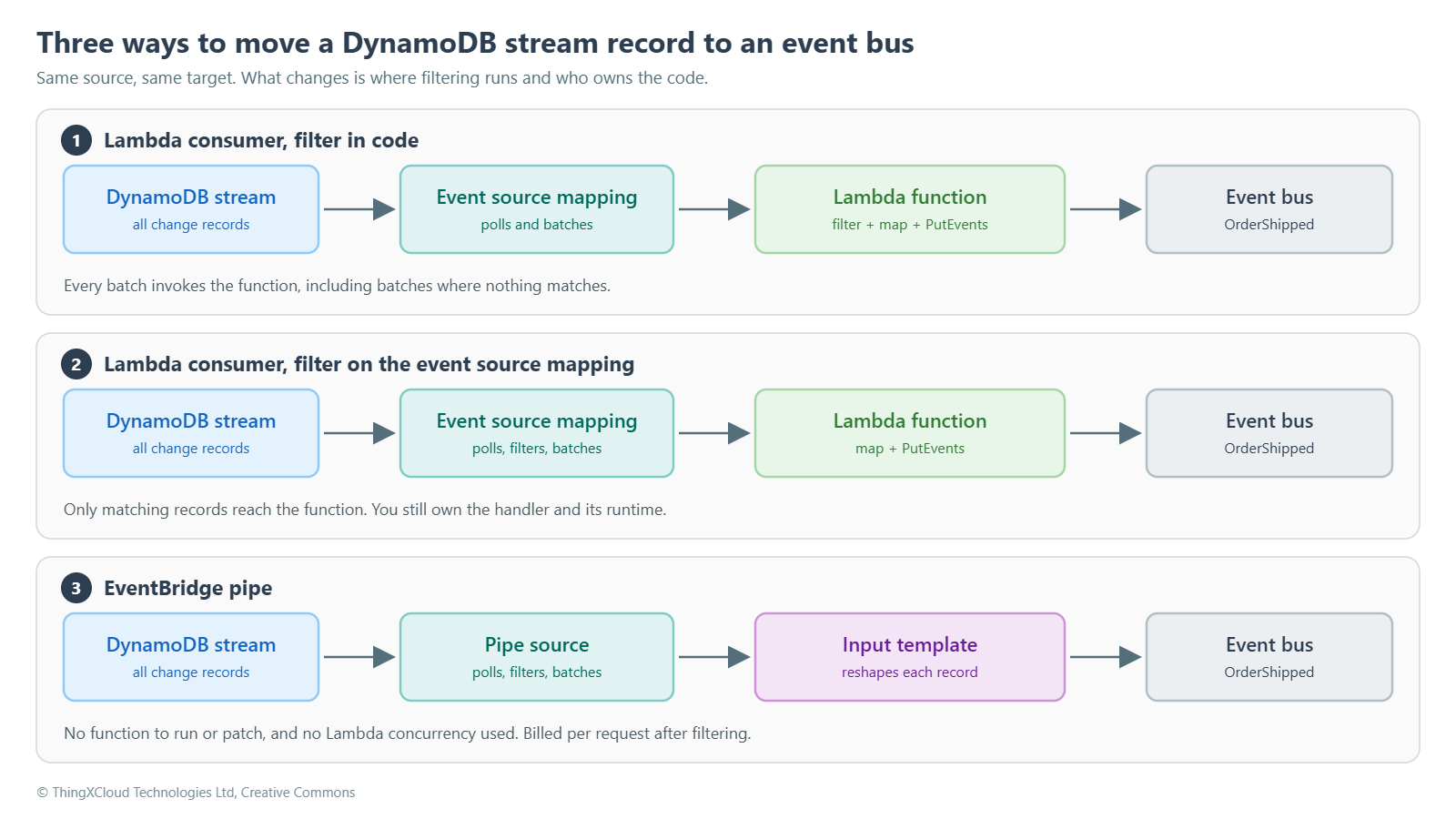
This article compares a pipe with a Lambda consumer for one concrete job: publishing an OrderShipped event to an EventBridge bus whenever an order in DynamoDB moves to SHIPPED. It covers how each option behaves under load and failure, what each really costs, and where a pipe stops being the right tool. One finding up front: the usual argument for Pipes, that it is far cheaper and removes a concurrency problem, does not survive contact with the documentation. The better argument is about ownership.
What Lambda glue really costs, and what it does not
Three claims come up whenever Pipes is compared with a Lambda consumer. Two of them describe Lambda as it was before late 2021, not as it is today.
Claim 1: you pay to throw events away
This is true only if you filter inside the handler. Since November 2021, Lambda event source mappings (ESMs) accept filter criteria for DynamoDB Streams, Kinesis, SQS, Amazon MSK, self-managed Kafka and Amazon MQ. The patterns use the same syntax as EventBridge rules. Records that match no filter never reach your function; for streams the iterator simply moves past them. You get up to five filters per mapping by default, and the quota can be raised to ten.
So the fair comparison is not “pipe with a filter” against “Lambda that filters in code”. It is a pipe against a Lambda consumer that also filters at the source. Both discard unwanted records before any of your code runs.
Claim 2: stream consumers drain your concurrency pool
An event source mapping on a stream runs at most one invocation per shard at a time, multiplied by the parallelization factor (1 to 10). That is a ceiling, not a reservation. Concurrency is consumed only while an invocation is in flight, and a consumer that finishes a batch in 300 ms spends most of its life holding nothing.
Pipes has the same ceiling. AWS documents the maximum concurrent executions of a pipe with a DynamoDB or Kinesis source as the parallelization factor multiplied by the number of shards. If the pipe calls a Lambda function for enrichment or as its target, that function uses Lambda concurrency exactly as a direct consumer would. The real difference is narrower and still useful: a pipe that needs no function at all, because a filter and an input template are enough, uses no Lambda concurrency.
Claim 3: poison records need hand-written recovery code
Lambda event source mappings for streams have had managed error handling for years: MaximumRetryAttempts, MaximumRecordAgeInSeconds, BisectBatchOnFunctionError, partial batch responses and on-failure destinations (SQS, SNS or S3). Pipes offers an equivalent set under slightly different names. In both services the defaults are the dangerous part, which is covered below.
What remains after removing those three claims is the honest case for Pipes: there is no handler, no runtime version, no deployment package and no dependency tree. For a pure filter-and-forward integration that is a real reduction in what a team has to own.
How a pipe works
A pipe has four stages. Only the source and the target are mandatory.
%%{init: {'theme':'base','themeVariables':{'primaryColor':'#E3F2FD','primaryTextColor':'#2C3E50','primaryBorderColor':'#90CAF9','lineColor':'#546E7A','actorBkg':'#E3F2FD','actorBorder':'#90CAF9','actorTextColor':'#1565C0','signalColor':'#546E7A','signalTextColor':'#2C3E50','noteBkgColor':'#F3E5F5','noteBorderColor':'#CE93D8','noteTextColor':'#6A1B9A','edgeLabelBackground':'#FFFFFF','fontSize':'14px'}}}%%
flowchart LR
    S[("DynamoDB stream")] --> F{"Filter pattern"}
    F -->|"no match"| X["Dropped, not billed"]
    F -->|"match"| E["Enrichment (optional)"]
    E --> T["Input template"]
    T -->|"deliver"| B["Event bus"]
    T -.->|"retries exhausted"| D[("SQS dead-letter queue")]
    style S fill:#E3F2FD,stroke:#90CAF9,stroke-width:2px,color:#1565C0
    style F fill:#E0F2F1,stroke:#80CBC4,stroke-width:2px,color:#00695C
    style X fill:#F5F5F5,stroke:#B0BEC5,stroke-width:2px,color:#2C3E50
    style E fill:#E8F5E9,stroke:#A5D6A7,stroke-width:2px,color:#2E7D32
    style T fill:#F3E5F5,stroke:#CE93D8,stroke-width:2px,color:#6A1B9A
    style B fill:#ECEFF1,stroke:#B0BEC5,stroke-width:3px,color:#2C3E50
style D fill:#EDE7F6,stroke:#B39DDB,stroke-width:2px,color:#512DA8- Source. The pipe polls the stream for you. For DynamoDB Streams it polls each shard at a base rate of four times per second and gathers records until the batch size is reached, the batching window (up to 300 seconds) expires or the payload reaches 6 MB.
- Filter. An EventBridge pattern evaluated against each record. Non-matching records are dropped and are not billed as pipe requests.
- Enrichment. An optional synchronous call to a Lambda function, a Step Functions Express workflow, API Gateway or an API destination. This is where a lookup or a non-trivial transformation goes.
- Target. The pipe calls the target’s batch API. An input template reshapes each record first, using placeholders such as
<$.dynamodb.NewImage.OrderId.S>.
Four documented limits shape most pipe designs, and they are easy to miss in a quick-start:
- The target caps the batch size. An event bus, an SQS queue and an SNS topic accept at most 10 records per batch; Kinesis and Firehose accept 500. You cannot configure a source batch size larger than the target supports, so a stream-to-bus pipe runs with a batch size of 10 or less.
- An execution has five minutes. Enrichment and target delivery together must finish inside that window, and the limit cannot be raised.
- Input templates are not validated. A path that does not exist resolves to an empty string at runtime. The event is still delivered, with an empty field.
- The source is fixed. You cannot change a pipe’s source after creation. If a DynamoDB stream is disabled and re-enabled it gets a new ARN, and the pipe has to be recreated.
The silent empty string is the limit that deserves the most attention. A renamed attribute in the table does not fail the pipe. It produces well-formed events with blank values, and the first sign of trouble is usually a downstream consumer. Put a schema check on the consumer side or a contract test in the pipeline that deploys the table.
Side by side: event source mapping and pipe
With filtering available on both sides, the two options are closer than most comparisons suggest. The table lists documented behaviour for a DynamoDB Streams source.
| Dimension | Lambda with event source mapping | EventBridge pipe |
|---|---|---|
| Filtering before compute | Yes, filter criteria on the mapping | Yes, filter criteria on the source |
| Batch size | Up to 10,000 records, within the 6 MB invoke payload | Up to 10,000 at the source, but capped by the target (10 for an event bus) |
| Batching window | 0 to 300 seconds | 0 to 300 seconds |
| Concurrency ceiling | Shards × parallelization factor (1–10) | Shards × parallelization factor (1–10) |
| Lambda concurrency used | While an invocation runs | None, unless the pipe invokes a function |
| Default retry behaviour | Retries until the record expires | Retries until the record expires |
| Splitting a failed batch | BisectBatchOnFunctionError | OnPartialBatchItemFailure: AUTOMATIC_BISECT |
| Partial batch response | ReportBatchItemFailures, keyed by sequence number | For Lambda and Step Functions targets, keyed by eventID; not supported for enrichment |
| Destination for failed batches | SQS, SNS or S3 on-failure destination | SQS or SNS dead-letter queue (no FIFO queues) |
| Transformation | Any code | Input template; enrichment for anything more |
| What you maintain | Handler, dependencies, runtime upgrades, tests | Configuration only |
Failure handling: the defaults are the trap in both
Stream processing is ordered, so a batch that keeps failing blocks everything behind it on the same shard. Both services default to retrying until the record ages out of the stream. For DynamoDB Streams that means roughly 24 hours, and the Lambda documentation says so plainly: with default settings a bad record can block processing on the affected shard for up to one day. A pipe behaves the same way, because MaximumRetryAttempts and MaximumRecordAgeInSeconds both default to -1, which means no limit.
Whichever option you choose, set these four things explicitly:
- A finite retry count.
- A maximum record age comfortably below the stream’s retention, so a failed batch reaches the dead-letter queue before the stream deletes the records.
- Batch bisection, so one bad record is isolated instead of failing its neighbours on every retry.
- A dead-letter destination with an alarm on its depth.
Two details are worth knowing before an incident. First, for stream sources a Lambda on-failure destination on SQS or SNS receives metadata about the failed batch (shard ID and sequence number range), not the records. Someone or something has to read those records back from the stream before they expire. The Pipes documentation does not describe its dead-letter message format for stream sources, so test it and write the replay runbook against what you observe. Second, a pipe that hits near-continuous 4xx errors, for example after an IAM change removes a permission, can be disabled automatically. Alarm on pipe state as well as on failures.
For comparison, this is the path of a batch through a Lambda consumer that filters on the mapping:
%%{init: {'theme':'base','themeVariables':{'primaryColor':'#E3F2FD','primaryTextColor':'#2C3E50','primaryBorderColor':'#90CAF9','lineColor':'#546E7A','actorBkg':'#E3F2FD','actorBorder':'#90CAF9','actorTextColor':'#1565C0','signalColor':'#546E7A','signalTextColor':'#2C3E50','noteBkgColor':'#F3E5F5','noteBorderColor':'#CE93D8','noteTextColor':'#6A1B9A','edgeLabelBackground':'#FFFFFF','fontSize':'14px'}}}%%
sequenceDiagram
    autonumber
    participant S as DynamoDB stream
    participant M as Event source mapping
    participant L as Lambda consumer
    participant B as Event bus
    M->>S: GetRecords on a shard
    S-->>M: 100 change records
    Note over M: Filter keeps the 15 SHIPPED records
    M->>L: Invoke with 15 records
    L->>B: PutEvents (up to 10 entries per call)
    B-->>L: Per-entry results
    L-->>M: batchItemFailures (empty on success)
    Note over M: Checkpoint moves past all 100 records
The same integration, built both ways
Option A: Lambda consumer with a filtered event source mapping
The mapping carries the filter and the failure policy, which leaves the handler with one job. In CDK:
consumerFn.addEventSource(new DynamoEventSource(ordersTable, {
  startingPosition: lambda.StartingPosition.TRIM_HORIZON,
  batchSize: 100,
  maxBatchingWindow: cdk.Duration.seconds(5),
  filters: [
    lambda.FilterCriteria.filter({
      eventName: lambda.FilterRule.or('INSERT', 'MODIFY'),
      dynamodb: { NewImage: { Status: { S: lambda.FilterRule.isEqual('SHIPPED') } } },
    }),
  ],
  reportBatchItemFailures: true,
  bisectBatchOnError: true,
  retryAttempts: 3,
  maxRecordAge: cdk.Duration.hours(1),
  onFailure: new SqsDlq(consumerDlq),
}));
The handler maps records to events and reports the first record that could not be published. Three details matter here, and all three are common bugs in stream consumers. The partial-batch identifier for a stream is the record’s sequence number, not its eventID. PutEvents does not raise on partial failure; it reports failures per entry in the response. And the boto3 service name for EventBridge is events.
"""
order_stream_consumer.py
DynamoDB Streams -> EventBridge bus, for the cases a pipe cannot cover.

Expects the event source mapping to do the heavy lifting:
  - FilterCriteria        : only INSERT/MODIFY records with Status = SHIPPED arrive
  - ReportBatchItemFailures + BisectBatchOnFunctionError
  - MaximumRetryAttempts, MaximumRecordAgeInSeconds and an on-failure destination
"""
import json
import logging
import os

import boto3

logger = logging.getLogger()
logger.setLevel(logging.INFO)

eventbridge = boto3.client("events")  # the service name is "events", not "eventbridge"
EVENT_BUS_NAME = os.environ["EVENT_BUS_NAME"]
PUT_EVENTS_MAX_ENTRIES = 10


def to_entry(record: dict) -> dict:
    """Map one stream record to a PutEvents entry. Raises KeyError on a malformed record."""
    change = record["dynamodb"]
    image = change["NewImage"]
    return {
        "Source": "ecommerce.orders",
        "DetailType": "OrderShipped",
        "EventBusName": EVENT_BUS_NAME,
        "Detail": json.dumps({
            "orderId": image["OrderId"]["S"],
            "customerId": image["CustomerId"]["S"],
            # DynamoDB numbers arrive as strings. Keep them that way: no float rounding on money.
            "totalAmount": image["TotalAmount"]["N"],
            "timestamp": change["ApproximateCreationDateTime"],
        }),
    }


def checkpoint_at(sequence_number: str) -> dict:
    """Tell Lambda to retry from this record onwards. Streams use the sequence number, not eventID."""
    return {"batchItemFailures": [{"itemIdentifier": sequence_number}]}


def lambda_handler(event, context):
    pending = []        # (sequence_number, entry) in stream order
    poison_sequence = None

    for record in event.get("Records", []):
        sequence = record["dynamodb"]["SequenceNumber"]
        try:
            pending.append((sequence, to_entry(record)))
        except (KeyError, TypeError) as exc:
            # Log identifiers only. Stream images routinely contain personal data.
            logger.error("Malformed record at sequence %s: %r", sequence, exc)
            poison_sequence = sequence
            break       # everything from here on is retried from the checkpoint

    for start in range(0, len(pending), PUT_EVENTS_MAX_ENTRIES):
        chunk = pending[start:start + PUT_EVENTS_MAX_ENTRIES]
        response = eventbridge.put_events(Entries=[entry for _, entry in chunk])

        # PutEvents does not raise on partial failure. It reports it in the response.
        if response["FailedEntryCount"]:
            for (sequence, _), result in zip(chunk, response["Entries"]):
                if "ErrorCode" in result:
                    logger.error("PutEvents rejected sequence %s: %s", sequence, result["ErrorCode"])
                    return checkpoint_at(sequence)

    if poison_sequence:
        return checkpoint_at(poison_sequence)
    return {"batchItemFailures": []}
Lambda retries from the reported sequence number, so records after a failure can be published twice. Delivery is at-least-once in both options, and consumers of OrderShipped need to be idempotent either way.
Option B: the pipe
The same behaviour as a CDK stack. There is no handler; the filter, mapping and failure policy are all properties of the pipe.
import * as cdk from 'aws-cdk-lib';
import * as dynamodb from 'aws-cdk-lib/aws-dynamodb';
import * as events from 'aws-cdk-lib/aws-events';
import * as iam from 'aws-cdk-lib/aws-iam';
import * as pipes from 'aws-cdk-lib/aws-pipes';
import * as sqs from 'aws-cdk-lib/aws-sqs';
import { Construct } from 'constructs';

export interface OrderStreamPipeStackProps extends cdk.StackProps {
  /** Stream ARN of the existing Orders table. An imported table has no stream ARN unless you pass one. */
  readonly ordersStreamArn: string;
}

export class OrderStreamPipeStack extends cdk.Stack {
  constructor(scope: Construct, id: string, props: OrderStreamPipeStackProps) {
    super(scope, id, props);

    const ordersTable = dynamodb.Table.fromTableAttributes(this, 'OrdersTable', {
      tableName: 'Orders',
      tableStreamArn: props.ordersStreamArn,
    });
    const targetBus = events.EventBus.fromEventBusName(this, 'TargetBus', 'EnterpriseEventBus');

    const pipeDlq = new sqs.Queue(this, 'PipeDlq', {
      retentionPeriod: cdk.Duration.days(14),
      encryption: sqs.QueueEncryption.SQS_MANAGED,
      enforceSSL: true,
    });

    // Least privilege: stream read, PutEvents on one bus, SendMessage on one queue.
    const pipeRole = new iam.Role(this, 'OrderPipeRole', {
      assumedBy: new iam.ServicePrincipal('pipes.amazonaws.com', {
        conditions: { StringEquals: { 'aws:SourceAccount': this.account } },
      }),
    });
    ordersTable.grantStreamRead(pipeRole);
    targetBus.grantPutEventsTo(pipeRole);
    pipeDlq.grantSendMessages(pipeRole);

    const pipe = new pipes.CfnPipe(this, 'OrderShippedPipe', {
      name: 'orders-shipped-pipe',
      roleArn: pipeRole.roleArn,
      source: props.ordersStreamArn,
      sourceParameters: {
        filterCriteria: {
          filters: [{
            pattern: JSON.stringify({
              eventName: ['INSERT', 'MODIFY'],
              dynamodb: { NewImage: { Status: { S: ['SHIPPED'] } } },
            }),
          }],
        },
        dynamoDbStreamParameters: {
          // LATEST can miss records written while the pipe is being created or updated.
          // TRIM_HORIZON replays up to 24 hours on first deploy, so consumers must be idempotent.
          startingPosition: 'TRIM_HORIZON',
          batchSize: 10,                       // an event bus target accepts at most 10 per batch
          maximumBatchingWindowInSeconds: 5,
          maximumRetryAttempts: 3,             // the default (-1) retries until the record expires
          maximumRecordAgeInSeconds: 3600,     // keep well under the stream's 24-hour retention
          onPartialBatchItemFailure: 'AUTOMATIC_BISECT',
          deadLetterConfig: { arn: pipeDlq.queueArn },
        },
      },
      target: targetBus.eventBusArn,
      targetParameters: {
        eventBridgeEventBusParameters: {
          detailType: 'OrderShipped',
          source: 'ecommerce.orders',
        },
        // Becomes the event detail. Paths are not validated at deploy time.
        inputTemplate: JSON.stringify({
          orderId: '<$.dynamodb.NewImage.OrderId.S>',
          customerId: '<$.dynamodb.NewImage.CustomerId.S>',
          totalAmount: '<$.dynamodb.NewImage.TotalAmount.N>',
          timestamp: '<$.dynamodb.ApproximateCreationDateTime>',
        }),
      },
    });
    // The role's policy must exist before the pipe validates its source and target.
    pipe.node.addDependency(pipeRole);
  }
}
Two things in this stack are easy to get wrong. A table imported with Table.fromTableName has no stream ARN, so tableStreamArn is undefined at synth time; import it with fromTableAttributes and pass the ARN. And the batch size must respect the target: a value of 100 is fine for a Lambda consumer but is rejected for an event bus target.
Both samples were checked before publication: the handler against a stubbed EventBridge client for the success, partial-failure and malformed-record paths, and the stack with
cdk synth. Neither was deployed to a live account as part of this article, so run them in a sandbox account before adopting them.Cost: a model you can check
Cost comparisons between these two services go wrong in a predictable way: they bill Lambda once per event. An event source mapping invokes the function once per batch, and Pipes is also billed per batch after filtering. With that corrected, the numbers are small and close.
Prices used (us-east-1, x86, free tier ignored)
- EventBridge Pipes: $0.40 per million requests. A request is a batch delivered after filtering, counted in 64 KB chunks. The AWS pricing page works an example this way: 10 million events, 25% matching, batches of five, billed as 500,000 requests.
- Lambda: $0.20 per million requests plus $0.0000166667 per GB-second.
Assumptions
- 100 million stream records per month, small enough that a batch stays under 64 KB.
- Target is an event bus, so the pipe uses a batch size of 10. The Lambda consumer uses a batch size of 100.
- Batches fill completely. This is the best case for both options; a trickle of traffic produces smaller batches and raises both bills.
- Lambda at 512 MB, taking 50 ms of fixed overhead plus 25 ms for each
PutEventscall of 10 entries. These durations are assumptions for the model, not measurements. Replace them with your own. - Charges that are the same in every option are left out: custom event ingestion on the bus, DynamoDB, and the dead-letter queue.
Monthly cost for 100 million stream records
| Share of records filtered out | Lambda, filter in code | Lambda, filter on the mapping | Pipe, batch size 10 | Pipe, no batching (worst case) |
|---|---|---|---|---|
| 0% (100M forwarded) | 1M invocations × 300 ms $2.70 | 1M invocations × 300 ms $2.70 | 10M requests $4.00 | 100M requests $40.00 |
| 50% (50M forwarded) | 1M invocations × 175 ms $1.66 | 0.5M invocations × 300 ms $1.35 | 5M requests $2.00 | 50M requests $20.00 |
| 90% (10M forwarded) | 1M invocations × 75 ms $0.83 | 0.1M invocations × 300 ms $0.27 | 1M requests $0.40 | 10M requests $4.00 |
The arithmetic for one cell, so the rest can be reproduced: at 0% filtered, the Lambda consumer runs 1,000,000 invocations of 0.3 seconds at 0.5 GB, which is 150,000 GB-seconds, or $2.50, plus $0.20 in request charges.
Three conclusions follow. At this volume every well-configured option costs a few dollars a month, so the difference is noise next to the engineering time either option consumes. A pipe is not automatically the cheaper choice: Pipes charges per delivered batch, and a target that caps batches at 10 means more billable requests than a Lambda consumer reading 100 records at a time. And batching is the lever that matters most for a pipe: the same workload costs ten times more if records are delivered one at a time.
Logging can outweigh all of the above. A handler that writes one log line per record at 100 million records a month generates far more CloudWatch Logs ingestion cost than its compute. Log per batch, and log identifiers instead of payloads. Pipe logging is off by default when the pipe is created through the API or infrastructure as code; the console preselects CloudWatch Logs at the ERROR level.
Running it in production
Pitfalls that show up after go-live
- Numbers become strings. DynamoDB stores numbers as strings in its wire format, and a quoted placeholder in an input template keeps them that way.
totalAmountarrives as"49.99". Either document that in the event schema or convert in an enrichment step. - Starting position. AWS notes that
LATESTcan miss records written while a pipe is being created or updated.TRIM_HORIZONavoids the gap at the price of replaying whatever is still in the stream. - Enrichment has no partial-batch handling. If the enrichment function fails for one record, the whole batch is retried. Keep enrichment batches small and the function idempotent.
- Double-encoded payloads. A pipe parses one level of JSON in an SQS body or Kinesis data field. An SNS message delivered through SQS is encoded twice, so its inner fields cannot be reached from a filter path or template. That case needs enrichment.
- Observability is different, not absent. There is no function log to tail. Decide early which pipe log level you want (ERROR, INFO or TRACE) and where records go: CloudWatch Logs, Firehose or S3.
Migrating an existing consumer
A stream can have more than one reader, which makes a side-by-side migration possible. Deploy the pipe against a temporary bus or a rule that only archives, compare its output with the existing consumer for a representative period, then switch the target and disable the old event source mapping. Do not run both against the production bus unless every consumer is idempotent. DynamoDB recommends keeping the number of simultaneous readers on a stream shard low to avoid throttling, so treat the overlap as temporary.
Change streams often carry personal data, and in healthcare or payments they can carry regulated data. Three controls apply to both options. Dead-letter queues hold failed payloads or pointers to them for up to 14 days, so encrypt them and restrict who can read them. Pipe logging has an option to include execution data, which writes event payloads and target requests to the log destination; AWS states that it makes no attempt to redact these fields, so leave it off for regulated data. Under GDPR, check that every stage (stream, pipe, bus, queue, log destination) sits in a region your data residency rules allow, and make sure erasure requests are honoured in any archive or replay store fed by the bus.
Decision framework
%%{init: {'theme':'base','themeVariables':{'primaryColor':'#E3F2FD','primaryTextColor':'#2C3E50','primaryBorderColor':'#90CAF9','lineColor':'#546E7A','actorBkg':'#E3F2FD','actorBorder':'#90CAF9','actorTextColor':'#1565C0','signalColor':'#546E7A','signalTextColor':'#2C3E50','noteBkgColor':'#F3E5F5','noteBorderColor':'#CE93D8','noteTextColor':'#6A1B9A','edgeLabelBackground':'#FFFFFF','fontSize':'14px'}}}%%
flowchart TD
    Q1{"One source and one target?"} -->|"No"| L["Lambda consumer or Step Functions"]
    Q1 -->|"Yes"| Q2{"Filter is a static pattern?"}
    Q2 -->|"No"| L
    Q2 -->|"Yes"| Q3{"Mapping is field to field?"}
    Q3 -->|"Yes"| P["Pipe with an input template"]
    Q3 -->|"No"| Q4{"Per-record lookup or parsing is enough?"}
    Q4 -->|"Yes"| PE["Pipe with Lambda enrichment"]
    Q4 -->|"No"| L
    style Q1 fill:#E3F2FD,stroke:#90CAF9,stroke-width:2px,color:#1565C0
    style Q2 fill:#E1F5FE,stroke:#81D4FA,stroke-width:2px,color:#0277BD
    style Q3 fill:#E0F2F1,stroke:#80CBC4,stroke-width:2px,color:#00695C
    style Q4 fill:#B2DFDB,stroke:#4DB6AC,stroke-width:2px,color:#00695C
    style P fill:#F3E5F5,stroke:#CE93D8,stroke-width:3px,color:#6A1B9A
    style PE fill:#EDE7F6,stroke:#B39DDB,stroke-width:2px,color:#512DA8
style L fill:#E8F5E9,stroke:#A5D6A7,stroke-width:2px,color:#2E7D32| Situation | Better fit | Why |
|---|---|---|
| Filter, rename fields, forward to one target | Pipe | No code to own; the whole integration is reviewable configuration |
| Same, plus a lookup against another service | Pipe with enrichment | The function runs only on matching records and stays small |
| Fan-out of one batch to several targets with different rules | Lambda consumer, or a pipe to a bus with rules | A pipe has exactly one target |
| Filtering that depends on runtime state or a cache | Lambda consumer | Filter patterns are static |
| Protobuf or Avro decoding, aggregation across records | Lambda consumer | Beyond what a template can express |
| Processing that can exceed five minutes per batch | Lambda consumer with an asynchronous hand-off, or Step Functions | Pipe executions are capped at five minutes |
| Very high volume to a target with a small batch limit | Model both | Per-request pricing can favour the larger Lambda batch |
When the answer is a Lambda consumer, the first table in this article still applies: put the filter on the event source mapping, set the retry limits and attach an on-failure destination. Most of what makes a pipe attractive is available to a well-configured consumer too.
Key takeaways
- Compare like with like. Lambda event source mappings have filtered at the source since 2021, so the filtered-event cost argument applies only to consumers that still filter in code.
- A pipe and an event source mapping have the same concurrency ceiling on a stream. A pipe saves Lambda concurrency only when it needs no function.
- Both default to retrying a failed batch until the record expires. Set retry limits, record age, bisection and a dead-letter destination in either case.
- At 100 million records a month the cost difference is a few dollars in either direction. Choose on ownership and fit, then confirm the cost with your own batch sizes.
- Pipes moves risk from code to configuration. Unvalidated template paths and target batch limits are the two things to test before production.
If you have moved stream consumers to Pipes, or moved back, the batch sizes and failure modes you saw in practice would make a useful comparison. Share them in the comments.
Glossary
- Lambda glue
- Informal name for small Lambda functions that exist only to filter, reshape and forward events between two services.
- EventBridge Pipes
- Managed point-to-point integration service with a source, optional filter, optional enrichment and a single target.
- ESM (event source mapping)
- The Lambda resource that polls a stream or queue, batches records and invokes a function with them.
- Filter criteria
- EventBridge-style JSON patterns evaluated against each record before it is delivered. Supported by both event source mappings and pipes.
- Shard
- An ordered partition of a stream. Records in a shard are processed in sequence, which is why one failing batch blocks those behind it.
- Parallelization factor
- Number of batches (1 to 10) processed concurrently from each shard, with ordering preserved per partition key.
- Input template
- A pipe’s declarative transformation. Placeholders such as <$.path> are replaced with values from each record.
- Enrichment
- Optional pipe stage that calls a Lambda function, Step Functions Express workflow, API Gateway or API destination between filter and target.
- Partial batch response
- A response listing failed items so that only part of a batch is retried. For a Lambda stream consumer the identifier is the sequence number.
- Batch bisection
- Splitting a failed batch in two and retrying each half to isolate a bad record.
- Poison record
- A record that fails on every attempt and, without retry limits, blocks its shard.
- DLQ (dead-letter queue)
- A queue or topic that receives failed batches, or metadata about them, once retries are exhausted.
- GB-second
- Lambda’s compute billing unit: one second of execution at 1 GB of configured memory.
References & Further Reading
- → Amazon EventBridge Pipes— Overview of sources, filtering, enrichment and targets.
- → EventBridge Pipes event filtering— Filter pattern syntax and per-source behaviour.
- → EventBridge Pipes batching and concurrency— Target batch limits, concurrency ceilings, partial batch failure and the five-minute execution limit.
- → DynamoDB stream as a pipe source— Polling rate, starting position, parallelization factor and retention guidance.
- → EventBridge Pipes input transformation— Template syntax, reserved variables and the unvalidated-path behaviour.
- → EventBridge Pipes error handling and troubleshooting— Retry rules, dead-letter queues and automatic disabling.
- → Logging EventBridge Pipes— Log destinations, levels and the execution-data option.
- → Lambda event filtering— Filter criteria on event source mappings and what happens to filtered records.
- → Partial batch response for DynamoDB and Lambda— Sequence-number identifiers, checkpointing and bisection.
- → Retaining discarded records for a DynamoDB event source— Retry settings, on-failure destinations and the invocation record format.
- → Amazon EventBridge pricing— Pipes request pricing with a worked example.
- → AWS Lambda pricing— Request and duration pricing.
Discover more from C4: Container, Code, Cloud & Context
Subscribe to get the latest posts sent to your email.