Revised in November 2026. The original version described the API Gateway timeout as impossible to change and included a Python streaming handler that does not run on Lambda. Both were wrong. This version is checked against current AWS documentation, and the code samples were rewritten and re-tested.
For years the first production incident on a new GenAI backend was the same one. A request that took four seconds in the demo takes forty once the agent starts calling tools, Amazon API Gateway gives up at 29 seconds, and the user gets a 504 while the Lambda function carries on working for nobody.
That limit is still the default, and it still catches teams. What has changed is that it is no longer a wall. Since 2024 AWS has added a way to raise it, a way to stream through it, and two runtimes built for work that takes minutes or hours. Much of the advice written before those changes, including “never put API Gateway in front of an agent”, is now out of date.
This article sets out what the limits are today, then walks through the three patterns that hold up in production: streaming the response, running the work as an asynchronous job, and pushing progress events to the client. It closes with the concurrency and cost consequences, which are larger than the timeout problem itself.
What the 29-second limit is today
The number comes from the integration timeout on API Gateway REST APIs: 50 milliseconds to 29 seconds for every integration type. HTTP APIs have a similar but separate ceiling of 30 seconds. When the timeout fires, API Gateway returns a 504 to the client and stops listening. It does not cancel the Lambda invocation, so the function runs to completion and you pay for a result that is thrown away.
%%{init: {'theme':'base','themeVariables':{'actorBkg':'#FFF3E0','actorBorder':'#FF9900','actorTextColor':'#232F3E','actorLineColor':'#FF9900','signalColor':'#0073BB','signalTextColor':'#0F172A','labelBoxBkgColor':'#FFF3E0','labelBoxBorderColor':'#FF9900','labelTextColor':'#232F3E','noteBkgColor':'#FFF8E7','noteBorderColor':'#FF9900','noteTextColor':'#232F3E','sequenceNumberColor':'#FFFFFF'}}}%%
sequenceDiagram
    autonumber
    participant C as Client
    participant G as API Gateway
    participant L as Lambda function
    participant B as Amazon Bedrock
    C->>G: POST /agent/run
    G->>L: Invoke, buffered response
    L->>B: Model and tool calls
    Note over G: Integration timeout reached
    G-->>C: 504 Gateway Timeout
    Note over L,B: The function is not cancelled
    B-->>L: Final answer
    Note over L: Result discarded, duration billed
Four releases have changed how much that matters:
| When | Change | What it means for long-running requests |
|---|---|---|
| June 2024 | REST API integration timeout can be raised above 29 seconds | Available for Regional and private REST APIs through a quota request. AWS notes it may require a lower account-level throttle quota. Not available for edge-optimized or HTTP APIs. |
| July 2025 | Lambda response streaming payload limit raised to 200 MB | Streaming is no longer limited to small responses. |
| October 2025 | Amazon Bedrock AgentCore became generally available | A managed runtime for agents with sessions measured in hours, not seconds. |
| November 2025 | API Gateway REST APIs gained response streaming | A streamed response can run for up to 15 minutes and is not subject to the 29-second timeout. No quota increase is needed. |
| December 2025 | Lambda durable functions | Checkpointed, multi-step executions that can last up to a year, written as ordinary handler code. |
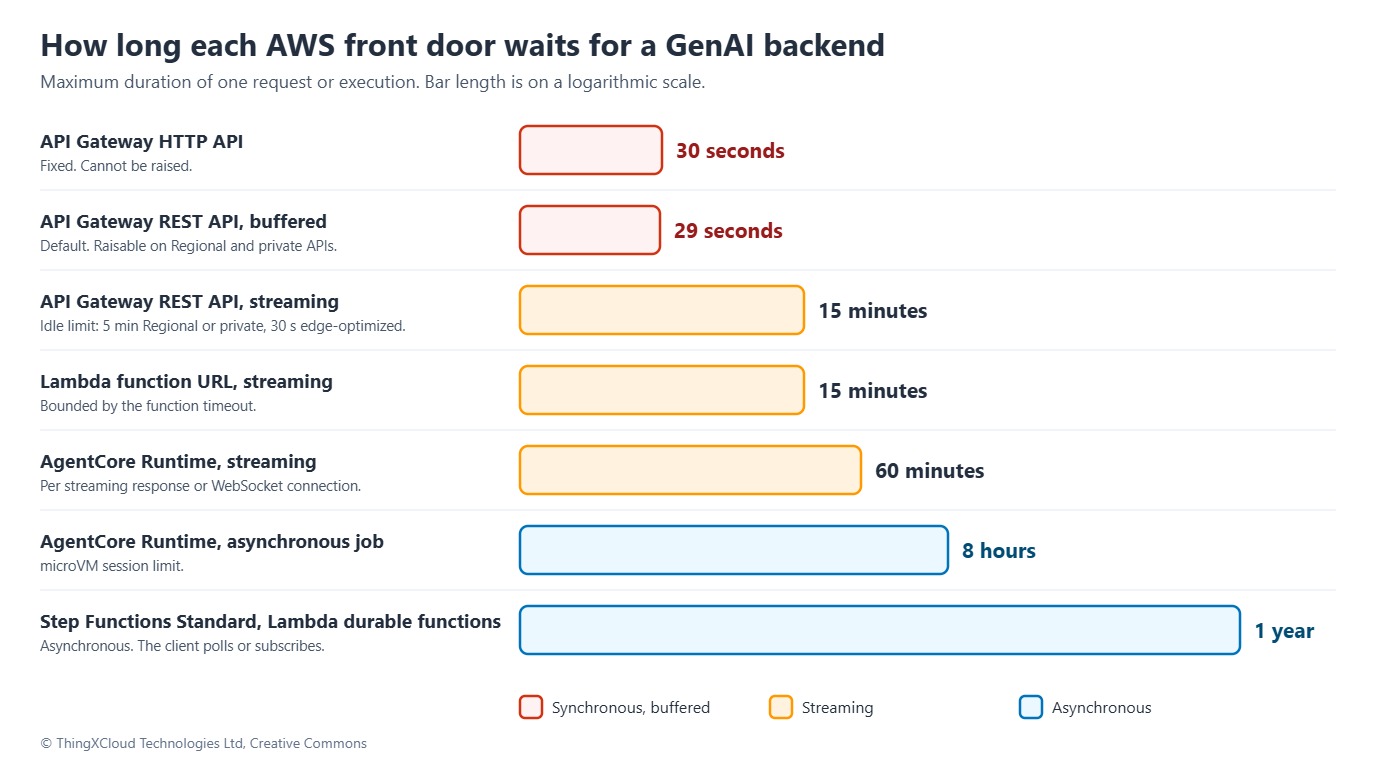
Raising the timeout is the least useful of these for GenAI work. A user who waits 90 seconds for a buffered response still stares at a spinner for 90 seconds, and the throttle trade-off is real. The three patterns below change the interaction instead.
Pattern 1: stream the response
For anything conversational, streaming is the right answer. The first token reaches the user as soon as the model produces it, and the connection stays active for as long as tokens keep flowing. Lambda supports this through response streaming, and there are now two ways to put it on the internet.
%%{init: {'theme':'base','themeVariables':{'primaryColor':'#FFF3E0','primaryTextColor':'#232F3E','primaryBorderColor':'#FF9900','lineColor':'#232F3E','clusterBkg':'#F8FAFC','clusterBorder':'#CBD5E1','edgeLabelBackground':'#FFFFFF','nodeTextColor':'#232F3E'}}}%%
flowchart TD
    C["Browser or mobile client"] -->|"Option A"| G["API Gateway REST API
responseTransferMode STREAM"]
    C -->|"Option B"| CF["CloudFront with origin access control"]
    CF --> FU["Lambda function URL
invoke mode RESPONSE_STREAM"]
    G --> FN["Lambda streaming handler"]
    FU --> FN
    FN -->|"ConverseStream"| B["Amazon Bedrock"]
    classDef compute fill:#FFF3E0,stroke:#FF9900,stroke-width:2px,color:#232F3E;
    classDef edge fill:#EBF8FF,stroke:#0073BB,stroke-width:2px,color:#004C74;
    classDef store fill:#F0FFF4,stroke:#1D8102,stroke-width:2px,color:#145202;
    classDef alert fill:#FEF2F2,stroke:#D13212,stroke-width:2px,color:#991B1B;
    classDef mesh fill:#F3E8FF,stroke:#7C3AED,stroke-width:2px,color:#4C1D95;
    class C,CF,G edge;
    class FU,FN compute;
class B store;| A: REST API in STREAM mode | B: Function URL behind CloudFront | |
|---|---|---|
| Maximum stream | 15 minutes | The function timeout, up to 15 minutes |
| Idle limit | 5 minutes on Regional and private endpoints, 30 seconds on edge-optimized | CloudFront origin response timeout: 30 seconds by default, configurable to 180, higher by quota request |
| Authentication | Cognito, Lambda and IAM authorizers; usage plans; AWS WAF | AWS_IAM on the function URL with CloudFront origin access control; end-user authentication is yours to build at the edge |
| Constraints | Proxy integrations only. No endpoint caching, VTL response transformation or content encoding in STREAM mode | Clients sending POST or PUT must add the SHA-256 of the body in x-amz-content-sha256, because Lambda does not accept unsigned payloads |
| Per-request charge | REST API request price plus a streaming charge | None for the function URL; CloudFront request and transfer charges apply |
Option A is the simpler choice for most teams now, because authorizers, throttling and WAF are already there. Option B has no per-request gateway fee, which matters at high volume, but it moves authentication into your own edge code and the payload-hash requirement surprises every team that meets it.
Limits that apply to both
- Runtime. Lambda supports response streaming natively on Node.js managed runtimes only. Python and other languages need a custom runtime or the Lambda Web Adapter. There is no
response_streamargument on a Python handler. - Size and rate. A streamed response can reach 200 MB. The first 6 MB is uncapped, after which Lambda streams at up to 2 MBps. API Gateway applies a similar rule: the first 10 MB is unrestricted, then 2 MB/s.
- Disconnects. A streamed response is not stopped when the client goes away. The function keeps running and keeps billing. Streaming improves the experience; it does not fix the orphaned-work problem.
- VPC. Function URL streaming is not available from inside a VPC. Use the
InvokeWithResponseStreamAPI through an interface endpoint instead. - Idle gaps. Both front doors enforce an idle limit. An agent that goes silent during a long tool call will be cut off unless the handler keeps the stream alive.
A streaming handler for Bedrock
The handler below uses the Bedrock Converse API, which has the same request shape for every model, and emits Server-Sent Events. The same code runs behind either front door.
// stream-handler.mjs
// Lambda response streaming (Node.js managed runtime) -> Amazon Bedrock ConverseStream.
// Works behind a function URL (InvokeMode RESPONSE_STREAM) or an API Gateway REST API
// proxy integration with responseTransferMode STREAM.
import { BedrockRuntimeClient, ConverseStreamCommand } from '@aws-sdk/client-bedrock-runtime';

const bedrock = new BedrockRuntimeClient({});
const MODEL_ID = process.env.BEDROCK_MODEL_ID;      // model or inference profile ID, set per environment
const MAX_PROMPT_CHARS = 8000;
const HEARTBEAT_MS = 15000;                          // keeps idle timeouts at the edge from firing
const SHUTDOWN_MARGIN_MS = 5000;                     // stop cleanly before Lambda kills the invocation

function readPrompt(event) {
  const raw = event.isBase64Encoded
    ? Buffer.from(event.body ?? '', 'base64').toString('utf8')
    : (event.body ?? '');
  const { prompt } = JSON.parse(raw || '{}');
  if (typeof prompt !== 'string' || prompt.trim() === '' || prompt.length > MAX_PROMPT_CHARS) {
    throw new RangeError('prompt must be a non-empty string of at most ' + MAX_PROMPT_CHARS + ' characters');
  }
  return prompt;
}

function open(responseStream, statusCode, contentType) {
  return awslambda.HttpResponseStream.from(responseStream, {
    statusCode,
    headers: { 'Content-Type': contentType, 'Cache-Control': 'no-cache, no-transform' },
  });
}

export const handler = awslambda.streamifyResponse(async (event, responseStream, context) => {
  // Validate before the status line is committed. After the first byte it cannot change.
  let prompt;
  try {
    prompt = readPrompt(event);
  } catch (err) {
    const body = open(responseStream, 400, 'application/json');
    body.write(JSON.stringify({ message: err instanceof RangeError ? err.message : 'Request body must be JSON' }));
    body.end();
    return;
  }

  const sse = open(responseStream, 200, 'text/event-stream');
  const send = (name, data) => sse.write('event: ' + name + '\ndata: ' + JSON.stringify(data) + '\n\n');

  const abort = new AbortController();
  const deadline = setTimeout(
    () => abort.abort(),
    Math.max(context.getRemainingTimeInMillis() - SHUTDOWN_MARGIN_MS, 0),
  );
  const heartbeat = setInterval(() => sse.write(': keep-alive\n\n'), HEARTBEAT_MS);

  try {
    const response = await bedrock.send(
      new ConverseStreamCommand({
        modelId: MODEL_ID,
        messages: [{ role: 'user', content: [{ text: prompt }] }],
        inferenceConfig: { maxTokens: 2048 },
      }),
      { abortSignal: abort.signal },
    );

    for await (const part of response.stream) {
      if (part.contentBlockDelta?.delta?.text) {
        send('token', { text: part.contentBlockDelta.delta.text });
      } else if (part.messageStop) {
        send('done', { stopReason: part.messageStop.stopReason });
      } else if (part.metadata?.usage) {
        // Token counts only. Never log prompts or completions.
        console.log(JSON.stringify({ requestId: context.awsRequestId, usage: part.metadata.usage }));
      }
    }
  } catch (err) {
    // Headers are already sent, so the failure has to travel in-band.
    console.error(JSON.stringify({ requestId: context.awsRequestId, error: err.name, message: err.message }));
    send('error', {
      message: abort.signal.aborted ? 'Generation exceeded the time limit' : 'Generation failed',
      requestId: context.awsRequestId,
    });
  } finally {
    clearTimeout(deadline);
    clearInterval(heartbeat);
    sse.end();
  }
});
Three design points are worth copying even if the rest changes. Input is validated before the status code is committed, because a streamed response cannot change its status after the first byte. Failures after that point travel as an error event, so the client must treat a 200 as “started”, not “succeeded”. And a comment line is written every 15 seconds so that an idle limit at the edge never fires during a slow tool call.
On the client, read the stream with
fetch and a stream reader. The browser EventSource API only issues GET requests and cannot send a request body or custom headers, which rules it out for most chat backends.Pattern 2: run it as an asynchronous job
Streaming assumes someone is watching. Document analysis, report generation, codebase audits and research agents do not fit that assumption: they run for minutes, phones lock, laptops close, and nobody should have to keep a tab open. For this class of work, accept the request, return a job ID immediately and let the client come back for the result.
%%{init: {'theme':'base','themeVariables':{'primaryColor':'#FFF3E0','primaryTextColor':'#232F3E','primaryBorderColor':'#FF9900','lineColor':'#232F3E','clusterBkg':'#F8FAFC','clusterBorder':'#CBD5E1','edgeLabelBackground':'#FFFFFF','nodeTextColor':'#232F3E'}}}%%
flowchart TD
    C["Client"] -->|"1. POST /jobs"| G["API Gateway"]
    G -->|"2. StartExecution"| SF["Step Functions Standard workflow"]
    G -->|"3. 202 Accepted with jobId"| C
    SF -->|"4. InvokeModel"| B["Amazon Bedrock"]
    SF -->|"5. Result object"| S3[("Amazon S3")]
    SF -->|"6. Job status"| D[("Amazon DynamoDB")]
    C -->|"7. GET /jobs/id"| G
    classDef compute fill:#FFF3E0,stroke:#FF9900,stroke-width:2px,color:#232F3E;
    classDef edge fill:#EBF8FF,stroke:#0073BB,stroke-width:2px,color:#004C74;
    classDef store fill:#F0FFF4,stroke:#1D8102,stroke-width:2px,color:#145202;
    classDef alert fill:#FEF2F2,stroke:#D13212,stroke-width:2px,color:#991B1B;
    classDef mesh fill:#F3E8FF,stroke:#7C3AED,stroke-width:2px,color:#4C1D95;
    class C,G edge;
    class SF,B compute;
    class S3,D store;
API Gateway can call StartExecution directly, so no Lambda function is needed to accept the job. Use the job ID as the execution name: Step Functions will not start a second execution with the same name, which protects against a double-submitted form. If submissions arrive in bursts larger than your Bedrock quota can absorb, put an SQS queue in front and start executions from it with a Lambda function or an EventBridge pipe. SQS cannot start a state machine on its own. The trade-offs of that glue are covered in EventBridge Pipes vs. custom Lambda glue.
A job workflow that stays inside the payload limit
Step Functions calls Bedrock through an optimized integration, so the model call itself needs no Lambda function and accrues no compute charge while the model is working. The definition below records the job, invokes the model with bounded retries and writes the response to S3.
{
  "Comment": "Asynchronous model job: record state, invoke the model, write the result to S3",
  "StartAt": "MarkRunning",
  "TimeoutSeconds": 900,
  "States": {
    "MarkRunning": {
      "Type": "Task",
      "Resource": "arn:aws:states:::dynamodb:putItem",
      "Parameters": {
        "TableName": "AgentJobs",
        "Item": {
          "JobId": { "S.$": "$.jobId" },
          "Status": { "S": "RUNNING" },
          "StartedAt": { "S.$": "$$.Execution.StartTime" }
        }
      },
      "ResultPath": null,
      "Next": "InvokeModel"
    },
    "InvokeModel": {
      "Type": "Task",
      "Resource": "arn:aws:states:::bedrock:invokeModel",
      "TimeoutSeconds": 300,
      "Parameters": {
        "ModelId": "REPLACE_WITH_MODEL_OR_INFERENCE_PROFILE_ID",
        "Body": {
          "anthropic_version": "bedrock-2023-05-31",
          "max_tokens": 4096,
          "messages": [
            { "role": "user", "content.$": "$.prompt" }
          ]
        },
        "Output": {
          "S3Uri.$": "States.Format('s3://agent-job-results/{}/response.json', $.jobId)"
        }
      },
      "ResultPath": null,
      "Retry": [
        {
          "ErrorEquals": ["States.Timeout"],
          "MaxAttempts": 1
        },
        {
          "ErrorEquals": ["States.TaskFailed"],
          "IntervalSeconds": 2,
          "MaxAttempts": 4,
          "BackoffRate": 2.0,
          "MaxDelaySeconds": 30,
          "JitterStrategy": "FULL"
        }
      ],
      "Catch": [
        {
          "ErrorEquals": ["States.ALL"],
          "ResultPath": "$.error",
          "Next": "MarkFailed"
        }
      ],
      "Next": "MarkSucceeded"
    },
    "MarkSucceeded": {
      "Type": "Task",
      "Resource": "arn:aws:states:::dynamodb:updateItem",
      "Parameters": {
        "TableName": "AgentJobs",
        "Key": { "JobId": { "S.$": "$.jobId" } },
        "UpdateExpression": "SET #s = :s, ResultLocation = :r, CompletedAt = :t",
        "ExpressionAttributeNames": { "#s": "Status" },
        "ExpressionAttributeValues": {
          ":s": { "S": "SUCCEEDED" },
          ":r": { "S.$": "States.Format('s3://agent-job-results/{}/response.json', $.jobId)" },
          ":t": { "S.$": "$$.State.EnteredTime" }
        }
      },
      "End": true
    },
    "MarkFailed": {
      "Type": "Task",
      "Resource": "arn:aws:states:::dynamodb:updateItem",
      "Parameters": {
        "TableName": "AgentJobs",
        "Key": { "JobId": { "S.$": "$.jobId" } },
        "UpdateExpression": "SET #s = :s, FailureReason = :e, CompletedAt = :t",
        "ExpressionAttributeNames": { "#s": "Status" },
        "ExpressionAttributeValues": {
          ":s": { "S": "FAILED" },
          ":e": { "S.$": "$.error.Error" },
          ":t": { "S.$": "$$.State.EnteredTime" }
        }
      },
      "End": true
    }
  }
}
The details that matter:
- The result goes to S3, not through the state. Step Functions limits state input and output to 256 KB, and a DynamoDB item to 400 KB. A long model response will exceed one of them sooner or later. The integration’s
Output.S3Urifield writes the response straight to a bucket, and the job record stores only the location. - Retries have jitter and a cap.
JitterStrategy: FULLspreads retries out so that a burst of throttled jobs does not retry in step.States.TaskFailedis deliberately broad here. Once you have seen the throttling error names in your own execution history, narrowErrorEqualsto those, so that a malformed request fails immediately instead of being retried four times. - Every wait has a timeout. The task is limited to 300 seconds and the execution to 900. Without them a hung call holds a job in RUNNING indefinitely.
- The model ID is configuration. Model and inference profile identifiers change faster than workflow definitions. Inject the value at deploy time.
This workflow makes one model call. A real agent adds a loop: a Choice state that inspects the model’s stop reason, Task states for each tool, and a path back to the model. For fan-out over many documents, a Distributed Map state runs up to 10,000 child executions in parallel. In practice your Bedrock quota is the ceiling long before that, so set MaxConcurrency to a number the model endpoint can actually serve.
Pattern 3: push progress events to the client
Polling is fine for a job that finishes in ten minutes. It is a poor fit when the user is watching an agent work and expects to see “searching”, “running query” and “writing summary” as they happen. For that, keep the asynchronous backend from Pattern 2 and add a push channel.
Three managed options exist: AppSync Events (a WebSocket publish and subscribe API), AppSync GraphQL subscriptions, and API Gateway WebSocket APIs. AppSync Events is the lightest if you do not already run GraphQL: the worker publishes to a channel over HTTP and every subscribed client receives the message.
%%{init: {'theme':'base','themeVariables':{'actorBkg':'#FFF3E0','actorBorder':'#FF9900','actorTextColor':'#232F3E','actorLineColor':'#FF9900','signalColor':'#0073BB','signalTextColor':'#0F172A','labelBoxBkgColor':'#FFF3E0','labelBoxBorderColor':'#FF9900','labelTextColor':'#232F3E','noteBkgColor':'#FFF8E7','noteBorderColor':'#FF9900','noteTextColor':'#232F3E','sequenceNumberColor':'#FFFFFF'}}}%%
sequenceDiagram
    autonumber
    participant C as Client
    participant A as Job API
    participant E as AppSync Events
    participant W as Worker
    C->>E: Connect and subscribe to the job channel
    C->>A: POST /jobs
    A-->>C: 202 Accepted
    A->>W: Start worker
    W->>E: Publish "planning"
    E-)C: Push event
    W->>E: Publish "running tool"
    E-)C: Push event
    W->>E: Publish "complete" with result location
    E-)C: Push event
    Note over C: After a reconnect, read job state from the API first
The rule that keeps this pattern reliable is to treat the channel as a notification path and not as the system of record. Persist every status change to DynamoDB before publishing it. A client that drops off the network reconnects, reads the current state from the job API, then resumes listening. Nothing is lost, and no model call is repeated. Note that AppSync GraphQL requests have their own execution limit of 30 seconds, so the mutation that starts the work must hand off and return, exactly as the REST endpoint does.
Two newer options worth evaluating
Lambda durable functions
Durable functions let you write a multi-step process as a normal handler. Each step is checkpointed; a wait suspends the execution without compute charges; and when the function resumes, Lambda replays the handler and substitutes stored results for the steps that already ran. An execution can last up to a year, while each individual invocation is still bound by the function timeout. SDKs exist for Node.js, Python, Java, Go and .NET.
For an agent loop this is attractive: the loop stays in code, and a crash or timeout midway does not repeat model calls that already completed. The cost is a discipline requirement. Code outside steps must be deterministic, so reading the clock or generating a random ID has to happen inside a step. Choose Step Functions when you want the workflow visible and auditable as a diagram; choose durable functions when the logic is easier to read as code.
Amazon Bedrock AgentCore Runtime
AgentCore Runtime hosts agent code in an isolated session per user. Its limits are set for this workload: 15 minutes for a synchronous request, 60 minutes for a streaming response, and up to 8 hours for an asynchronous job on microVMs. The billing model is the notable part. AWS states that I/O wait and idle time are free, and that CPU is charged on actual consumption. An agent spends most of its life waiting on a model or a tool, and on Lambda that waiting is billed as duration.
It is a different operating model from a Lambda function behind an API, with its own deployment, identity and observability story, so it is a platform decision and not a drop-in fix. If agents are a core product for you and not a feature, evaluate it before building the equivalent yourself.
The concurrency consequence
Removing the timeout exposes the next constraint. Lambda concurrency is the number of invocations in flight, and it is the product of arrival rate and duration:
concurrency = requests per second × average duration in seconds
A conventional API at 50 requests per second and 150 ms per request holds about 8 concurrent executions. The same 50 requests per second with a 60-second streamed response holds 3,000. The default account limit in a Region is 1,000, new accounts often start lower, and the limit is shared by every function in the account. A successful chat feature can throttle unrelated workloads.
- Set reserved concurrency on the streaming function. It acts as a ceiling, so the feature degrades on its own instead of taking the account with it.
- Request the quota increase early. Raising account concurrency is routine but not instant.
- Move the waiting out of Lambda. A Step Functions task that calls Bedrock directly holds no Lambda concurrency at all. Neither does a durable function during a wait, or an AgentCore session.
- Isolate by account when the workload is large enough that sharing a limit with other systems is itself the risk.
- Throttle at the queue for background work. The maximum concurrency setting on an SQS event source mapping caps how many jobs run at once.
Cost: where the money goes
Model tokens are the largest line on the bill for every pattern and are the same whichever one you choose, so they are left out here. What differs is how much you pay for infrastructure to sit and wait for the model.
Assumptions
- 100,000 requests per month in us-east-1, each taking 60 seconds end to end. Free tier ignored.
- Lambda on x86 at $0.20 per million requests and $0.0000166667 per GB-second.
- Step Functions Standard at $0.025 per 1,000 state transitions, four transitions per job.
- API Gateway HTTP API at $1.00 per million requests, REST API at $3.50 per million.
- AppSync Events at $1.00 per million operations and $0.08 per million connection-minutes.
| Design | What is billed | Monthly infrastructure cost |
|---|---|---|
| Pattern 1, Lambda at 1 GB | 100,000 × 60 s × 1 GB = 6,000,000 GB-seconds | $100.02, plus $0.35 for REST API requests and the API Gateway streaming charge |
| Pattern 1, Lambda at 256 MB | 100,000 × 60 s × 0.25 GB = 1,500,000 GB-seconds | $25.02, plus the same front-door charges |
| Pattern 2, Step Functions calling Bedrock directly | 400,000 state transitions; 700,000 HTTP API requests (one submit and six polls per job) | $10.70 |
| Pattern 3, Pattern 2 plus AppSync Events | As Pattern 2 without the polls, plus about 43 operations per job (20 publishes, 20 deliveries, connection handling) and one connection-minute | about $14.40 |
| Any pattern with a Lambda worker running the whole agent loop at 1 GB | 6,000,000 GB-seconds of mostly idle waiting | $100 on top |
Two things stand out. First, Lambda bills wall-clock duration, and a function that is waiting for tokens is still running. Memory size is the multiplier: a handler that only relays a stream does not need 1 GB, and dropping to 256 MB cuts the bill by three quarters. Measure before choosing, because CPU scales with memory and JSON handling on very small sizes can slow the stream. Second, the cheapest designs are the ones where nothing of yours is running while the model thinks. That is the practical argument for the Step Functions integration, and it is the same argument AgentCore makes with its billing model.
These are infrastructure figures only. For a sense of proportion, work out your model spend for the same 100,000 requests from your own token counts. For most workloads it is far larger than any number in this table, which is why caps on
maxTokens, agent iterations and per-user request rates matter more to the bill than the choice of pattern.Running it in production
- A 200 is not success. With streaming, the status code is sent before generation starts. Clients must handle an in-stream error event and a stream that ends without a completion event.
- Bound every loop. Orphaned work is still possible in all three patterns. Set a maximum token count, a maximum number of agent iterations and a deadline shorter than the platform timeout, and stop cleanly when any of them is reached.
- Make submission idempotent. Users double-click and clients retry. A client-generated job ID used as the execution name is enough.
- Expect throttling from the model. Bedrock quotas are per model and per account. Back off with jitter, and surface a clear “busy” state instead of a generic failure.
- Protect the endpoint. Every request spends money on tokens. Put AWS WAF rate rules and per-user quotas in front of it, and never expose a function URL with authentication set to
NONEfor a model-backed endpoint. - Measure the right things. Time to first token, total duration, token usage and stop reason per request tell you more than average latency. Record them as metrics, without the prompt.
If you are moving an existing buffered endpoint to streaming on API Gateway, the order matters. Deploy the streaming version of the function first, then switch the integration to the response-streaming invocation path with responseTransferMode set to STREAM, then redeploy the stage. AWS documents that the function has to be updated before the transfer mode is changed.
Prompts and completions routinely contain personal data, and in healthcare or financial services they can contain regulated data. Keep them out of logs: log identifiers and token counts only. Encrypt the results bucket and the job table, and give both a retention rule, such as an S3 lifecycle policy and a DynamoDB TTL, so that outputs do not accumulate indefinitely. Under GDPR, check where inference actually runs. A cross-Region inference profile can route a request to another Region in the same geography, which needs to be consistent with your data residency commitments. Erasure requests must reach stored results as well as source records.
Decision framework
%%{init: {'theme':'base','themeVariables':{'primaryColor':'#FFF3E0','primaryTextColor':'#232F3E','primaryBorderColor':'#FF9900','lineColor':'#232F3E','clusterBkg':'#F8FAFC','clusterBorder':'#CBD5E1','edgeLabelBackground':'#FFFFFF','nodeTextColor':'#232F3E'}}}%%
flowchart TD
    Q1{"Is the user waiting on screen?"} -->|"Yes"| Q2{"Done within 15 minutes?"}
    Q1 -->|"No"| Q3{"Does the user want live progress?"}
    Q2 -->|"Yes"| P1["Pattern 1: stream the response"]
    Q2 -->|"No"| P3["Pattern 3: asynchronous job with push events"]
    Q3 -->|"Yes"| P3
    Q3 -->|"No"| P2["Pattern 2: asynchronous job with polling"]
    classDef compute fill:#FFF3E0,stroke:#FF9900,stroke-width:2px,color:#232F3E;
    classDef edge fill:#EBF8FF,stroke:#0073BB,stroke-width:2px,color:#004C74;
    classDef store fill:#F0FFF4,stroke:#1D8102,stroke-width:2px,color:#145202;
    classDef alert fill:#FEF2F2,stroke:#D13212,stroke-width:2px,color:#991B1B;
    classDef mesh fill:#F3E8FF,stroke:#7C3AED,stroke-width:2px,color:#4C1D95;
    class Q1,Q2,Q3 edge;
    class P1 compute;
    class P2 store;
class P3 mesh;| Workload | Recommended design | Reason |
|---|---|---|
| Chat or copilot, answers within a minute or two | Pattern 1 on a REST API in STREAM mode | First token arrives quickly; authorizers and throttling are built in |
| Same, at very high request volume | Pattern 1 on a function URL behind CloudFront | No per-request gateway charge, at the price of building authentication at the edge |
| Report, batch summarisation, document pipeline | Pattern 2 with Step Functions | Survives disconnects; retries are declarative; nothing runs while the model works |
| Agent with visible multi-step progress | Pattern 3 | Push events for the experience, durable state for correctness |
| Agent loop that is easier to express in code | Lambda durable function behind Pattern 2 or 3 | Checkpointed steps without a separate workflow definition |
| Agents as a core product, sessions lasting hours | Evaluate AgentCore Runtime | Session isolation and billing designed for I/O-bound agents |
| Internal tool, modest latency, Regional REST API already in place | Raise the integration timeout | Smallest change, but accept the throttle trade-off and the spinner |
Key takeaways
- The 29-second limit is a default now, not a wall. REST APIs can stream for up to 15 minutes, and Regional and private REST APIs can have the timeout raised.
- Stream when a person is waiting, queue when nobody is, and add push events when they want to watch.
- Lambda response streaming is native on Node.js only. Python needs the Lambda Web Adapter or a custom runtime.
- A timeout or a disconnect does not cancel a Lambda invocation in any of these designs. Bound the work yourself.
- Long requests multiply concurrency and billed duration. Reserved concurrency, right-sized memory and designs that do not run compute while the model works are the controls that matter.
If you have moved an agent backend from one of these patterns to another, the reasons would be useful to other readers. Share them in the comments.
Glossary
- Integration timeout
- The longest API Gateway waits for a backend to respond before returning a 504. 29 seconds by default on REST APIs, 30 seconds on HTTP APIs.
- Response streaming
- Sending a response to the client in pieces as it is produced, instead of buffering the whole payload first.
- Response transfer mode
- The API Gateway integration setting, BUFFERED or STREAM, that controls whether a proxy integration response is streamed.
- Function URL
- A dedicated HTTPS endpoint for a single Lambda function, with either IAM authentication or none.
- OAC (origin access control)
- The CloudFront feature that signs origin requests with SigV4 so that only the distribution can call a function URL.
- SSE (Server-Sent Events)
- A text format for a one-way stream of events over HTTP, using the text/event-stream content type.
- Converse API
- The Amazon Bedrock inference API with a common request and response shape across models. ConverseStream is its streaming form.
- Inference profile
- A Bedrock resource that routes model requests, optionally across Regions, and is addressed in place of a model ID.
- Optimized integration
- A Step Functions service integration with first-class support for a service, such as bedrock:invokeModel, that needs no Lambda function.
- Distributed Map
- A Step Functions state that fans a dataset out to as many as 10,000 parallel child executions.
- Durable function
- A Lambda function whose steps are checkpointed, so that an execution can pause, resume and span many invocations.
- Reserved concurrency
- A per-function setting that both guarantees and caps the number of concurrent executions.
- AgentCore Runtime
- The Amazon Bedrock AgentCore service that hosts agent code in isolated sessions with long execution limits.
References & Further Reading
- → Stream the integration response for proxy integrations in API Gateway— Stream duration, idle timeouts, bandwidth rules and unsupported features.
- → Configure a Lambda proxy integration with response streaming— Integration URI, STREAM mode and the required function response format.
- → Response streaming for Lambda functions— Supported runtimes, the 200 MB limit, bandwidth throttling and disconnect behaviour.
- → Writing response streaming-enabled Lambda functions— The streamifyResponse wrapper and stream handling guidance.
- → Restrict access to a Lambda function URL origin— Origin access control setup and the payload hash requirement for POST and PUT.
- → Invoke Amazon Bedrock models with Step Functions— InvokeModel parameters, S3 input and output, and the payload limit.
- → Handling errors in Step Functions workflows— Retry fields, jitter, and the scope of States.TaskFailed and States.ALL.
- → Lambda durable functions: basic concepts— Steps, waits, replay, determinism and execution limits.
- → Amazon Bedrock AgentCore quotas— Session, request and streaming duration limits for AgentCore Runtime.
- → API Gateway integration timeout increase beyond 29 seconds— The June 2024 announcement and its throttle quota trade-off.
- → API Gateway response streaming for REST APIs— The November 2025 launch announcement.
- → AWS AppSync pricing— GraphQL and Events API operation and connection pricing.
Discover more from C4: Container, Code, Cloud & Context
Subscribe to get the latest posts sent to your email.