
On this page
A local coding agent such as Claude Code or GitHub Copilot CLI runs as the developer who started it. It reads the files that developer can read, runs commands in their shell, uses their GitHub and cloud tokens, and connects to whatever Model Context Protocol (MCP) servers are configured on the machine. For a security team, that is an unmanaged privileged process with an instruction channel any file or web page can write to.
At Ignite on 17 November 2026, Microsoft announced controls for these agents across its stack: discovery and runtime protection in Defender, device compliance in Intune, an identity per agent in Entra, and an MCP firewall in Global Secure Access. The agents’ own vendors already provide managed policy for the agents themselves. This article sets out what each layer sees and misses, what is generally available versus in preview, and a rollout order that delivers protection now without waiting for every preview. It comes with a tested tool that reviews a Claude Code MCP policy before it is deployed.
Governance layers
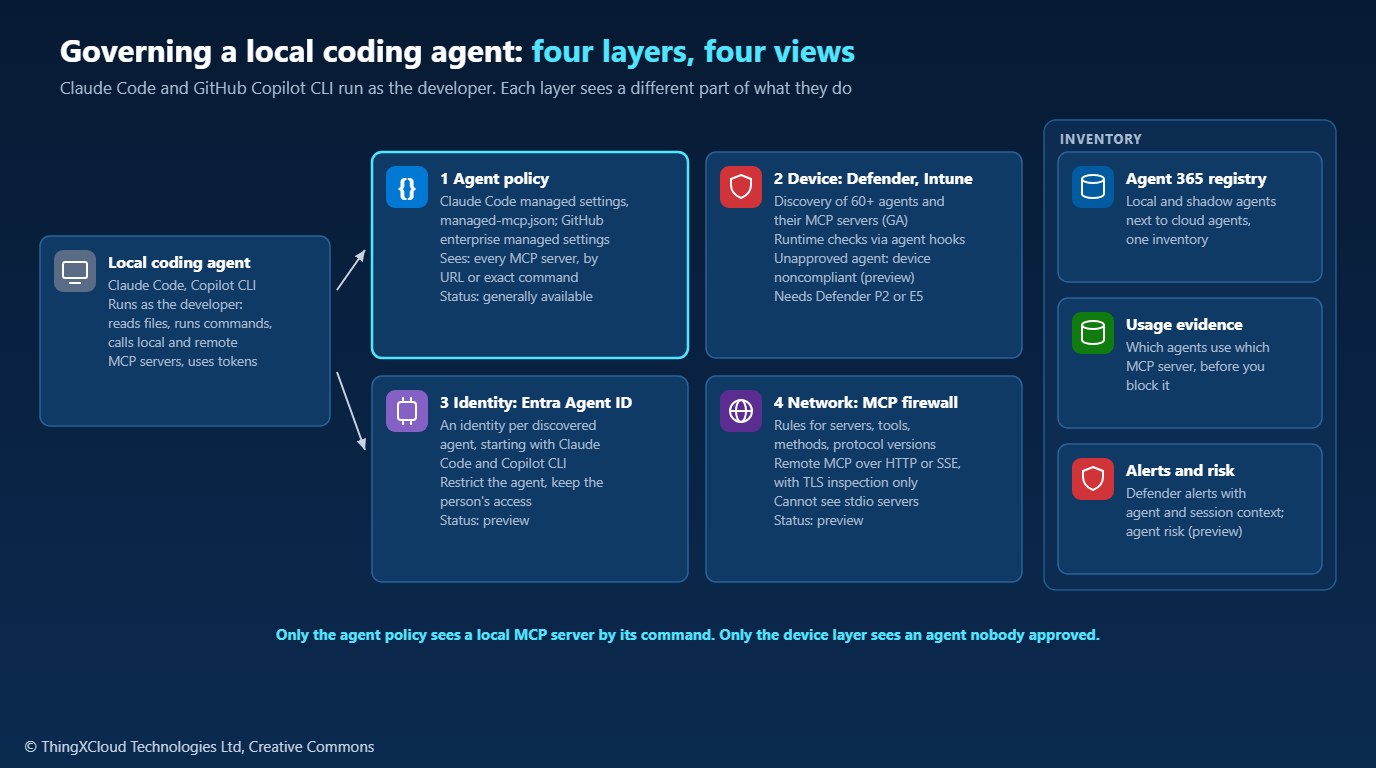
Four layers apply, and they are complementary rather than alternatives. Agent policy is configuration the agent itself enforces: which tools it may run without asking and which MCP servers it may load. The device layer watches the agent as a process on a managed endpoint. The identity layer gives the agent an identity separate from the person running it. The network layer inspects MCP traffic leaving the device. Above them, Microsoft’s Agent 365 registry collects local agents discovered by Defender and Global Secure Access next to cloud agents, so there is one inventory.
Agent policy
Both agents read managed settings that users cannot override. Claude Code takes them from a managed-settings.json file in a system directory, an MDM or registry policy, or server-managed settings from the claude.ai admin console, and managed settings sit above every user and project file. For MCP specifically it offers two mechanisms. A managed-mcp.json file at a system path gives the organization exclusive control: only the servers it lists load, and an empty server map disables MCP. Or allowedMcpServers and deniedMcpServers filter what users configure, with allowManagedMcpServersOnly stopping user and project allowlists from widening the managed one.
GitHub’s enterprise managed-settings.json for Copilot uses the same shapes: allowedMcpServers and deniedMcpServers with serverUrl and serverCommand entries, where a deny always wins and an unmatched server is blocked once an allowlist exists. It also carries permission rules and disableBypassPermissionsMode, and enterprises can instead point Copilot CLI at a private MCP registry with a “registry only” policy.
The rules for how an entry matches are where policies go wrong. In Claude Code, a remote server must match a serverUrl pattern and a local stdio server must match a serverCommand exactly, argument for argument, once any entry of that kind exists. A serverName entry matches the label a user typed, not the server, so the documentation states plainly that it is not a security control. The sample reviews a policy against these documented rules before it ships:
"""Claude Code's MCP allowlist and denylist rules, as documented.

Source: "Control MCP server access for your organization",
https://code.claude.com/docs/en/managed-mcp (read 19 Nov 2026).

This is a model of the documented behaviour for reviewing a policy before it
is deployed. Claude Code itself is the authority: confirm a deployed policy
with `claude mcp list` on a managed machine.
"""
from __future__ import annotations

import re
from dataclasses import dataclass, field
from typing import Literal

Source = Literal["user", "project", "local", "plugin", "connector", "cli", "managed_file", "managed_settings", "builtin"]
_VAR = re.compile(r"\$\{[^}]+\}")


@dataclass(frozen=True)
class Server:
    name: str
    url: str | None = None                 # remote (http or sse) server
    command: tuple[str, ...] | None = None  # stdio server: command and arguments
    source: Source = "user"

    @property
    def remote(self) -> bool:
        return self.url is not None

    def uses_var_expansion(self) -> bool:
        parts = [self.url or "", *(self.command or ())]
        return any(_VAR.search(p) for p in parts)


@dataclass
class Policy:
    """The lists after merging every scope, plus the managed lock."""
    allowed: list[dict] | None = None       # None means unset: every server allowed
    denied: list[dict] = field(default_factory=list)
    managed_only: bool = False              # allowManagedMcpServersOnly
    managed_allowed: list[dict] | None = None

    @classmethod
    def from_scopes(cls, managed: dict, others: list[dict]) -> "Policy":
        """Merge settings documents the way the docs describe: denylists always
        merge; allowlists merge unless the managed source sets the lock."""
        lock = bool(managed.get("allowManagedMcpServersOnly"))
        denied = list(managed.get("deniedMcpServers", []))
        for doc in others:
            denied += doc.get("deniedMcpServers", [])
        sources = [managed] if lock else [managed, *others]
        allow_lists = [d["allowedMcpServers"] for d in sources if "allowedMcpServers" in d]
        allowed = None if not allow_lists else [e for lst in allow_lists for e in lst]
        return cls(allowed=allowed, denied=denied, managed_only=lock,
                   managed_allowed=managed.get("allowedMcpServers"))


@dataclass(frozen=True)
class Decision:
    allowed: bool
    reason: str


def url_matches(pattern: str, url: str) -> bool:
    """`*` matches anything, anywhere, including the scheme. Host matching is
    case-insensitive and ignores a trailing dot; paths are case-sensitive; a
    pattern with no path matches any path."""
    p_scheme, _, p_rest = pattern.partition("://")
    u_scheme, _, u_rest = url.partition("://")
    p_host, slash, p_path = p_rest.partition("/")
    u_host, _, u_path = u_rest.partition("/")
    if not slash:
        p_path = "*"
    norm = lambda h: h.lower().rstrip(".")
    return (_glob(p_scheme.lower(), u_scheme.lower())
            and _glob(norm(p_host), norm(u_host))
            and _glob(p_path, u_path))


def _glob(pattern: str, text: str) -> bool:
    rx = "".join(".*" if ch == "*" else re.escape(ch) for ch in pattern)
    return re.fullmatch(rx, text, flags=re.DOTALL) is not None


def _matches(entry: dict, s: Server) -> bool:
    if "serverUrl" in entry:
        return s.url is not None and url_matches(entry["serverUrl"], s.url)
    if "serverCommand" in entry:
        return s.command is not None and tuple(entry["serverCommand"]) == s.command
    if "serverName" in entry:
        return entry["serverName"] == s.name
    return False


def evaluate(policy: Policy, s: Server) -> Decision:
    for e in policy.denied:
        if _matches(e, s):
            return Decision(False, f"denylist: {e}")
    skips = s.source in ("managed_settings", "builtin") or (s.source == "managed_file" and not s.uses_var_expansion())
    if skips:
        return Decision(True, "organization or built-in server: allowlist not checked")
    allowed = policy.allowed
    if allowed is None:
        return Decision(True, "no allowlist set")
    key = "serverUrl" if s.remote else "serverCommand"
    typed = [e for e in allowed if key in e]
    if typed:
        hit = next((e for e in typed if _matches(e, s)), None)
        return Decision(hit is not None, f"allowlist {key}: {hit}" if hit else f"no {key} entry matches")
    named = [e for e in allowed if "serverName" in e]
    hit = next((e for e in named if _matches(e, s)), None)
    return Decision(hit is not None, f"allowlist serverName: {hit}" if hit else "not on the allowlist")
Run against an example policy and an inventory of servers found on developer machines, it shows which would load and flags the weak spots in a second policy:
$ python -m mcp_policy examples/managed-settings.json examples/inventory.json
[INFO  ] deny_by_name: Denying 'pastebin' by name blocks only servers with that label; add the URL or command too.

LOAD  github         https://api.githubcopilot.com/mcp/                   allowlist serverUrl: {'serverUrl': 'https://api.githubcopilot.com/*'}
LOAD  records        https://mcp.internal.contoso-health.example/records  allowlist serverUrl: {'serverUrl': 'https://mcp.internal.contoso-health.example/*'}
LOAD  jira           npx -y @acme/mcp-jira@3.2.1                          allowlist serverCommand: {'serverCommand': ['npx', '-y', '@acme/mcp-jira@3.2.1']}
BLOCK jira           npx -y @acme/mcp-jira                                no serverCommand entry matches
BLOCK github         node /tmp/github-mcp.js                              no serverCommand entry matches
BLOCK notes          https://share.pastebin.example/mcp                   denylist: {'serverUrl': 'https://*.pastebin.example/*'}
exit code 0

$ python -m mcp_policy examples/weak-settings.json
[HIGH  ] allowlist_not_locked: allowManagedMcpServersOnly is not true: user and project allowlists merge in and can widen this one.
[MEDIUM] plain_http: http://mcp.partner.example/* allows unencrypted HTTP; MCP traffic can carry code and secrets.
[MEDIUM] unpinned_package: ['npx', '@playwright/mcp@latest'] runs whatever version is latest at launch; pin a version.
[INFO  ] deny_by_name: Denying 'pastebin' by name blocks only servers with that label; add the URL or command too.
exit code 2Allow and deny MCP servers by URL pattern and by exact command, and pin package versions in commands. A policy that allows github by name allows any server a developer labels github, and a command ending in @latest runs whatever was published most recently.
Device layer: Defender and Intune
Defender’s discovery of local AI agents is generally available on managed Windows and macOS devices, and together with Global Secure Access it covers more than 60 agent types and the MCP servers they have configured, tied to device and user. Discovery is the step to take first, because it answers the question every other control depends on: which agents are actually running, and connected to what.
Runtime protection inspects the agent loop and can block a malicious instruction, typically a prompt injection hidden in content the agent reads, before the agent acts on it. For Claude Code, Copilot CLI and their desktop and VS Code variants it uses the vendors’ own hook interfaces (“agent-native event inspection”); for agents without hooks, such as Ollama Desktop and ChatGPT, it inspects traffic to the model. Each method is set to Disabled, Audit or Block through an Intune antivirus profile, a Defender portal template or Set-MpPreference -AiAgentProtection, and detections raise a “Suspicious AI prompt injection” alert with the agent and session context. It needs Defender for Endpoint Plan 2, Microsoft 365 E5, Agent 365 or Microsoft 365 E7.
Microsoft’s Ignite posts describe runtime protection for local agents as generally available on Windows, but on 19 November 2026 its support matrix and configuration guide still label it preview, and the guide lists known issues: an alert can report a block while the policy is in Audit mode, and in Block mode Claude Code may keep processing a tool response after a reported block. Follow Microsoft’s own advice: Audit on a few devices for one to two weeks, then widen, then block.
Intune adds enforcement (preview): it can mark a device running an unapproved agent as noncompliant, so Conditional Access blocks that device from company resources. For approved agents on Windows, Intune also defines file and network boundaries that Microsoft Execution Containers enforce outside the agent’s control. Defender also gained detections for identity attacks on developers, such as device-code phishing that takes over a GitHub account to misuse Copilot CLI, with automatic disruption of the compromised account.
Identity layer: Entra Agent ID
In preview, Entra Agent ID gives each supported local agent discovered by Defender or Global Secure Access its own identity, starting with GitHub Copilot CLI and Claude Code. The point is separation: activity by the agent can be told apart from activity by the person, and a security team can restrict a risky agent while leaving the employee’s own access untouched. Until this is generally available, assume the agent acts with the developer’s identity and tokens, and scope those tokens accordingly.
Network layer: the MCP firewall
The Global Secure Access MCP firewall (preview) inspects MCP’s JSON-RPC messages between agents and remote MCP servers. Policies can allow or block servers by URL, tools by name, resources and prompt templates, MCP protocol versions, methods and transports, with a default action of allow or block. It needs a Microsoft Entra Internet Access licence, the Global Secure Access client on an Entra-joined or hybrid-joined device, the Internet Access traffic forwarding profile, and TLS inspection, without which, in Microsoft’s words, it cannot parse or enforce MCP policy.
Its documented limits shape where it fits. It inspects streamable HTTP and Server-Sent Events only, so stdio servers running on the developer’s machine are invisible to it, and it does not inspect JSON-RPC batches. For local servers, the agent’s own policy is the only layer that can decide by command. Earlier posts cover hosting remote MCP servers securely, which is the traffic this firewall sees, and red-teaming an MCP server, which shows what a malicious tool description can do.
Coverage and gaps
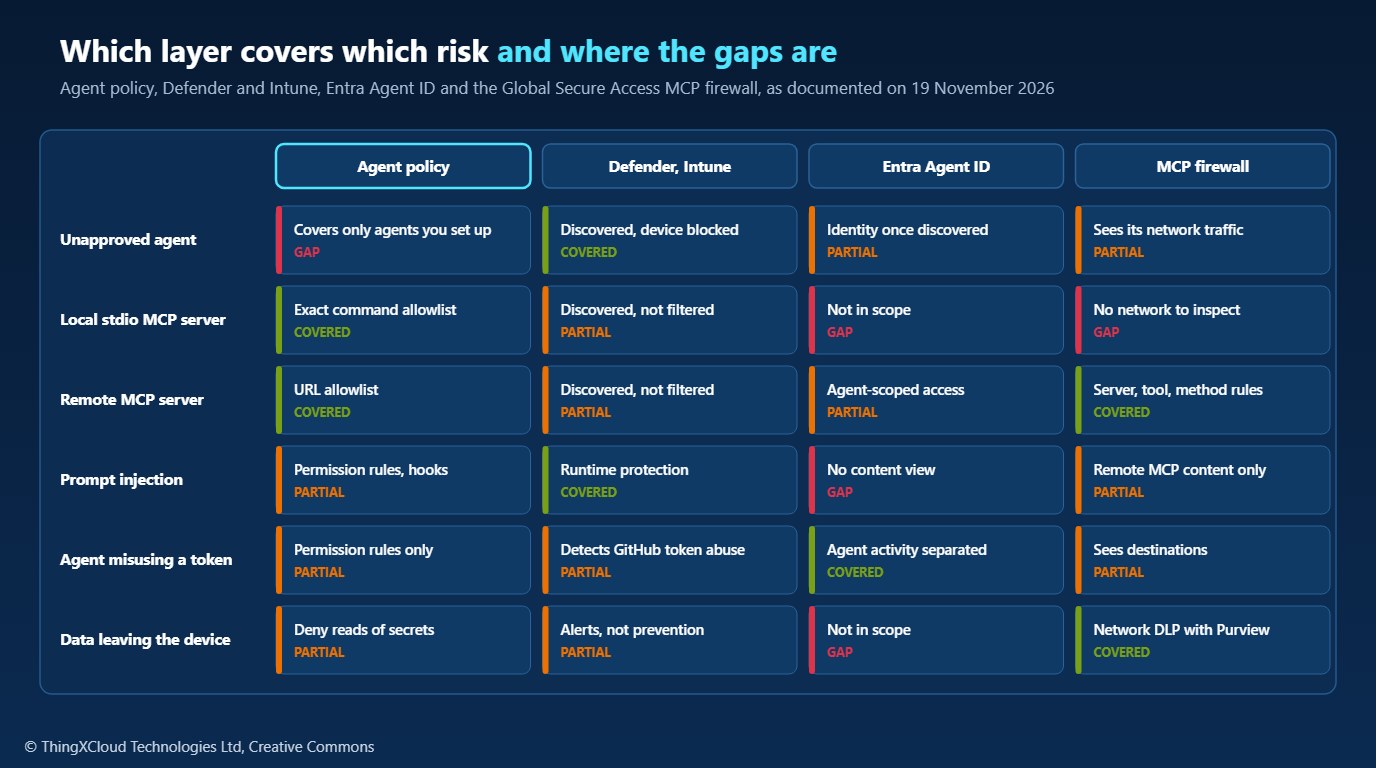
Two rows decide the design. An agent nobody approved is invisible to agent policy, which only exists where it has been deployed, so device discovery and Intune compliance are the only controls that find and stop it. A local stdio MCP server is invisible to the network, so agent policy with exact command matching is the only control that decides whether it runs. The remaining rows have partial coverage from several layers, and that overlap is useful: prompt injection, for example, is narrowed by permission rules in the agent and caught at runtime by Defender.
Status and licensing
| Control | Status on 19 Nov 2026 | Licence or prerequisite |
|---|---|---|
| Claude Code managed settings and MCP allow/deny lists | Generally available | Claude Code; delivery by MDM, file or claude.ai admin console |
| GitHub Copilot enterprise managed settings and MCP allowlist | Managed settings file GA; custom registry in preview | Copilot Business or Enterprise |
| Defender discovery of local agents and MCP servers | Generally available | Defender for Endpoint, onboarded devices |
| Defender runtime protection for local agents | Announced GA on Windows; documentation still labels it preview | Defender for Endpoint P2, Microsoft 365 E5, Agent 365 or E7 |
| Intune noncompliance for unapproved agents | Preview | Intune and Conditional Access |
| Entra Agent ID for local agents | Preview | Entra, with Defender or Global Secure Access discovery |
| Global Secure Access MCP firewall | Preview | Entra Internet Access, GSA client, TLS inspection |
Rollout order
%%{init: {'theme': 'base', 'themeVariables': {'primaryColor': '#EAF4FD', 'primaryTextColor': '#0F2B46', 'primaryBorderColor': '#0078D4', 'lineColor': '#243A5E', 'clusterBkg': '#F8FAFC', 'clusterBorder': '#CBD5E1', 'edgeLabelBackground': '#FFFFFF', 'nodeTextColor': '#0F2B46'}}}%%
flowchart TD
    A[Step 1: Discover: Defender local agent and MCP discovery, GA] --> B[Step 2: Inventory: Agent 365 registry, owners, usage per MCP server]
    B --> C[Step 3: Agent policy: managed settings and MCP allowlist,<br/>reviewed in a pull request]
    C --> D[Step 4: Runtime protection in Audit on pilot devices, 1 to 2 weeks]
    D --> E[Alerts reviewed and tuned?]
    E -- No --> D
    E -- Yes --> F[Step 5: Block mode where validated]
    F --> G[Step 6: Pilot previews: Intune compliance, Entra Agent ID, MCP firewall]
    style A fill:#F0FFF4,stroke:#1D8102,stroke-width:2px,color:#145202
    style F fill:#F0FFF4,stroke:#1D8102,stroke-width:2px,color:#145202
    style G fill:#F3E8FF,stroke:#7C3AED,stroke-width:2px,color:#4C1D95
The order front-loads what is generally available and reversible. Discovery changes nothing on the device and gives the inventory everything else depends on. Agent policy is a configuration file that can be reviewed in a pull request, with the sample tool as a build gate, and rolled back in minutes. Runtime protection starts in Audit because a false positive in Block mode stops a developer mid-task. The preview controls come last, as pilots, because they depend on licences, device join state and TLS inspection that many estates do not yet have everywhere.
Prompt evidence collection sends snippets of what agents read and were told to Defender, and Microsoft’s guide states that sensitive data and secrets are not redacted from the snippets shown in alerts. Those snippets can contain source code, credentials and, in healthcare or finance, personal data. Decide who can read these alerts, how long they are kept, and, in the EU, treat prompt collection on developers’ machines as employee monitoring: involve your data protection officer and works council, and record it in a DPIA.
The policy checker was tested with Python 3.12 and pytest 8.3.3: 19 tests pass, and those in test_documented_examples.py are the worked examples from Claude Code’s documentation on managed MCP (read 19 November 2026), so the model fails if it disagrees with the documented rules. It is a model of documented behaviour: running the Claude Code CLI against the policies was not possible in the environment used to write this article, and GitHub Copilot’s matching was not checked against it. Nothing was run against Defender, Intune, Entra or Global Secure Access. Status, licences and limitations are from Microsoft’s Ignite posts, the Defender support matrix and configuration guide, and the MCP firewall guide, all read on 19 November 2026.
Key takeaways
- Treat local coding agents as privileged processes acting as the developer, and govern them in four layers: agent policy, device, identity and network.
- Start with what is generally available: Defender discovery and the agents’ own managed MCP policy, enforced by URL and exact command, never by name.
- Run Defender runtime protection in Audit first; it is announced GA but still documented as preview with known issues.
- The MCP firewall cannot see local stdio servers and needs TLS inspection; agent policy is the only control for local servers.
- Handle prompt evidence as sensitive data: secrets are not redacted, and collection on developer machines is employee monitoring.
Which layer are you starting with for your developers’ agents? Tell me in the comments what you have found running that nobody approved.
The complete sample for this article is on GitHub: nithinmohantk/blog-samples-working-repo/mcp-policy-check. Clone it with git clone https://github.com/nithinmohantk/blog-samples-working-repo.git and open the mcp-policy-check folder. Its README says how to run it and what has been verified.
Glossary
- Local coding agent
- An AI agent that runs on a developer’s machine with that developer’s permissions, such as Claude Code or GitHub Copilot CLI.
- MCP
- Model Context Protocol: the protocol agents use to call tools, read resources and use prompts from servers.
- stdio MCP server
- An MCP server the agent starts as a local process and talks to over standard input and output.
- Remote MCP server
- An MCP server reached over the network with streamable HTTP or Server-Sent Events.
- Managed settings
- Agent configuration deployed by an organization that users and projects cannot override.
- Agent hooks
- Vendor interfaces that let other programs inspect or stop an agent’s actions at defined points.
- Runtime protection
- Defender’s inspection of an agent’s activity, in Audit or Block mode.
- Entra Agent ID
- An identity in Microsoft Entra for an agent, separate from the person who runs it.
- Global Secure Access
- Microsoft Entra’s security service edge, which routes and inspects device traffic.
- TLS inspection
- Decrypting traffic at a proxy so its contents can be inspected.
- Agent 365 registry
- Microsoft’s inventory of agents across cloud and local platforms.
- Conditional Access
- Entra policies that decide access based on user, device and risk signals.
References & Further Reading
- → What’s new in Microsoft Agent 365: Ignite 2026— Discovery, Agent ID for local agents, Intune and MCP firewall
- → Ignite 2026: What’s new in Microsoft Defender and Sentinel— Runtime protection and GitHub CLI attack detections
- → Defender for Endpoint AI agent support matrix— Supported agents and inspection methods
- → Set up AI agent runtime protection— Licences, Audit and Block, known issues
- → Configure the Global Secure Access MCP firewall— Prerequisites, policies and limitations
- → Control MCP server access for your organization— Claude Code managed-mcp.json, allowlists and denylists
- → Claude Code settings files and precedence— Managed settings and precedence
- → Copilot enterprise managed settings— GitHub Copilot MCP allowlist and permissions
- → Sample code for this article— MCP policy checker with the documented examples as tests
Discover more from C4: Container, Code, Cloud & Context
Subscribe to get the latest posts sent to your email.
