Google Cloud Platform (GCP) provides a comprehensive suite of cloud computing services for enterprise developers. This guide covers the essential architecture patterns, services, and best practices that every developer needs to master for building production-grade applications on GCP.
GCP Resource Hierarchy
Understanding GCP’s resource hierarchy is fundamental to designing secure, manageable enterprise architectures. Resources are organized in a parent-child relationship that enables policy inheritance and centralized management.

Hierarchy Levels Explained
Organization: The root node representing your company. Linked to your Google Workspace or Cloud Identity domain. All IAM policies at this level apply to everything below.
Folders: Optional grouping layer for organizing projects by team, environment, or application. Supports nesting up to 10 levels deep. Ideal for applying environment-specific policies (production vs development).
Projects: The fundamental unit for billing, APIs, and resource management. Each project has a unique ID, name, and number. Resources cannot span projects without explicit configuration.
# Create a new project
gcloud projects create my-app-prod --folder=123456789 --name="My App Production"

# Set project for subsequent commands
gcloud config set project my-app-prod

# Enable required APIs
gcloud services enable compute.googleapis.com
gcloud services enable container.googleapis.com
gcloud services enable sqladmin.googleapis.com
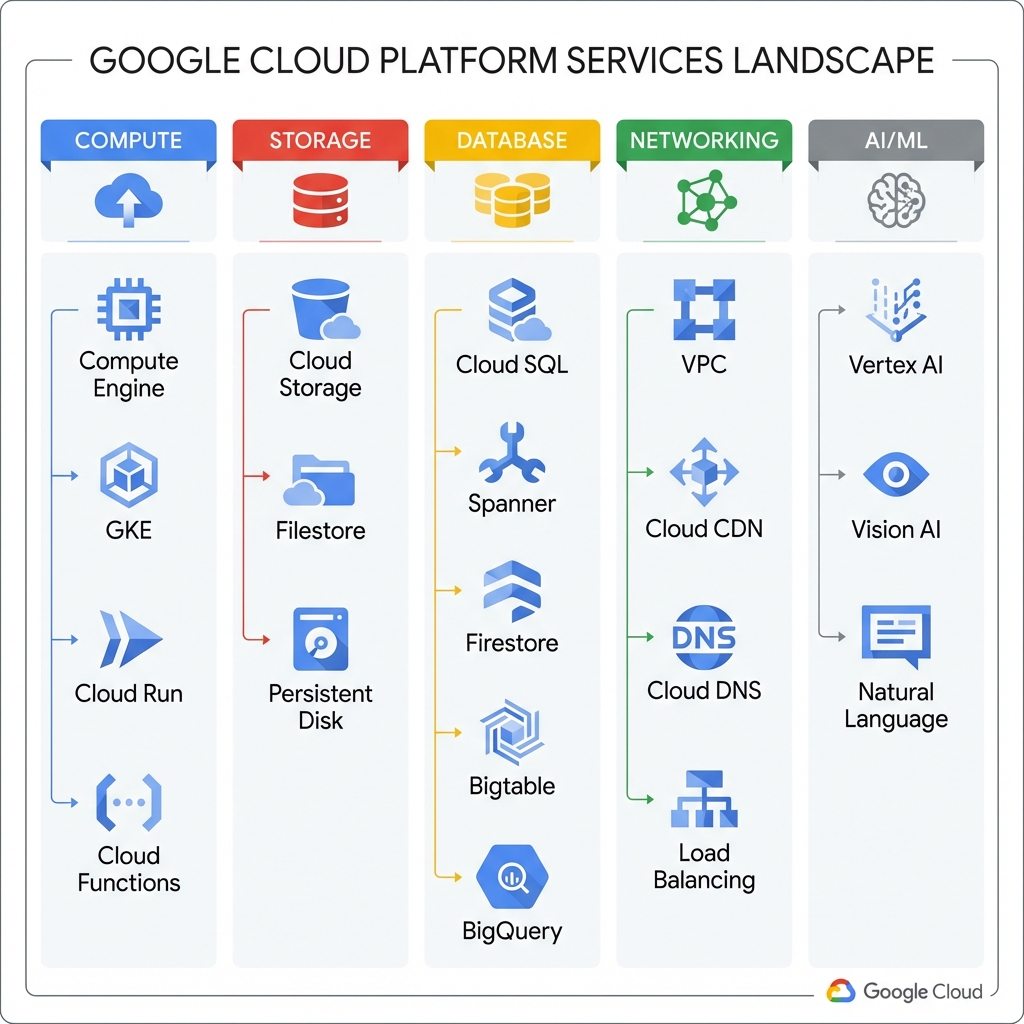
GCP Services Landscape
GCP offers over 100 services across compute, storage, databases, networking, AI/ML, and more. Understanding which services to use for each use case is critical for building efficient architectures.
Compute Services Deep Dive
Compute Engine: Infrastructure-as-a-Service (IaaS) virtual machines. Use for lift-and-shift migrations, custom OS requirements, or when you need full control over the runtime environment.
# Python: Create a Compute Engine instance
from google.cloud import compute_v1

def create_instance(project_id: str, zone: str, instance_name: str):
    instance_client = compute_v1.InstancesClient()

    # Configure the machine
    machine_type = f"zones/{zone}/machineTypes/e2-medium"

    # Use the latest Debian image
    image_response = compute_v1.ImagesClient().get_from_family(
        project="debian-cloud",
        family="debian-11"
    )

    # Define the instance
    instance = compute_v1.Instance(
        name=instance_name,
        machine_type=machine_type,
        disks=[
            compute_v1.AttachedDisk(
                boot=True,
                auto_delete=True,
                initialize_params=compute_v1.AttachedDiskInitializeParams(
                    source_image=image_response.self_link,
                    disk_size_gb=50
                )
            )
        ],
        network_interfaces=[
            compute_v1.NetworkInterface(
                network="global/networks/default",
                access_configs=[compute_v1.AccessConfig(name="External NAT")]
            )
        ]
    )

    # Create the instance
    operation = instance_client.insert(
        project=project_id,
        zone=zone,
        instance_resource=instance
    )

    return operation
Google Kubernetes Engine (GKE): Managed Kubernetes for containerized workloads. GKE Autopilot removes node management entirely, while GKE Standard provides more control.
# Create a GKE Autopilot cluster
gcloud container clusters create-auto my-cluster \
    --region=us-central1 \
    --project=my-project

# Get credentials for kubectl
gcloud container clusters get-credentials my-cluster --region=us-central1

# Deploy an application
kubectl create deployment hello-app --image=gcr.io/google-samples/hello-app:1.0
kubectl expose deployment hello-app --type=LoadBalancer --port=80 --target-port=8080
Cloud Run: Serverless containers that scale to zero. Perfect for APIs, web applications, and event-driven processing where you want to pay only for actual usage.
# Cloud Run service example - main.py
from flask import Flask, request
import os

app = Flask(__name__)

@app.route('/')
def hello():
    name = os.environ.get('NAME', 'World')
    return f'Hello {name}!'

@app.route('/api/process', methods=['POST'])
def process():
    data = request.get_json()
    # Process the data
    result = {"processed": True, "items": len(data.get('items', []))}
    return result

if __name__ == '__main__':
    port = int(os.environ.get('PORT', 8080))
    app.run(host='0.0.0.0', port=port)
GKE Enterprise Architecture
For production Kubernetes workloads, a well-architected GKE setup includes proper networking, security controls, observability, and integration with managed services for databases and caching.

Workload Identity Configuration
Workload Identity is the recommended way for GKE workloads to access GCP services. It eliminates the need for service account keys by binding Kubernetes service accounts to GCP service accounts.
# Enable Workload Identity on cluster
gcloud container clusters update my-cluster \
    --workload-pool=my-project.svc.id.goog

# Create GCP service account
gcloud iam service-accounts create my-app-sa \
    --display-name="My App Service Account"

# Grant permissions to the service account
gcloud projects add-iam-policy-binding my-project \
    --member="serviceAccount:my-app-sa@my-project.iam.gserviceaccount.com" \
    --role="roles/cloudsql.client"

# Bind K8s SA to GCP SA
gcloud iam service-accounts add-iam-policy-binding \
    my-app-sa@my-project.iam.gserviceaccount.com \
    --role="roles/iam.workloadIdentityUser" \
    --member="serviceAccount:my-project.svc.id.goog[default/my-app-ksa]"
# Kubernetes ServiceAccount with Workload Identity annotation
apiVersion: v1
kind: ServiceAccount
metadata:
name: my-app-ksa
namespace: default
annotations:
iam.gke.io/gcp-service-account: my-app-sa@my-project.iam.gserviceaccount.com
---
apiVersion: apps/v1
kind: Deployment
metadata:
name: my-app
spec:
replicas: 3
selector:
matchLabels:
app: my-app
template:
metadata:
labels:
app: my-app
spec:
serviceAccountName: my-app-ksa
containers:
- name: app
image: gcr.io/my-project/my-app:latest
ports:
- containerPort: 8080
resources:
requests:
memory: "256Mi"
cpu: "250m"
limits:
memory: "512Mi"
cpu: "500m"Hub-and-Spoke Network Architecture
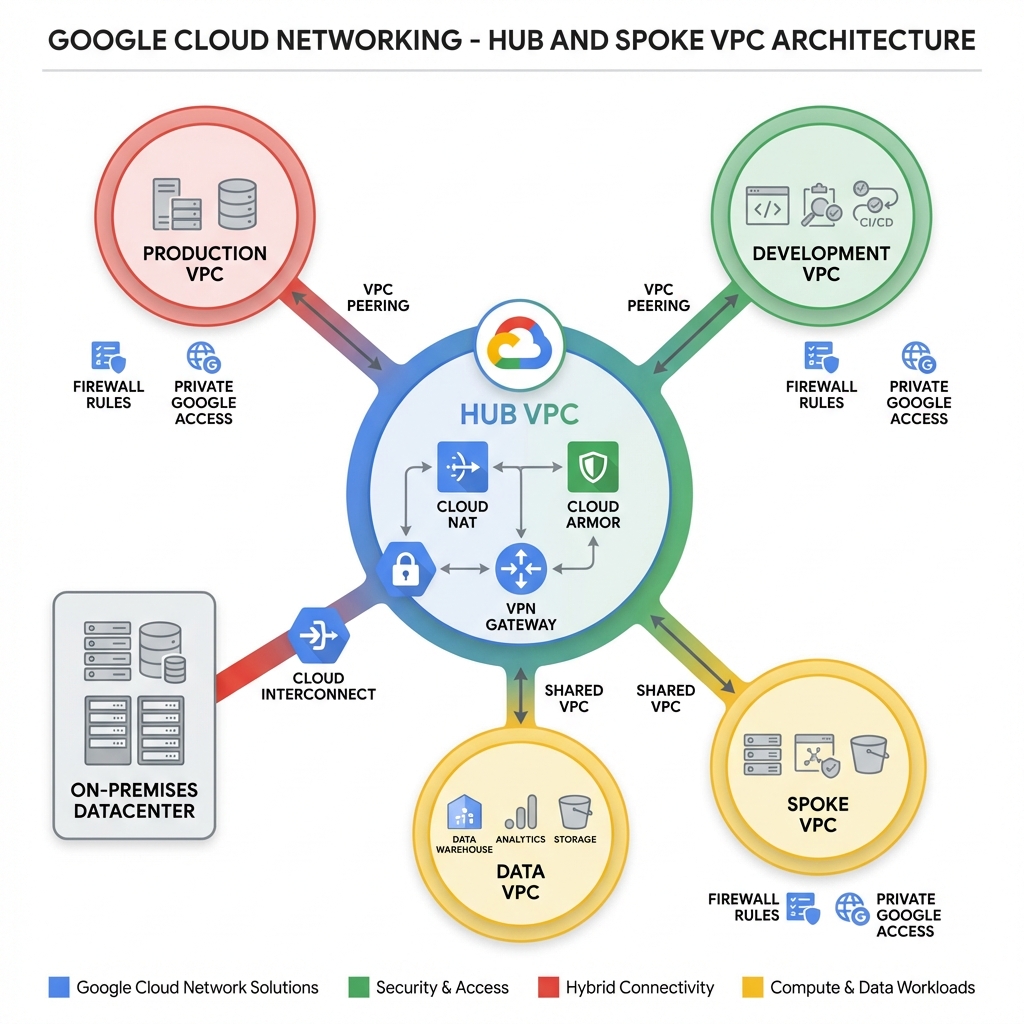
Enterprise GCP deployments typically use a hub-and-spoke network topology. The hub VPC hosts shared services like NAT, DNS, and security controls, while spoke VPCs contain workload-specific resources.
VPC Peering Configuration
VPC Peering connects VPCs for private RFC 1918 communication without traversing the public internet. Peering is non-transitive—if VPC-A peers with VPC-B and VPC-B peers with VPC-C, VPC-A cannot reach VPC-C through VPC-B.
# Terraform: Hub-and-Spoke VPC Configuration

# Hub VPC
resource "google_compute_network" "hub" {
  name                    = "hub-vpc"
  auto_create_subnetworks = false
  project                 = var.hub_project_id
}

resource "google_compute_subnetwork" "hub_subnet" {
  name          = "hub-subnet"
  ip_cidr_range = "10.0.0.0/24"
  region        = "us-central1"
  network       = google_compute_network.hub.id

  secondary_ip_range {
    range_name    = "gke-pods"
    ip_cidr_range = "10.1.0.0/16"
  }

  secondary_ip_range {
    range_name    = "gke-services"
    ip_cidr_range = "10.2.0.0/20"
  }
}

# Production Spoke VPC
resource "google_compute_network" "prod" {
  name                    = "prod-vpc"
  auto_create_subnetworks = false
  project                 = var.prod_project_id
}

# VPC Peering: Hub to Production
resource "google_compute_network_peering" "hub_to_prod" {
  name         = "hub-to-prod"
  network      = google_compute_network.hub.self_link
  peer_network = google_compute_network.prod.self_link

  export_custom_routes = true
  import_custom_routes = true
}

resource "google_compute_network_peering" "prod_to_hub" {
  name         = "prod-to-hub"
  network      = google_compute_network.prod.self_link
  peer_network = google_compute_network.hub.self_link

  export_custom_routes = true
  import_custom_routes = true
}

# Cloud NAT in Hub VPC
resource "google_compute_router" "hub_router" {
  name    = "hub-router"
  region  = "us-central1"
  network = google_compute_network.hub.id
}

resource "google_compute_router_nat" "hub_nat" {
  name                               = "hub-nat"
  router                             = google_compute_router.hub_router.name
  region                             = "us-central1"
  nat_ip_allocate_option             = "AUTO_ONLY"
  source_subnetwork_ip_ranges_to_nat = "ALL_SUBNETWORKS_ALL_IP_RANGES"
}
Cloud SQL Connection Patterns
Connecting to Cloud SQL from GKE requires careful consideration of security and performance. The Cloud SQL Auth Proxy is the recommended approach for secure, IAM-authenticated connections.
# Python: Connecting to Cloud SQL from GKE with SQLAlchemy
import sqlalchemy
from google.cloud.sql.connector import Connector
import os

def get_connection():
    connector = Connector()

    def getconn():
        conn = connector.connect(
            os.environ["INSTANCE_CONNECTION_NAME"],  # project:region:instance
            "pg8000",  # PostgreSQL driver
            user=os.environ["DB_USER"],
            password=os.environ["DB_PASS"],
            db=os.environ["DB_NAME"],
        )
        return conn

    pool = sqlalchemy.create_engine(
        "postgresql+pg8000://",
        creator=getconn,
        pool_size=5,
        max_overflow=2,
        pool_timeout=30,
        pool_recycle=1800,
    )

    return pool

# Usage
engine = get_connection()
with engine.connect() as conn:
    result = conn.execute(sqlalchemy.text("SELECT * FROM users LIMIT 10"))
    users = result.fetchall()
Secret Management Best Practices
Google Secret Manager provides secure, centralized secret storage. Combined with Workload Identity, it eliminates the need to store secrets in environment variables or config files.
# Python: Accessing secrets from Secret Manager
from google.cloud import secretmanager

def access_secret(project_id: str, secret_id: str, version_id: str = "latest") -> str:
    client = secretmanager.SecretManagerServiceClient()
    name = f"projects/{project_id}/secrets/{secret_id}/versions/{version_id}"
    response = client.access_secret_version(request={"name": name})
    return response.payload.data.decode("UTF-8")

# Usage
db_password = access_secret("my-project", "db-password")
api_key = access_secret("my-project", "external-api-key")Use Secret Manager’s automatic rotation feature with Cloud Functions to rotate database passwords automatically. Enable audit logging to track all secret access.
Key Takeaways
- ✅ Organize with hierarchy – Use Organization → Folders → Projects for policy inheritance and billing separation
- ✅ Choose the right compute – Cloud Run for serverless, GKE for containers, Compute Engine for VMs
- ✅ Implement Workload Identity – Eliminate service account keys in GKE workloads
- ✅ Use hub-and-spoke networking – Centralize security controls and simplify hybrid connectivity
- ✅ Secure connections to Cloud SQL – Use Cloud SQL Auth Proxy for encrypted, IAM-authenticated access
- ✅ Centralize secrets – Store all secrets in Secret Manager with proper IAM controls
Conclusion
Google Cloud Platform provides enterprise developers with powerful primitives for building scalable, secure applications. Mastering the resource hierarchy, selecting appropriate compute services, implementing proper networking patterns, and following security best practices are essential for production success. The code examples and architectures in this guide provide a foundation for building world-class applications on GCP.
References
- GCP Enterprise Best Practices
- GKE Workload Identity
- VPC Network Peering
- Connecting GKE to Cloud SQL
- Secret Manager Documentation
Discover more from C4: Container, Code, Cloud & Context
Subscribe to get the latest posts sent to your email.