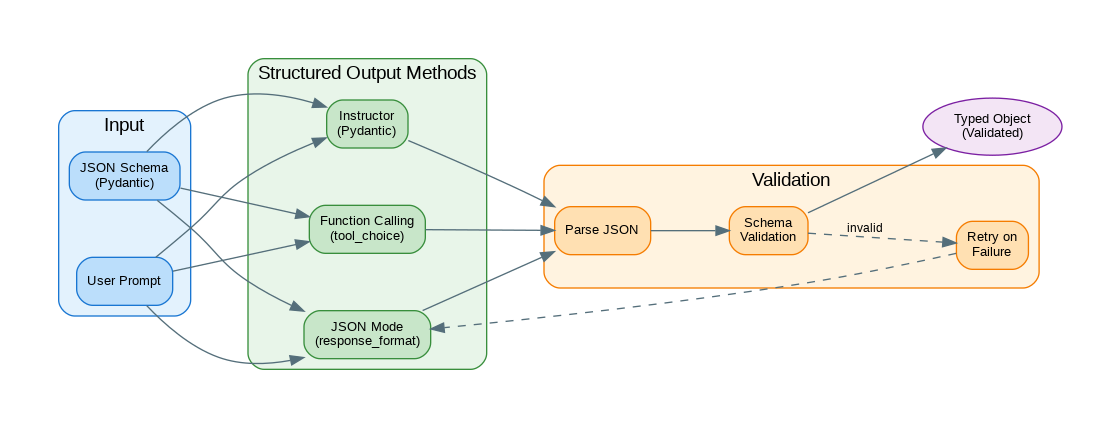
Introduction: Getting LLMs to return structured data instead of free-form text is essential for building reliable applications. Whether you need JSON for API responses, typed objects for downstream processing, or specific formats for data extraction, structured output techniques ensure consistency and parseability. This guide covers the major approaches: JSON mode, function calling, the Instructor library, and custom parsing with validation and retry logic. Each method has trade-offs in terms of reliability, flexibility, and complexity.
Building on Part 1’s foundations, this article covers production-grade patterns for reliable structured extraction.
- Part 1: JSON Mode, Function Calling, and Pydantic fundamentals
- Part 2 (this article): Instructor library, validation patterns, and production services
JSON Mode
JSON mode is the simplest path to structured output—just append “respond in JSON” to your prompt and enable the response_format parameter. While it guarantees valid JSON syntax, it doesn’t validate against a specific schema.
from openai import OpenAI
import json
from typing import Any

client = OpenAI()

def get_json_response(
    prompt: str,
    system_prompt: str = "You are a helpful assistant that responds in JSON format.",
    model: str = "gpt-4o-mini"
) -> dict[str, Any]:
    """Get JSON response using JSON mode."""

    response = client.chat.completions.create(
        model=model,
        messages=[
            {"role": "system", "content": system_prompt},
            {"role": "user", "content": prompt}
        ],
        response_format={"type": "json_object"}
    )

    return json.loads(response.choices[0].message.content)

# Usage
result = get_json_response(
    "Extract the following information from this text: "
    "'John Smith is a 35-year-old software engineer from San Francisco.' "
    "Return name, age, occupation, and city."
)

print(result)
# {"name": "John Smith", "age": 35, "occupation": "software engineer", "city": "San Francisco"}

# With schema guidance in prompt
schema_prompt = """
Extract product information and return JSON with this exact structure:
{
    "product_name": "string",
    "price": number,
    "currency": "string",
    "in_stock": boolean,
    "categories": ["string"]
}

Text: "The new iPhone 15 Pro is available for $999 USD. Currently in stock.
Categories: Electronics, Smartphones, Apple."
"""

product = get_json_response(schema_prompt)
print(json.dumps(product, indent=2))
Function Calling
Function calling provides schema enforcement by defining the exact structure you expect. The model is constrained to produce output matching your JSON schema, dramatically reducing parsing errors.
from openai import OpenAI
from typing import Callable
import json

client = OpenAI()

def extract_with_function_calling(
    text: str,
    function_schema: dict,
    model: str = "gpt-4o-mini"
) -> dict:
    """Extract structured data using function calling."""

    response = client.chat.completions.create(
        model=model,
        messages=[
            {"role": "user", "content": f"Extract information from: {text}"}
        ],
        tools=[{
            "type": "function",
            "function": function_schema
        }],
        tool_choice={"type": "function", "function": {"name": function_schema["name"]}}
    )

    tool_call = response.choices[0].message.tool_calls[0]
    return json.loads(tool_call.function.arguments)

# Define extraction schema
person_schema = {
    "name": "extract_person",
    "description": "Extract person information from text",
    "parameters": {
        "type": "object",
        "properties": {
            "name": {
                "type": "string",
                "description": "Full name of the person"
            },
            "age": {
                "type": "integer",
                "description": "Age in years"
            },
            "occupation": {
                "type": "string",
                "description": "Job title or profession"
            },
            "location": {
                "type": "object",
                "properties": {
                    "city": {"type": "string"},
                    "country": {"type": "string"}
                },
                "required": ["city"]
            },
            "skills": {
                "type": "array",
                "items": {"type": "string"},
                "description": "List of skills or expertise"
            }
        },
        "required": ["name"]
    }
}

# Usage
text = """
Sarah Johnson is a 28-year-old data scientist based in New York, USA.
She specializes in machine learning, Python, and statistical analysis.
"""

person = extract_with_function_calling(text, person_schema)
print(json.dumps(person, indent=2))

# Multiple extraction functions
event_schema = {
    "name": "extract_event",
    "description": "Extract event information",
    "parameters": {
        "type": "object",
        "properties": {
            "event_name": {"type": "string"},
            "date": {"type": "string", "description": "ISO format date"},
            "location": {"type": "string"},
            "attendees": {"type": "integer"},
            "topics": {"type": "array", "items": {"type": "string"}}
        },
        "required": ["event_name", "date"]
    }
}

event_text = """
PyCon 2024 will be held on May 15-23, 2024 in Pittsburgh, PA.
Expected attendance is around 3000 developers. Topics include
AI/ML, web development, and Python core development.
"""

event = extract_with_function_calling(event_text, event_schema)
print(json.dumps(event, indent=2))
Instructor Library
Instructor wraps function calling with Pydantic integration, automatic validation, and intelligent retry logic. It’s the recommended approach for production applications that need reliable structured extraction.
import instructor
from openai import OpenAI
from pydantic import BaseModel, Field, field_validator
from typing import Optional
from enum import Enum

# Patch OpenAI client with Instructor
client = instructor.from_openai(OpenAI())

class Sentiment(str, Enum):
    POSITIVE = "positive"
    NEGATIVE = "negative"
    NEUTRAL = "neutral"

class ReviewAnalysis(BaseModel):
    """Structured review analysis."""

    sentiment: Sentiment
    rating: int = Field(ge=1, le=5, description="Rating from 1-5")
    key_points: list[str] = Field(description="Main points from review")
    recommendation: bool = Field(description="Would recommend")
    confidence: float = Field(ge=0, le=1, description="Confidence score")

    @field_validator("key_points")
    @classmethod
    def validate_key_points(cls, v):
        if len(v) < 1:
            raise ValueError("Must have at least one key point")
        return v

def analyze_review(review_text: str) -> ReviewAnalysis:
    """Analyze a review using Instructor."""

    return client.chat.completions.create(
        model="gpt-4o-mini",
        response_model=ReviewAnalysis,
        messages=[
            {"role": "user", "content": f"Analyze this review:\n\n{review_text}"}
        ]
    )

# Usage
review = """
I've been using this laptop for 3 months now and I'm impressed.
The battery life is excellent, lasting 12+ hours. The keyboard is
comfortable for long typing sessions. However, the webcam quality
is disappointing and the speakers are mediocre. Overall, great
value for the price and I'd recommend it for developers.
"""

analysis = analyze_review(review)
print(f"Sentiment: {analysis.sentiment}")
print(f"Rating: {analysis.rating}/5")
print(f"Key Points: {analysis.key_points}")
print(f"Recommends: {analysis.recommendation}")
print(f"Confidence: {analysis.confidence:.2%}")

# Nested models
class Address(BaseModel):
    street: str
    city: str
    state: Optional[str] = None
    country: str
    postal_code: str

class Company(BaseModel):
    name: str
    industry: str
    founded_year: Optional[int] = None
    headquarters: Address
    employee_count: Optional[int] = None

class Person(BaseModel):
    name: str
    title: str
    company: Company
    email: Optional[str] = None

def extract_person(text: str) -> Person:
    """Extract person with company info."""

    return client.chat.completions.create(
        model="gpt-4o-mini",
        response_model=Person,
        messages=[
            {"role": "user", "content": f"Extract person information:\n\n{text}"}
        ]
    )

bio = """
Jane Doe is the CTO of TechCorp, a software company founded in 2015.
TechCorp is headquartered at 123 Innovation Way, San Francisco, CA 94105, USA.
The company has around 500 employees and focuses on AI solutions.
Jane can be reached at jane.doe@techcorp.com.
"""

person = extract_person(bio)
print(f"Name: {person.name}")
print(f"Title: {person.title}")
print(f"Company: {person.company.name}")
print(f"Location: {person.company.headquarters.city}, {person.company.headquarters.country}")
Validation and Retry Logic
Even with schema enforcement, edge cases occur. Production systems need validation beyond schema matching—semantic validation, constraint checking, and automatic retry with refined prompts when extraction fails.
from pydantic import BaseModel, ValidationError
from typing import TypeVar, Type
import json
import time

T = TypeVar("T", bound=BaseModel)

class StructuredOutputParser:
    """Parse and validate structured output with retries."""

    def __init__(
        self,
        max_retries: int = 3,
        retry_delay: float = 0.5
    ):
        self.client = OpenAI()
        self.max_retries = max_retries
        self.retry_delay = retry_delay

    def parse(
        self,
        prompt: str,
        response_model: Type[T],
        model: str = "gpt-4o-mini"
    ) -> T:
        """Parse response into Pydantic model with retries."""

        schema = response_model.model_json_schema()

        system_prompt = f"""
You must respond with valid JSON that matches this schema:
{json.dumps(schema, indent=2)}

Only output the JSON, no additional text.
"""

        last_error = None

        for attempt in range(self.max_retries):
            try:
                response = self.client.chat.completions.create(
                    model=model,
                    messages=[
                        {"role": "system", "content": system_prompt},
                        {"role": "user", "content": prompt}
                    ],
                    response_format={"type": "json_object"}
                )

                content = response.choices[0].message.content
                data = json.loads(content)

                return response_model.model_validate(data)

            except json.JSONDecodeError as e:
                last_error = f"JSON parse error: {e}"

            except ValidationError as e:
                last_error = f"Validation error: {e}"

                # Add error context for retry
                prompt = f"""
{prompt}

Previous attempt failed with validation error:
{e}

Please fix the output to match the schema exactly.
"""

            if attempt < self.max_retries - 1:
                time.sleep(self.retry_delay)

        raise ValueError(f"Failed after {self.max_retries} attempts. Last error: {last_error}")

    def parse_list(
        self,
        prompt: str,
        item_model: Type[T],
        model: str = "gpt-4o-mini"
    ) -> list[T]:
        """Parse response into list of Pydantic models."""

        # Create wrapper model for list
        class ListWrapper(BaseModel):
            items: list[item_model]

        result = self.parse(prompt, ListWrapper, model)
        return result.items

# Usage
class Task(BaseModel):
    title: str
    priority: str = Field(pattern="^(high|medium|low)$")
    estimated_hours: float = Field(ge=0)
    tags: list[str] = []

parser = StructuredOutputParser(max_retries=3)

tasks = parser.parse_list(
    "Extract tasks from: 'Need to finish the API documentation (high priority, ~4 hours), "
    "fix the login bug (high priority, ~2 hours), and update dependencies (low priority, ~1 hour)'",
    Task
)

for task in tasks:
    print(f"- {task.title} [{task.priority}] - {task.estimated_hours}h")
Custom Output Formats
The following code implements custom output formats. Key aspects include proper error handling and clean separation of concerns.
from abc import ABC, abstractmethod
from typing import Any
import xml.etree.ElementTree as ET
import yaml

class OutputFormatter(ABC):
    """Base class for output formatters."""

    @abstractmethod
    def format_prompt(self, base_prompt: str) -> str:
        """Add format instructions to prompt."""
        pass

    @abstractmethod
    def parse(self, response: str) -> Any:
        """Parse the response."""
        pass

class JSONFormatter(OutputFormatter):
    """JSON output formatter."""

    def __init__(self, schema: dict = None):
        self.schema = schema

    def format_prompt(self, base_prompt: str) -> str:
        schema_str = ""
        if self.schema:
            schema_str = f"\n\nOutput JSON schema:\n{json.dumps(self.schema, indent=2)}"

        return f"{base_prompt}{schema_str}\n\nRespond with valid JSON only."

    def parse(self, response: str) -> dict:
        # Extract JSON from response
        start = response.find("{")
        end = response.rfind("}") + 1

        if start == -1 or end == 0:
            raise ValueError("No JSON object found in response")

        return json.loads(response[start:end])

class XMLFormatter(OutputFormatter):
    """XML output formatter."""

    def __init__(self, root_element: str = "response"):
        self.root_element = root_element

    def format_prompt(self, base_prompt: str) -> str:
        return f"{base_prompt}\n\nRespond with valid XML with root element <{self.root_element}>."

    def parse(self, response: str) -> ET.Element:
        # Extract XML from response
        start = response.find(f"<{self.root_element}")
        end = response.rfind(f"") + len(f"")

        if start == -1 or end <= len(f""):
            raise ValueError("No XML found in response")

        xml_str = response[start:end]
        return ET.fromstring(xml_str)

class YAMLFormatter(OutputFormatter):
    """YAML output formatter."""

    def format_prompt(self, base_prompt: str) -> str:
        return f"{base_prompt}\n\nRespond with valid YAML only, no markdown code blocks."

    def parse(self, response: str) -> dict:
        # Remove markdown code blocks if present
        if "```yaml" in response:
            start = response.find("```yaml") + 7
            end = response.find("```", start)
            response = response[start:end]
        elif "```" in response:
            start = response.find("```") + 3
            end = response.find("```", start)
            response = response[start:end]

        return yaml.safe_load(response.strip())

class FormattedLLM:
    """LLM client with format support."""

    def __init__(self):
        self.client = OpenAI()

    def complete(
        self,
        prompt: str,
        formatter: OutputFormatter,
        model: str = "gpt-4o-mini"
    ) -> Any:
        """Complete with specified output format."""

        formatted_prompt = formatter.format_prompt(prompt)

        response = self.client.chat.completions.create(
            model=model,
            messages=[{"role": "user", "content": formatted_prompt}]
        )

        content = response.choices[0].message.content
        return formatter.parse(content)

# Usage
llm = FormattedLLM()

# JSON output
json_result = llm.complete(
    "List 3 programming languages with their main use cases",
    JSONFormatter(schema={
        "type": "object",
        "properties": {
            "languages": {
                "type": "array",
                "items": {
                    "type": "object",
                    "properties": {
                        "name": {"type": "string"},
                        "use_cases": {"type": "array", "items": {"type": "string"}}
                    }
                }
            }
        }
    })
)

# YAML output
yaml_result = llm.complete(
    "Describe a simple REST API structure for a todo app",
    YAMLFormatter()
)

print(yaml.dump(yaml_result, default_flow_style=False))
Production Structured Output Service
A production-ready structured output service needs caching, monitoring, graceful degradation, and comprehensive error handling. The following implementation demonstrates these patterns.
from fastapi import FastAPI, HTTPException
from pydantic import BaseModel, Field, create_model
from typing import Any, Optional
import instructor

app = FastAPI()
client = instructor.from_openai(OpenAI())

class ExtractionRequest(BaseModel):
    text: str
    schema_definition: dict = Field(description="JSON Schema for extraction")
    model: str = "gpt-4o-mini"

class ExtractionResponse(BaseModel):
    data: dict
    model_used: str
    tokens_used: int

def create_dynamic_model(schema: dict) -> type[BaseModel]:
    """Create Pydantic model from JSON schema."""

    fields = {}

    for name, prop in schema.get("properties", {}).items():
        field_type = str  # default

        if prop.get("type") == "integer":
            field_type = int
        elif prop.get("type") == "number":
            field_type = float
        elif prop.get("type") == "boolean":
            field_type = bool
        elif prop.get("type") == "array":
            field_type = list
        elif prop.get("type") == "object":
            field_type = dict

        required = name in schema.get("required", [])

        if required:
            fields[name] = (field_type, ...)
        else:
            fields[name] = (Optional[field_type], None)

    return create_model("DynamicModel", **fields)

@app.post("/extract", response_model=ExtractionResponse)
async def extract_structured(request: ExtractionRequest):
    """Extract structured data from text."""

    try:
        DynamicModel = create_dynamic_model(request.schema_definition)

        result = client.chat.completions.create(
            model=request.model,
            response_model=DynamicModel,
            messages=[
                {"role": "user", "content": f"Extract from:\n\n{request.text}"}
            ]
        )

        return ExtractionResponse(
            data=result.model_dump(),
            model_used=request.model,
            tokens_used=0  # Would need to track from response
        )

    except Exception as e:
        raise HTTPException(status_code=400, detail=str(e))

# Predefined extraction endpoints
class PersonExtract(BaseModel):
    name: str
    email: Optional[str] = None
    phone: Optional[str] = None
    company: Optional[str] = None
    title: Optional[str] = None

class EventExtract(BaseModel):
    name: str
    date: str
    location: Optional[str] = None
    description: Optional[str] = None

@app.post("/extract/person", response_model=PersonExtract)
async def extract_person(text: str):
    """Extract person information."""

    return client.chat.completions.create(
        model="gpt-4o-mini",
        response_model=PersonExtract,
        messages=[{"role": "user", "content": f"Extract person info:\n\n{text}"}]
    )

@app.post("/extract/event", response_model=EventExtract)
async def extract_event(text: str):
    """Extract event information."""

    return client.chat.completions.create(
        model="gpt-4o-mini",
        response_model=EventExtract,
        messages=[{"role": "user", "content": f"Extract event info:\n\n{text}"}]
    )
References
- OpenAI JSON Mode: https://platform.openai.com/docs/guides/text-generation/json-mode
- OpenAI Function Calling: https://platform.openai.com/docs/guides/function-calling
- Instructor Library: https://python.useinstructor.com/
- Pydantic: https://docs.pydantic.dev/
Conclusion
Structured output is fundamental for building reliable LLM applications. JSON mode provides the simplest approach for basic JSON responses. Function calling offers more control with explicit schemas and is well-suited for tool use patterns. The Instructor library combines the best of both with Pydantic integration, automatic retries, and type safety. For production systems, implement validation with retry logic to handle edge cases where the LLM doesn’t perfectly follow the schema. Choose your approach based on complexity needs: JSON mode for simple extractions, function calling for tool-based architectures, and Instructor for type-safe applications with complex nested schemas.
Key Takeaways
- ✅ Start with JSON mode for simple use cases where schema validation isn’t critical
- ✅ Use function calling when you need schema enforcement and structured extraction
- ✅ Adopt Instructor/Pydantic for production applications requiring validation and retries
- ✅ Implement retry logic with refined prompts for handling extraction failures
- ✅ Add semantic validation beyond schema matching for business-critical data
Conclusion
Structured output transforms LLMs from conversational tools into reliable data extraction engines. The progression from JSON mode through function calling to Instructor represents increasing levels of reliability and developer experience. Choose the approach that matches your needs—simple JSON mode for prototypes, full Instructor integration for production.
References
- OpenAI Structured Outputs Guide – Official documentation
- Instructor Library Documentation – Pydantic + LLM integration
- Pydantic Documentation – Python data validation
- Structured Output Generation – Related article on reliable JSON
Discover more from C4: Container, Code, Cloud & Context
Subscribe to get the latest posts sent to your email.