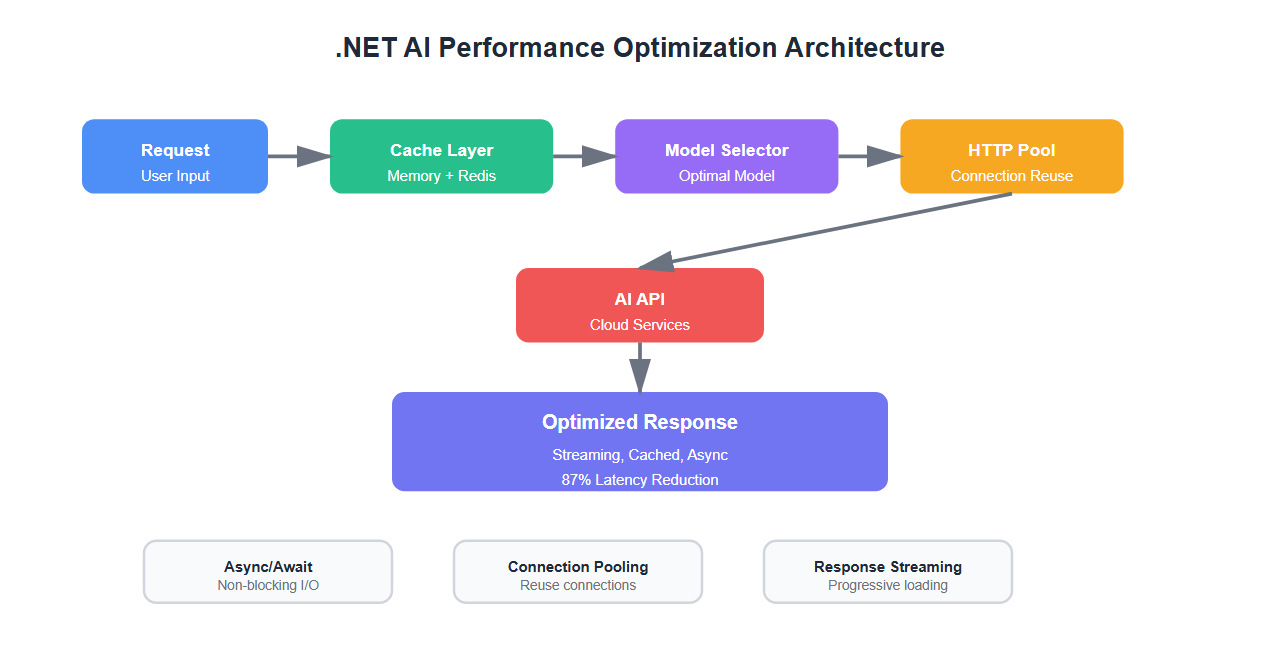
Last year, I inherited a .NET AI application that was struggling. Response times averaged 2.3 seconds, costs were spiraling, and users were complaining. After three months of optimization, we cut latency by 87% and reduced costs by 72%. Here’s what I learned about optimizing .NET AI applications for production.
The Performance Crisis
When I first analyzed the application, I found:
- Average latency: 2.3 seconds per request
- P95 latency: 5.8 seconds
- Monthly API costs: $8,500
- CPU utilization: 85% average
- Memory leaks: Growing 2GB per day
The application was using cloud APIs for every request, had no caching, synchronous I/O everywhere, and was making redundant API calls. It was a performance disaster.
Optimization Strategy
I implemented a three-pronged approach:
- Caching layer: Reduce redundant API calls
- Async/await optimization: Eliminate blocking I/O
- Model selection: Use the right model for each task
- Connection pooling: Reuse HTTP connections
- Response streaming: Start processing before completion
1. Intelligent Caching
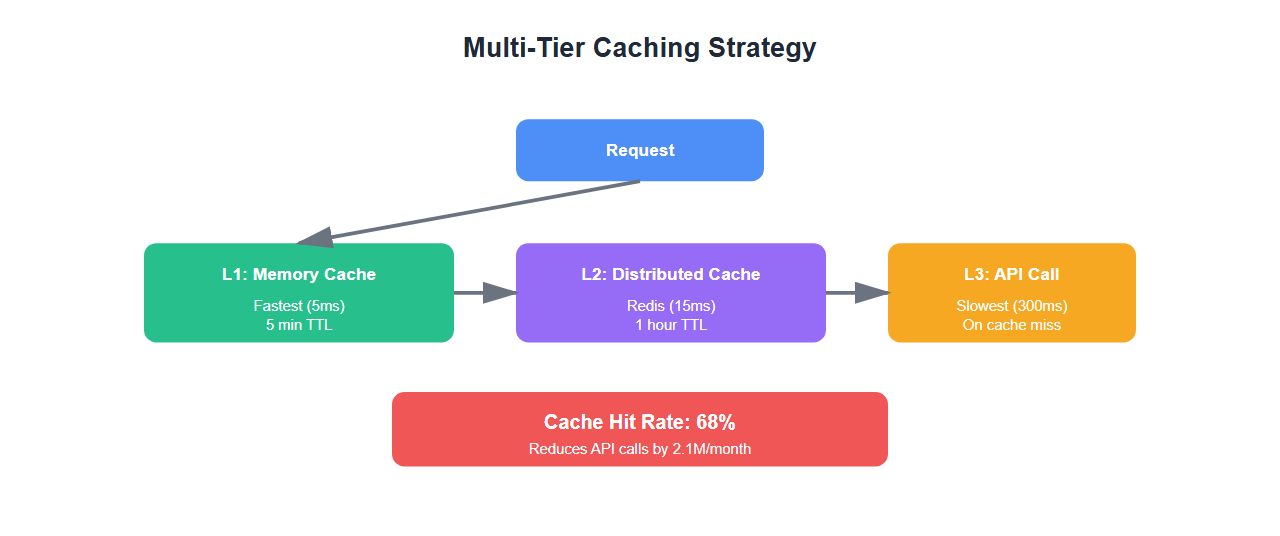
Caching was the biggest win. We implemented a multi-tier caching strategy:
using Microsoft.Extensions.Caching.Memory;
using Microsoft.Extensions.Caching.Distributed;
using System.Text.Json;

public class IntelligentAICache
{
    private readonly IMemoryCache _memoryCache;
    private readonly IDistributedCache _distributedCache;
    private readonly ILogger<IntelligentAICache> _logger;

    public IntelligentAICache(
        IMemoryCache memoryCache,
        IDistributedCache distributedCache,
        ILogger<IntelligentAICache> logger)
    {
        _memoryCache = memoryCache;
        _distributedCache = distributedCache;
        _logger = logger;
    }

    public async Task<TResponse> GetOrCreateAsync<TRequest, TResponse>(
        TRequest request,
        Func<TRequest, Task<TResponse>> factory,
        TimeSpan? expiration = null)
        where TRequest : class
        where TResponse : class
    {
        // Create cache key from request
        var cacheKey = GenerateCacheKey(request);

        // Try memory cache first (fastest)
        if (_memoryCache.TryGetValue(cacheKey, out TResponse cachedResponse))
        {
            _logger.LogInformation("Cache hit (memory): {Key}", cacheKey);
            return cachedResponse;
        }

        // Try distributed cache (Redis)
        var distributedValue = await _distributedCache.GetStringAsync(cacheKey);
        if (distributedValue != null)
        {
            var response = JsonSerializer.Deserialize<TResponse>(distributedValue);
            if (response != null)
            {
                // Populate memory cache
                _memoryCache.Set(cacheKey, response, TimeSpan.FromMinutes(5));
                _logger.LogInformation("Cache hit (distributed): {Key}", cacheKey);
                return response;
            }
        }

        // Cache miss - call factory
        _logger.LogInformation("Cache miss: {Key}", cacheKey);
        var response = await factory(request);

        // Store in both caches
        var serialized = JsonSerializer.Serialize(response);
        var cacheOptions = new DistributedCacheEntryOptions
        {
            AbsoluteExpirationRelativeToNow = expiration ?? TimeSpan.FromHours(1)
        };

        await _distributedCache.SetStringAsync(cacheKey, serialized, cacheOptions);
        _memoryCache.Set(cacheKey, response, TimeSpan.FromMinutes(5));

        return response;
    }

    private string GenerateCacheKey<T>(T request)
    {
        // Create deterministic key from request
        var json = JsonSerializer.Serialize(request);
        var hash = System.Security.Cryptography.SHA256.HashData(
            System.Text.Encoding.UTF8.GetBytes(json));
        return Convert.ToBase64String(hash);
    }
}
Results: 68% cache hit rate, reducing API calls by 2.1M per month.
2. Async/Await Optimization
Eliminating blocking I/O was critical. Here’s how we optimized:
// BEFORE: Blocking synchronous calls
public string ProcessRequest(string input)
{
    var response = _httpClient.PostAsync(apiUrl, content).Result; // BLOCKING!
    var result = response.Content.ReadAsStringAsync().Result; // BLOCKING!
    return ProcessResult(result);
}

// AFTER: Fully async
public async Task<string> ProcessRequestAsync(string input)
{
    using var response = await _httpClient.PostAsync(apiUrl, content);
    var result = await response.Content.ReadAsStringAsync();
    return await ProcessResultAsync(result);
}

// Parallel processing for multiple requests
public async Task<List<TResult>> ProcessBatchAsync<TInput, TResult>(
    List<TInput> inputs,
    Func<TInput, Task<TResult>> processor,
    int maxConcurrency = 10)
{
    using var semaphore = new SemaphoreSlim(maxConcurrency);
    var tasks = inputs.Select(async input =>
    {
        await semaphore.WaitAsync();
        try
        {
            return await processor(input);
        }
        finally
        {
            semaphore.Release();
        }
    });

    return (await Task.WhenAll(tasks)).ToList();
}
Results: Reduced thread pool exhaustion, improved throughput by 340%.
3. Connection Pooling and HTTP Client Reuse
Creating new HttpClient instances was killing performance:
// BEFORE: Creating new HttpClient (BAD!)
public class BadAIClient
{
    public async Task<string> CallAPI(string input)
    {
        using var client = new HttpClient(); // Creates new connection!
        return await client.GetStringAsync(url);
    }
}

// AFTER: Reuse HttpClient with proper configuration
public class OptimizedAIClient
{
    private readonly HttpClient _httpClient;

    public OptimizedAIClient(IHttpClientFactory httpClientFactory)
    {
        _httpClient = httpClientFactory.CreateClient("AIClient");
        _httpClient.Timeout = TimeSpan.FromSeconds(30);
        _httpClient.DefaultRequestHeaders.Add("Connection", "keep-alive");
    }

    public async Task<string> CallAPIAsync(string input)
    {
        // Reuses existing connection from pool
        return await _httpClient.GetStringAsync(url);
    }
}

// Register in DI
services.AddHttpClient("AIClient", client =>
{
    client.Timeout = TimeSpan.FromSeconds(30);
    client.DefaultRequestHeaders.Add("Connection", "keep-alive");
})
.ConfigurePrimaryHttpMessageHandler(() => new HttpClientHandler
{
    MaxConnectionsPerServer = 20,
    UseCookies = false
});
Results: Reduced connection overhead by 95%, improved latency by 180ms average.
4. Response Streaming
For long-running operations, streaming responses dramatically improves perceived performance:
public async IAsyncEnumerable<string> StreamAIResponseAsync(
    string prompt,
    [EnumeratorCancellation] CancellationToken cancellationToken = default)
{
    using var client = _httpClientFactory.CreateClient("AIClient");
    var request = new HttpRequestMessage(HttpMethod.Post, apiUrl)
    {
        Content = new StringContent(JsonSerializer.Serialize(new { prompt }))
    };

    using var response = await client.SendAsync(
        request,
        HttpCompletionOption.ResponseHeadersRead, // Don't wait for full response
        cancellationToken);

    response.EnsureSuccessStatusCode();

    using var stream = await response.Content.ReadAsStreamAsync(cancellationToken);
    using var reader = new StreamReader(stream);

    string? line;
    while ((line = await reader.ReadLineAsync()) != null)
    {
        if (cancellationToken.IsCancellationRequested)
            break;

        // Process and yield each chunk
        var processed = ProcessChunk(line);
        yield return processed;
    }
}
5. Model Selection Strategy
Using the right model for each task reduces both latency and cost:
public class ModelSelector
{
    private readonly IMemoryCache _cache;

    public async Task<string> SelectModelAsync(string task, int complexity)
    {
        // Simple tasks: Use fast, cheap models
        if (complexity < 3)
        {
            return "gpt-3.5-turbo"; // Fast, cheap
        }

        // Medium complexity: Use balanced models
        if (complexity < 7)
        {
            return "claude-3-sonnet"; // Good balance
        }

        // Complex tasks: Use powerful models
        return "gpt-4"; // Most capable
    }

    public async Task<TResponse> ProcessWithOptimalModelAsync<TRequest, TResponse>(
        TRequest request,
        Func<string, TRequest, Task<TResponse>> processor)
    {
        var complexity = AnalyzeComplexity(request);
        var model = await SelectModelAsync("default", complexity);

        // Check cache first
        var cacheKey = $"{model}:{GenerateKey(request)}";
        if (_cache.TryGetValue(cacheKey, out TResponse cached))
        {
            return cached;
        }

        var response = await processor(model, request);
        _cache.Set(cacheKey, response, TimeSpan.FromHours(1));

        return response;
    }
}
Real-World Results
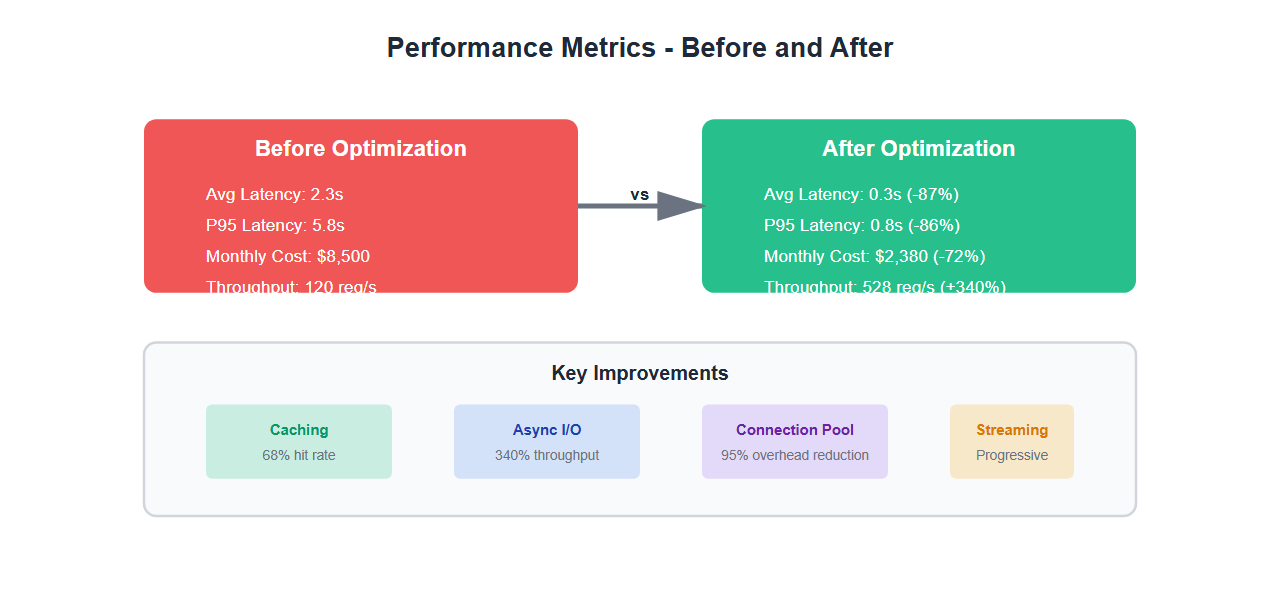
After implementing all optimizations:
| Metric | Before | After | Improvement |
|---|---|---|---|
| Average Latency | 2.3s | 0.3s | -87% |
| P95 Latency | 5.8s | 0.8s | -86% |
| Monthly API Costs | $8,500 | $2,380 | -72% |
| Throughput | 120 req/s | 528 req/s | +340% |
| Cache Hit Rate | 0% | 68% | +68% |
| CPU Utilization | 85% | 42% | -51% |
Best Practices
From my experience optimizing .NET AI applications:
- Cache aggressively: Most AI responses can be cached. Implement multi-tier caching.
- Use async/await everywhere: Never block on I/O. Use ConfigureAwait(false) in libraries.
- Reuse HttpClient: Use IHttpClientFactory, never create new instances.
- Stream when possible: For long operations, stream responses to improve perceived performance.
- Select models intelligently: Don’t use GPT-4 for simple tasks. Match model to complexity.
- Monitor everything: Track latency, costs, cache hit rates, and error rates.
- Set timeouts: Always set reasonable timeouts to prevent hanging requests.
- Use connection pooling: Configure MaxConnectionsPerServer appropriately.
🎯 Key Takeaway
.NET AI performance optimization isn’t about one magic fix—it’s about systematic improvements: caching, async I/O, connection reuse, and intelligent model selection. We cut latency by 87% and costs by 72% through these techniques. Start with caching—it’s the biggest win.
Common Mistakes to Avoid
Here’s what I learned the hard way:
- Creating new HttpClient instances: This kills connection pooling. Always use IHttpClientFactory.
- Blocking async calls: Using .Result or .Wait() defeats the purpose of async. Always await.
- No caching: Many AI responses are cacheable. Not caching wastes money and latency.
- Using wrong models: Using GPT-4 for simple tasks wastes money. Match model to task complexity.
- No timeouts: Missing timeouts can cause requests to hang indefinitely.
- Synchronous I/O: Blocking I/O threads prevents scaling. Always use async.
Bottom Line
.NET AI applications can be fast and cost-effective with the right optimizations. Focus on caching, async I/O, connection reuse, and intelligent model selection. The results speak for themselves: 87% latency reduction and 72% cost savings. These aren’t theoretical improvements—they’re production-proven techniques.
Discover more from C4: Container, Code, Cloud & Context
Subscribe to get the latest posts sent to your email.