Introduction: Documents are everywhere—PDFs, Word files, scanned images, spreadsheets. Extracting structured information from unstructured documents is one of the most valuable LLM applications. This guide covers building document processing pipelines: extracting text from various formats, chunking strategies for long documents, processing with LLMs for extraction and summarization, and handling edge cases like tables, images, and multi-column layouts. These patterns apply to invoice processing, contract analysis, research paper summarization, and any workflow involving document understanding.
- Part 1 (this article): From PDFs to structured data
- Part 2: Enterprise parsing, chunking, and extraction
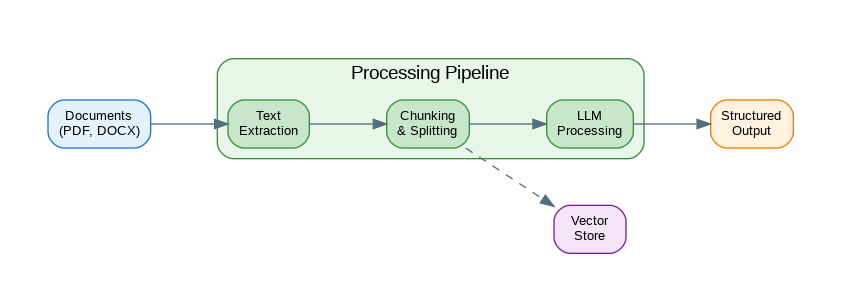
Document Processing Pipeline
Document processing involves multiple stages from raw input to structured output. This diagram shows the complete pipeline architecture.
flowchart TB
    subgraph Input["Document Input"]
        PDF[PDF Files]
        DOC[Word Docs]
        IMG[Scanned Images]
    end

    subgraph Parsing["Parsing Layer"]
        OCR[OCR Engine]
        PP[PDF Parser]
        TXT[Text Extractor]
    end

    subgraph Processing["Processing Layer"]
        CK[Chunker]
        EMB[Embedder]
        MD[Metadata Extractor]
    end

    subgraph LLM["LLM Extraction"]
        SE[Schema Extractor]
        QA[Q&A Engine]
        SUM[Summarizer]
    end

    subgraph Output["Structured Output"]
        JSON[JSON Data]
        VDB[(Vector Store)]
        DB[(Database)]
    end

    PDF --> PP
    DOC --> TXT
    IMG --> OCR
    PP --> CK
    TXT --> CK
    OCR --> CK
    CK --> EMB
    CK --> MD
    EMB --> VDB
    MD --> SE
    SE --> JSON
    CK --> QA
    CK --> SUM
    JSON --> DB

    style PDF fill:#E3F2FD,stroke:#90CAF9,stroke-width:2px,color:#1565C0
    style DOC fill:#E3F2FD,stroke:#90CAF9,stroke-width:2px,color:#1565C0
    style IMG fill:#E3F2FD,stroke:#90CAF9,stroke-width:2px,color:#1565C0
    style OCR fill:#F3E5F5,stroke:#CE93D8,stroke-width:2px,color:#6A1B9A
    style PP fill:#F3E5F5,stroke:#CE93D8,stroke-width:2px,color:#6A1B9A
    style TXT fill:#F3E5F5,stroke:#CE93D8,stroke-width:2px,color:#6A1B9A
    style CK fill:#E8F5E9,stroke:#A5D6A7,stroke-width:2px,color:#2E7D32
    style EMB fill:#E8F5E9,stroke:#A5D6A7,stroke-width:2px,color:#2E7D32
    style MD fill:#E8F5E9,stroke:#A5D6A7,stroke-width:2px,color:#2E7D32
    style SE fill:#FFF3E0,stroke:#FFCC80,stroke-width:2px,color:#E65100
    style QA fill:#FFF3E0,stroke:#FFCC80,stroke-width:2px,color:#E65100
    style SUM fill:#FFF3E0,stroke:#FFCC80,stroke-width:2px,color:#E65100
    style JSON fill:#E0F2F1,stroke:#80CBC4,stroke-width:2px,color:#00695C
    style VDB fill:#ECEFF1,stroke:#90A4AE,stroke-width:2px,color:#455A64
    style DB fill:#ECEFF1,stroke:#90A4AE,stroke-width:2px,color:#455A64
Figure 1: C4 Container Diagram – Document Processing Pipeline
Text Extraction
Parsing transforms raw input into structured data. This implementation handles common edge cases and malformed inputs gracefully.
# pip install pypdf python-docx openpyxl

from pathlib import Path
from typing import Union
import io

def extract_from_pdf(file_path: Union[str, Path]) -> str:
    """Extract text from PDF."""

    from pypdf import PdfReader

    reader = PdfReader(file_path)

    text_parts = []
    for page in reader.pages:
        text = page.extract_text()
        if text:
            text_parts.append(text)

    return "\n\n".join(text_parts)

def extract_from_docx(file_path: Union[str, Path]) -> str:
    """Extract text from Word document."""

    from docx import Document

    doc = Document(file_path)

    text_parts = []
    for para in doc.paragraphs:
        if para.text.strip():
            text_parts.append(para.text)

    # Also extract from tables
    for table in doc.tables:
        for row in table.rows:
            row_text = " | ".join(cell.text for cell in row.cells)
            if row_text.strip():
                text_parts.append(row_text)

    return "\n\n".join(text_parts)

def extract_from_xlsx(file_path: Union[str, Path]) -> str:
    """Extract text from Excel spreadsheet."""

    from openpyxl import load_workbook

    wb = load_workbook(file_path, data_only=True)

    text_parts = []
    for sheet_name in wb.sheetnames:
        sheet = wb[sheet_name]
        text_parts.append(f"Sheet: {sheet_name}")

        for row in sheet.iter_rows(values_only=True):
            row_text = " | ".join(str(cell) if cell else "" for cell in row)
            if row_text.strip(" |"):
                text_parts.append(row_text)

    return "\n\n".join(text_parts)

def extract_text(file_path: Union[str, Path]) -> str:
    """Extract text from any supported document type."""

    path = Path(file_path)
    suffix = path.suffix.lower()

    extractors = {
        ".pdf": extract_from_pdf,
        ".docx": extract_from_docx,
        ".xlsx": extract_from_xlsx,
        ".txt": lambda p: Path(p).read_text(),
        ".md": lambda p: Path(p).read_text(),
    }

    if suffix not in extractors:
        raise ValueError(f"Unsupported file type: {suffix}")

    return extractors[suffix](path)

# Usage
text = extract_text("contract.pdf")
print(f"Extracted {len(text)} characters")
Smart Chunking
Chunking splits documents into manageable pieces while preserving context. The strategy you choose significantly impacts retrieval quality.
from dataclasses import dataclass
from typing import Iterator
import re

@dataclass
class Chunk:
    text: str
    index: int
    metadata: dict

class DocumentChunker:
    """Split documents into processable chunks."""

    def __init__(
        self,
        chunk_size: int = 1000,
        chunk_overlap: int = 200,
        separators: list[str] = None
    ):
        self.chunk_size = chunk_size
        self.chunk_overlap = chunk_overlap
        self.separators = separators or ["\n\n", "\n", ". ", " "]

    def chunk_by_size(self, text: str) -> Iterator[Chunk]:
        """Simple size-based chunking with overlap."""

        start = 0
        index = 0

        while start < len(text):
            end = start + self.chunk_size

            # Try to break at a natural boundary
            if end < len(text):
                for sep in self.separators:
                    last_sep = text.rfind(sep, start, end)
                    if last_sep > start:
                        end = last_sep + len(sep)
                        break

            chunk_text = text[start:end].strip()

            if chunk_text:
                yield Chunk(
                    text=chunk_text,
                    index=index,
                    metadata={"start": start, "end": end}
                )
                index += 1

            start = end - self.chunk_overlap

    def chunk_by_sections(self, text: str) -> Iterator[Chunk]:
        """Chunk by document sections (headers)."""

        # Split by markdown-style headers
        pattern = r'(^#{1,3}\s+.+$)'
        parts = re.split(pattern, text, flags=re.MULTILINE)

        current_header = ""
        current_content = []
        index = 0

        for part in parts:
            if re.match(r'^#{1,3}\s+', part):
                # This is a header
                if current_content:
                    yield Chunk(
                        text="\n".join(current_content),
                        index=index,
                        metadata={"header": current_header}
                    )
                    index += 1

                current_header = part.strip()
                current_content = [current_header]
            else:
                current_content.append(part.strip())

        # Don't forget the last section
        if current_content:
            yield Chunk(
                text="\n".join(current_content),
                index=index,
                metadata={"header": current_header}
            )

    def chunk_semantic(self, text: str) -> Iterator[Chunk]:
        """Chunk by semantic similarity (paragraph grouping)."""

        paragraphs = [p.strip() for p in text.split("\n\n") if p.strip()]

        current_chunk = []
        current_size = 0
        index = 0

        for para in paragraphs:
            para_size = len(para)

            if current_size + para_size > self.chunk_size and current_chunk:
                yield Chunk(
                    text="\n\n".join(current_chunk),
                    index=index,
                    metadata={"paragraphs": len(current_chunk)}
                )
                index += 1

                # Keep last paragraph for context
                current_chunk = [current_chunk[-1]] if current_chunk else []
                current_size = len(current_chunk[0]) if current_chunk else 0

            current_chunk.append(para)
            current_size += para_size

        if current_chunk:
            yield Chunk(
                text="\n\n".join(current_chunk),
                index=index,
                metadata={"paragraphs": len(current_chunk)}
            )

# Usage
chunker = DocumentChunker(chunk_size=1500, chunk_overlap=200)

text = extract_text("long_document.pdf")
chunks = list(chunker.chunk_by_size(text))

print(f"Split into {len(chunks)} chunks")
LLM Document Processing
The following code implements llm document processing. Key aspects include proper error handling and clean separation of concerns.
from openai import OpenAI
from pydantic import BaseModel
from typing import Optional
import json

client = OpenAI()

class ExtractedEntity(BaseModel):
    name: str
    type: str
    value: str
    confidence: float

class DocumentSummary(BaseModel):
    title: str
    summary: str
    key_points: list[str]
    entities: list[ExtractedEntity]

def summarize_document(text: str, max_length: int = 500) -> str:
    """Summarize a document."""

    response = client.chat.completions.create(
        model="gpt-4o",
        messages=[
            {
                "role": "system",
                "content": f"Summarize documents concisely in under {max_length} words."
            },
            {
                "role": "user",
                "content": f"Summarize this document:\n\n{text[:10000]}"
            }
        ]
    )

    return response.choices[0].message.content

def extract_entities(text: str, entity_types: list[str]) -> list[ExtractedEntity]:
    """Extract specific entities from text."""

    response = client.chat.completions.create(
        model="gpt-4o",
        messages=[
            {
                "role": "system",
                "content": f"""Extract entities of these types: {', '.join(entity_types)}.
Return as JSON array: [{{"name": "...", "type": "...", "value": "...", "confidence": 0.0-1.0}}]"""
            },
            {
                "role": "user",
                "content": text[:8000]
            }
        ],
        response_format={"type": "json_object"}
    )

    data = json.loads(response.choices[0].message.content)
    entities = data.get("entities", data) if isinstance(data, dict) else data

    return [ExtractedEntity(**e) for e in entities]

def process_document_chunks(
    chunks: list[Chunk],
    processor: callable,
    combine: callable = None
) -> any:
    """Process document chunks and optionally combine results."""

    results = []

    for chunk in chunks:
        result = processor(chunk.text)
        results.append({
            "chunk_index": chunk.index,
            "result": result,
            "metadata": chunk.metadata
        })

    if combine:
        return combine(results)

    return results

# Usage
text = extract_text("research_paper.pdf")
chunks = list(DocumentChunker(chunk_size=2000).chunk_by_size(text))

# Summarize each chunk
chunk_summaries = process_document_chunks(
    chunks,
    processor=lambda t: summarize_document(t, max_length=100)
)

# Combine into final summary
all_summaries = "\n\n".join(r["result"] for r in chunk_summaries)
final_summary = summarize_document(all_summaries, max_length=300)

print(final_summary)
Invoice Processing
The following code implements invoice processing. Key aspects include proper error handling and clean separation of concerns.
from pydantic import BaseModel
from typing import Optional
from datetime import date

class LineItem(BaseModel):
    description: str
    quantity: float
    unit_price: float
    total: float

class Invoice(BaseModel):
    invoice_number: str
    invoice_date: Optional[str]
    due_date: Optional[str]
    vendor_name: str
    vendor_address: Optional[str]
    customer_name: Optional[str]
    line_items: list[LineItem]
    subtotal: float
    tax: Optional[float]
    total: float
    currency: str = "USD"

def extract_invoice(text: str) -> Invoice:
    """Extract structured invoice data from text."""

    response = client.chat.completions.create(
        model="gpt-4o",
        messages=[
            {
                "role": "system",
                "content": """Extract invoice information into structured JSON.
Include: invoice_number, invoice_date, due_date, vendor_name, vendor_address,
customer_name, line_items (description, quantity, unit_price, total),
subtotal, tax, total, currency.
Use null for missing fields. Dates in YYYY-MM-DD format."""
            },
            {
                "role": "user",
                "content": f"Extract invoice data:\n\n{text}"
            }
        ],
        response_format={"type": "json_object"}
    )

    data = json.loads(response.choices[0].message.content)
    return Invoice(**data)

def process_invoice_batch(file_paths: list[str]) -> list[dict]:
    """Process multiple invoices."""

    results = []

    for path in file_paths:
        try:
            text = extract_text(path)
            invoice = extract_invoice(text)

            results.append({
                "file": path,
                "status": "success",
                "invoice": invoice.model_dump()
            })
        except Exception as e:
            results.append({
                "file": path,
                "status": "error",
                "error": str(e)
            })

    return results

# Usage
invoice_files = ["invoice1.pdf", "invoice2.pdf", "invoice3.pdf"]
results = process_invoice_batch(invoice_files)

# Export to CSV
import csv

with open("invoices.csv", "w", newline="") as f:
    writer = csv.DictWriter(f, fieldnames=[
        "file", "invoice_number", "vendor_name", "total", "currency"
    ])
    writer.writeheader()

    for r in results:
        if r["status"] == "success":
            inv = r["invoice"]
            writer.writerow({
                "file": r["file"],
                "invoice_number": inv["invoice_number"],
                "vendor_name": inv["vendor_name"],
                "total": inv["total"],
                "currency": inv["currency"]
            })
Contract Analysis
The following code implements contract analysis. Key aspects include proper error handling and clean separation of concerns.
from pydantic import BaseModel
from enum import Enum

class RiskLevel(str, Enum):
    LOW = "low"
    MEDIUM = "medium"
    HIGH = "high"

class ContractClause(BaseModel):
    clause_type: str
    text: str
    risk_level: RiskLevel
    summary: str
    recommendations: list[str]

class ContractAnalysis(BaseModel):
    contract_type: str
    parties: list[str]
    effective_date: Optional[str]
    termination_date: Optional[str]
    key_terms: list[str]
    obligations: list[str]
    risky_clauses: list[ContractClause]
    overall_risk: RiskLevel
    summary: str

def analyze_contract(text: str) -> ContractAnalysis:
    """Analyze a contract for key terms and risks."""

    response = client.chat.completions.create(
        model="gpt-4o",
        messages=[
            {
                "role": "system",
                "content": """You are a legal contract analyst. Analyze contracts for:
1. Contract type and parties
2. Key dates (effective, termination)
3. Key terms and obligations
4. Risky clauses with risk levels (low/medium/high)
5. Overall risk assessment
6. Summary and recommendations

Return structured JSON matching the ContractAnalysis schema."""
            },
            {
                "role": "user",
                "content": f"Analyze this contract:\n\n{text[:15000]}"
            }
        ],
        response_format={"type": "json_object"}
    )

    data = json.loads(response.choices[0].message.content)
    return ContractAnalysis(**data)

def compare_contracts(contract1: str, contract2: str) -> dict:
    """Compare two contracts for differences."""

    response = client.chat.completions.create(
        model="gpt-4o",
        messages=[
            {
                "role": "system",
                "content": """Compare two contracts and identify:
1. Key differences in terms
2. Added/removed clauses
3. Changed obligations
4. Risk implications of differences"""
            },
            {
                "role": "user",
                "content": f"""Contract 1:
{contract1[:7000]}

Contract 2:
{contract2[:7000]}

Compare these contracts:"""
            }
        ],
        response_format={"type": "json_object"}
    )

    return json.loads(response.choices[0].message.content)

# Usage
contract_text = extract_text("service_agreement.pdf")
analysis = analyze_contract(contract_text)

print(f"Contract Type: {analysis.contract_type}")
print(f"Parties: {', '.join(analysis.parties)}")
print(f"Overall Risk: {analysis.overall_risk}")

for clause in analysis.risky_clauses:
    if clause.risk_level == RiskLevel.HIGH:
        print(f"\nHIGH RISK: {clause.clause_type}")
        print(f"  {clause.summary}")
        for rec in clause.recommendations:
            print(f"  - {rec}")
References
- pypdf: https://pypdf.readthedocs.io/
- python-docx: https://python-docx.readthedocs.io/
- Unstructured: https://unstructured.io/
- LangChain Document Loaders: https://python.langchain.com/docs/modules/data_connection/document_loaders/
Conclusion
Document processing with LLMs unlocks value from unstructured data at scale. Start with reliable text extraction—pypdf for PDFs, python-docx for Word files. Implement smart chunking that respects document structure rather than arbitrary character limits. Use structured output (JSON mode) for reliable entity extraction. Build specialized processors for common document types like invoices and contracts. For production systems, add error handling, validation, and human review workflows for high-stakes decisions. The combination of traditional document parsing and LLM understanding creates powerful automation for document-heavy workflows that previously required manual processing.
Key Takeaways
- ✅ Parse before processing – Clean text extraction is essential for quality
- ✅ Chunk intelligently – Semantic chunking preserves context
- ✅ Validate extractions – LLM output needs verification for business-critical data
- ✅ Handle failures gracefully – Document processing is inherently noisy
- ✅ Pipeline with care – Each stage can degrade quality if not monitored
Conclusion
LLM-powered document processing transforms unstructured documents into structured, actionable data. Success requires thoughtful pipeline design: robust parsing, intelligent chunking, validated extraction, and comprehensive error handling.
References
- Unstructured.io – Document parsing library
- LlamaIndex Document Loaders
- Document Understanding with Multimodal Models
Discover more from C4: Container, Code, Cloud & Context
Subscribe to get the latest posts sent to your email.