Introduction: Multi-modal AI combines text, images, audio, and video understanding in a single model. GPT-4V, Claude 3, and Gemini can analyze images, extract text from screenshots, understand charts, and reason about visual content. This guide covers building multi-modal applications: image analysis and description, document understanding with vision, combining OCR with LLM reasoning, audio transcription and analysis, and building applications that seamlessly handle multiple input types. These patterns unlock use cases that were impossible with text-only models.
Building on Part 1’s Vision API fundamentals, this article covers advanced multi-modal applications including audio processing and multi-modal RAG.
- Part 1: Vision API fundamentals – OpenAI GPT-4V, Claude Vision, Gemini
- Part 2 (this article): Advanced applications – Image analysis, Audio processing, Multi-modal RAG
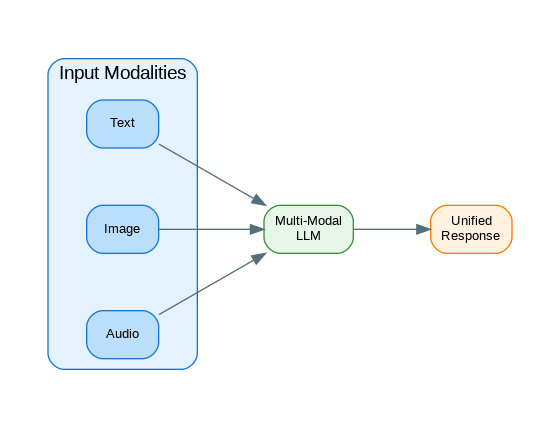
Image Analysis with GPT-4V
Beyond simple image description, GPT-4V excels at structured analysis tasks—extracting specific information, comparing elements, and reasoning about visual content. The following patterns demonstrate production-ready image analysis.
from openai import OpenAI
import base64
from pathlib import Path

client = OpenAI()

def encode_image(image_path: str) -> str:
    """Encode image to base64."""
    with open(image_path, "rb") as f:
        return base64.b64encode(f.read()).decode("utf-8")

def analyze_image(
    image_path: str,
    prompt: str = "Describe this image in detail.",
    model: str = "gpt-4o"
) -> str:
    """Analyze an image with GPT-4V."""

    # Determine media type
    suffix = Path(image_path).suffix.lower()
    media_types = {
        ".jpg": "image/jpeg",
        ".jpeg": "image/jpeg",
        ".png": "image/png",
        ".gif": "image/gif",
        ".webp": "image/webp"
    }
    media_type = media_types.get(suffix, "image/jpeg")

    # Encode image
    base64_image = encode_image(image_path)

    response = client.chat.completions.create(
        model=model,
        messages=[
            {
                "role": "user",
                "content": [
                    {"type": "text", "text": prompt},
                    {
                        "type": "image_url",
                        "image_url": {
                            "url": f"data:{media_type};base64,{base64_image}",
                            "detail": "high"  # "low", "high", or "auto"
                        }
                    }
                ]
            }
        ],
        max_tokens=1000
    )

    return response.choices[0].message.content

def analyze_image_url(
    image_url: str,
    prompt: str = "Describe this image."
) -> str:
    """Analyze an image from URL."""

    response = client.chat.completions.create(
        model="gpt-4o",
        messages=[
            {
                "role": "user",
                "content": [
                    {"type": "text", "text": prompt},
                    {
                        "type": "image_url",
                        "image_url": {"url": image_url}
                    }
                ]
            }
        ]
    )

    return response.choices[0].message.content

# Usage
description = analyze_image(
    "product_photo.jpg",
    "Describe this product image for an e-commerce listing. Include color, material, and key features."
)
print(description)
Multiple Image Comparison
def compare_images(
    image_paths: list[str],
    prompt: str = "Compare these images and describe the differences."
) -> str:
    """Compare multiple images."""

    content = [{"type": "text", "text": prompt}]

    for path in image_paths:
        base64_image = encode_image(path)
        suffix = Path(path).suffix.lower()
        media_type = "image/jpeg" if suffix in [".jpg", ".jpeg"] else "image/png"

        content.append({
            "type": "image_url",
            "image_url": {
                "url": f"data:{media_type};base64,{base64_image}"
            }
        })

    response = client.chat.completions.create(
        model="gpt-4o",
        messages=[{"role": "user", "content": content}],
        max_tokens=1500
    )

    return response.choices[0].message.content

# Usage - Compare before/after images
comparison = compare_images(
    ["before.jpg", "after.jpg"],
    "Compare these before and after images. What changes were made?"
)

# Usage - Product comparison
comparison = compare_images(
    ["product_a.jpg", "product_b.jpg", "product_c.jpg"],
    "Compare these three products. Create a comparison table with features, pros, and cons."
)
Document Understanding
from pydantic import BaseModel
from typing import Optional
import json

class ExtractedDocument(BaseModel):
    document_type: str
    title: Optional[str]
    date: Optional[str]
    key_fields: dict
    tables: list[dict]
    summary: str

def extract_document_data(
    image_path: str,
    document_type: str = "auto"
) -> ExtractedDocument:
    """Extract structured data from document image."""

    prompt = f"""Analyze this document image and extract all relevant information.

Document type hint: {document_type}

Extract:
1. Document type (invoice, receipt, form, contract, etc.)
2. Title or header
3. Date if present
4. All key fields and their values
5. Any tables with their data
6. Brief summary

Return as JSON with schema:
{{
    "document_type": "string",
    "title": "string or null",
    "date": "string or null",
    "key_fields": {{"field_name": "value"}},
    "tables": [{{"headers": [], "rows": [[]]}}],
    "summary": "string"
}}"""

    base64_image = encode_image(image_path)

    response = client.chat.completions.create(
        model="gpt-4o",
        messages=[
            {
                "role": "user",
                "content": [
                    {"type": "text", "text": prompt},
                    {
                        "type": "image_url",
                        "image_url": {
                            "url": f"data:image/png;base64,{base64_image}",
                            "detail": "high"
                        }
                    }
                ]
            }
        ],
        response_format={"type": "json_object"}
    )

    data = json.loads(response.choices[0].message.content)
    return ExtractedDocument(**data)

def process_invoice(image_path: str) -> dict:
    """Extract invoice-specific data."""

    prompt = """Extract invoice data from this image.

Return JSON with:
{
    "invoice_number": "string",
    "invoice_date": "YYYY-MM-DD",
    "due_date": "YYYY-MM-DD or null",
    "vendor": {"name": "", "address": ""},
    "customer": {"name": "", "address": ""},
    "line_items": [{"description": "", "quantity": 0, "unit_price": 0, "total": 0}],
    "subtotal": 0,
    "tax": 0,
    "total": 0,
    "currency": "USD"
}"""

    base64_image = encode_image(image_path)

    response = client.chat.completions.create(
        model="gpt-4o",
        messages=[
            {
                "role": "user",
                "content": [
                    {"type": "text", "text": prompt},
                    {
                        "type": "image_url",
                        "image_url": {
                            "url": f"data:image/png;base64,{base64_image}",
                            "detail": "high"
                        }
                    }
                ]
            }
        ],
        response_format={"type": "json_object"}
    )

    return json.loads(response.choices[0].message.content)

# Usage
invoice_data = process_invoice("invoice_scan.png")
print(f"Invoice #{invoice_data['invoice_number']}")
print(f"Total: {invoice_data['currency']} {invoice_data['total']}")
Chart and Graph Analysis
def analyze_chart(
    image_path: str,
    questions: list[str] = None
) -> dict:
    """Analyze a chart or graph image."""

    base_prompt = """Analyze this chart/graph image.

Extract:
1. Chart type (bar, line, pie, scatter, etc.)
2. Title and axis labels
3. Data series and their values (estimate if needed)
4. Key trends and insights
5. Any notable outliers or patterns"""

    if questions:
        base_prompt += "\n\nAlso answer these specific questions:\n"
        for i, q in enumerate(questions, 1):
            base_prompt += f"{i}. {q}\n"

    base_prompt += """

Return JSON:
{
    "chart_type": "string",
    "title": "string",
    "x_axis": "string",
    "y_axis": "string",
    "data_series": [{"name": "", "values": []}],
    "insights": ["string"],
    "answers": ["string"] // if questions provided
}"""

    base64_image = encode_image(image_path)

    response = client.chat.completions.create(
        model="gpt-4o",
        messages=[
            {
                "role": "user",
                "content": [
                    {"type": "text", "text": base_prompt},
                    {
                        "type": "image_url",
                        "image_url": {
                            "url": f"data:image/png;base64,{base64_image}",
                            "detail": "high"
                        }
                    }
                ]
            }
        ],
        response_format={"type": "json_object"}
    )

    return json.loads(response.choices[0].message.content)

# Usage
chart_analysis = analyze_chart(
    "sales_chart.png",
    questions=[
        "What month had the highest sales?",
        "What is the overall trend?",
        "Are there any seasonal patterns?"
    ]
)

print(f"Chart type: {chart_analysis['chart_type']}")
for insight in chart_analysis['insights']:
    print(f"- {insight}")
Audio Transcription and Analysis
Audio processing with Whisper provides accurate transcription that can then be analyzed by LLMs. This enables applications from meeting summarization to podcast indexing and voice-based customer service analysis.
def transcribe_audio(
    audio_path: str,
    language: str = None,
    prompt: str = None
) -> dict:
    """Transcribe audio using Whisper."""

    with open(audio_path, "rb") as audio_file:
        kwargs = {"model": "whisper-1", "file": audio_file}

        if language:
            kwargs["language"] = language
        if prompt:
            kwargs["prompt"] = prompt  # Helps with domain-specific terms

        response = client.audio.transcriptions.create(**kwargs)

    return {"text": response.text}

def transcribe_with_timestamps(audio_path: str) -> dict:
    """Transcribe with word-level timestamps."""

    with open(audio_path, "rb") as audio_file:
        response = client.audio.transcriptions.create(
            model="whisper-1",
            file=audio_file,
            response_format="verbose_json",
            timestamp_granularities=["word", "segment"]
        )

    return {
        "text": response.text,
        "segments": response.segments,
        "words": response.words
    }

def analyze_audio_content(audio_path: str, analysis_type: str = "summary") -> str:
    """Transcribe and analyze audio content."""

    # First transcribe
    transcription = transcribe_audio(audio_path)
    text = transcription["text"]

    # Then analyze with LLM
    prompts = {
        "summary": f"Summarize this transcript in 3-5 bullet points:\n\n{text}",
        "action_items": f"Extract action items and next steps from this meeting transcript:\n\n{text}",
        "sentiment": f"Analyze the sentiment and tone of this conversation:\n\n{text}",
        "key_topics": f"Identify the main topics discussed in this transcript:\n\n{text}"
    }

    response = client.chat.completions.create(
        model="gpt-4o",
        messages=[{"role": "user", "content": prompts.get(analysis_type, prompts["summary"])}]
    )

    return response.choices[0].message.content

# Usage
transcript = transcribe_audio("meeting.mp3")
print(f"Transcript: {transcript['text'][:500]}...")

action_items = analyze_audio_content("meeting.mp3", "action_items")
print(f"Action items:\n{action_items}")
Multi-Modal RAG Architecture
Multi-modal RAG extends traditional text-based retrieval to include images, diagrams, and other visual content. This enables powerful applications like visual document Q&A and image-based search.
flowchart TB
    subgraph Ingestion["Document Ingestion"]
        PDF[PDF Documents]
        IMG[Images/Diagrams]
        TXT[Text Content]
    end

    subgraph Processing["Multi-Modal Processing"]
        OCR[OCR Engine]
        VE[Vision Embeddings
CLIP]
        TE[Text Embeddings]
        CE[Combined Embeddings]
    end

    subgraph Storage["Vector Storage"]
        TDB[(Text Vectors)]
        IDB[(Image Vectors)]
        MDB[(Multi-Modal Index)]
    end

    subgraph Query["Query Processing"]
        QI[Query + Image?]
        QE[Query Embedding]
        HS[Hybrid Search]
    end

    subgraph Generation["Response Generation"]
        CTX[Retrieved Context
Text + Images]
        VLM[Vision-Language Model]
        RSP[Multi-Modal Response]
    end

    PDF --> OCR
    PDF --> IMG
    OCR --> TE
    IMG --> VE
    TXT --> TE

    VE --> CE
    TE --> CE

    CE --> TDB
    CE --> IDB
    TDB --> MDB
    IDB --> MDB

    QI --> QE
    QE --> HS
    MDB --> HS

    HS --> CTX
    CTX --> VLM
    VLM --> RSP

    style PDF fill:#E3F2FD,stroke:#90CAF9,stroke-width:2px,color:#1565C0
    style IMG fill:#E3F2FD,stroke:#90CAF9,stroke-width:2px,color:#1565C0
    style TXT fill:#E3F2FD,stroke:#90CAF9,stroke-width:2px,color:#1565C0
    style OCR fill:#E8F5E9,stroke:#A5D6A7,stroke-width:2px,color:#2E7D32
    style VE fill:#E8F5E9,stroke:#A5D6A7,stroke-width:2px,color:#2E7D32
    style TE fill:#E8F5E9,stroke:#A5D6A7,stroke-width:2px,color:#2E7D32
    style CE fill:#E8F5E9,stroke:#A5D6A7,stroke-width:2px,color:#2E7D32
    style TDB fill:#ECEFF1,stroke:#90A4AE,stroke-width:2px,color:#455A64
    style IDB fill:#ECEFF1,stroke:#90A4AE,stroke-width:2px,color:#455A64
    style MDB fill:#ECEFF1,stroke:#90A4AE,stroke-width:2px,color:#455A64
    style QI fill:#F3E5F5,stroke:#CE93D8,stroke-width:2px,color:#6A1B9A
    style QE fill:#F3E5F5,stroke:#CE93D8,stroke-width:2px,color:#6A1B9A
    style HS fill:#F3E5F5,stroke:#CE93D8,stroke-width:2px,color:#6A1B9A
    style CTX fill:#FFF3E0,stroke:#FFCC80,stroke-width:2px,color:#E65100
    style VLM fill:#FFF3E0,stroke:#FFCC80,stroke-width:2px,color:#E65100
    style RSP fill:#E0F2F1,stroke:#80CBC4,stroke-width:2px,color:#00695C
Figure 1: C4 Container Diagram – Multi-Modal RAG Architecture
Multi-Modal RAG
Multi-modal RAG combines text and image retrieval, enabling questions over visual documents like diagrams, charts, and annotated images. This is essential for enterprise knowledge bases with rich visual content.
from dataclasses import dataclass
from typing import Union
from enum import Enum

class ContentType(str, Enum):
    TEXT = "text"
    IMAGE = "image"
    AUDIO = "audio"

@dataclass
class MultiModalDocument:
    id: str
    content_type: ContentType
    content: Union[str, bytes]
    metadata: dict
    embedding: list[float] = None

class MultiModalRAG:
    """RAG system supporting text, images, and audio."""

    def __init__(self):
        self.documents: list[MultiModalDocument] = []

    def _get_text_embedding(self, text: str) -> list[float]:
        """Get embedding for text."""
        response = client.embeddings.create(
            model="text-embedding-3-small",
            input=text
        )
        return response.data[0].embedding

    def _describe_image(self, image_path: str) -> str:
        """Get text description of image for embedding."""
        return analyze_image(
            image_path,
            "Describe this image in detail for search indexing. Include all visible text, objects, colors, and context."
        )

    def _transcribe_audio(self, audio_path: str) -> str:
        """Get text from audio for embedding."""
        result = transcribe_audio(audio_path)
        return result["text"]

    def add_document(
        self,
        doc_id: str,
        content_type: ContentType,
        content_path: str,
        metadata: dict = None
    ):
        """Add a document of any type."""

        # Convert to text for embedding
        if content_type == ContentType.TEXT:
            with open(content_path) as f:
                text = f.read()
        elif content_type == ContentType.IMAGE:
            text = self._describe_image(content_path)
        elif content_type == ContentType.AUDIO:
            text = self._transcribe_audio(content_path)

        # Get embedding
        embedding = self._get_text_embedding(text[:8000])

        doc = MultiModalDocument(
            id=doc_id,
            content_type=content_type,
            content=text,
            metadata=metadata or {},
            embedding=embedding
        )

        self.documents.append(doc)

    def search(self, query: str, k: int = 5) -> list[MultiModalDocument]:
        """Search across all document types."""

        query_embedding = self._get_text_embedding(query)

        # Calculate similarities
        import numpy as np

        scored = []
        for doc in self.documents:
            similarity = np.dot(query_embedding, doc.embedding) / (
                np.linalg.norm(query_embedding) * np.linalg.norm(doc.embedding)
            )
            scored.append((doc, similarity))

        # Sort by similarity
        scored.sort(key=lambda x: x[1], reverse=True)

        return [doc for doc, _ in scored[:k]]

    def query(self, question: str, k: int = 3) -> str:
        """Query with multi-modal context."""

        # Retrieve relevant documents
        docs = self.search(question, k=k)

        # Build context
        context_parts = []
        for doc in docs:
            prefix = f"[{doc.content_type.value.upper()}]"
            context_parts.append(f"{prefix}: {doc.content[:2000]}")

        context = "\n\n".join(context_parts)

        # Generate answer
        response = client.chat.completions.create(
            model="gpt-4o",
            messages=[
                {
                    "role": "system",
                    "content": f"Answer based on this context:\n\n{context}"
                },
                {"role": "user", "content": question}
            ]
        )

        return response.choices[0].message.content

# Usage
rag = MultiModalRAG()

# Add different content types
rag.add_document("doc1", ContentType.TEXT, "report.txt")
rag.add_document("img1", ContentType.IMAGE, "diagram.png")
rag.add_document("audio1", ContentType.AUDIO, "meeting.mp3")

# Query across all types
answer = rag.query("What were the main points discussed about the architecture?")
Production Multi-Modal Service
from fastapi import FastAPI, UploadFile, File, Form
from pydantic import BaseModel
from typing import Optional
import tempfile
import os

app = FastAPI()

class AnalysisResponse(BaseModel):
    content_type: str
    analysis: dict
    text_content: Optional[str]

@app.post("/analyze/image", response_model=AnalysisResponse)
async def analyze_image_endpoint(
    file: UploadFile = File(...),
    prompt: str = Form(default="Describe this image in detail.")
):
    """Analyze an uploaded image."""

    # Save temporarily
    with tempfile.NamedTemporaryFile(delete=False, suffix=".png") as tmp:
        content = await file.read()
        tmp.write(content)
        tmp_path = tmp.name

    try:
        description = analyze_image(tmp_path, prompt)

        return AnalysisResponse(
            content_type="image",
            analysis={"description": description},
            text_content=description
        )
    finally:
        os.unlink(tmp_path)

@app.post("/analyze/document", response_model=AnalysisResponse)
async def analyze_document_endpoint(
    file: UploadFile = File(...),
    document_type: str = Form(default="auto")
):
    """Extract data from document image."""

    with tempfile.NamedTemporaryFile(delete=False, suffix=".png") as tmp:
        content = await file.read()
        tmp.write(content)
        tmp_path = tmp.name

    try:
        extracted = extract_document_data(tmp_path, document_type)

        return AnalysisResponse(
            content_type="document",
            analysis=extracted.model_dump(),
            text_content=extracted.summary
        )
    finally:
        os.unlink(tmp_path)

@app.post("/analyze/audio", response_model=AnalysisResponse)
async def analyze_audio_endpoint(
    file: UploadFile = File(...),
    analysis_type: str = Form(default="summary")
):
    """Transcribe and analyze audio."""

    with tempfile.NamedTemporaryFile(delete=False, suffix=".mp3") as tmp:
        content = await file.read()
        tmp.write(content)
        tmp_path = tmp.name

    try:
        transcript = transcribe_audio(tmp_path)
        analysis = analyze_audio_content(tmp_path, analysis_type)

        return AnalysisResponse(
            content_type="audio",
            analysis={
                "transcript": transcript["text"],
                "analysis": analysis
            },
            text_content=transcript["text"]
        )
    finally:
        os.unlink(tmp_path)
References
- GPT-4 Vision: https://platform.openai.com/docs/guides/vision
- Whisper API: https://platform.openai.com/docs/guides/speech-to-text
- Claude Vision: https://docs.anthropic.com/claude/docs/vision
- Gemini Multi-Modal: https://ai.google.dev/docs/multimodal_concepts
Key Takeaways
- ✅ Choose models by use case – GPT-4V for general vision, Claude for documents, Gemini for native multi-modality
- ✅ Optimize image handling – Resize images appropriately, use base64 for reliability, consider cost per image
- ✅ Structure prompts carefully – Be specific about desired output format and analysis criteria
- ✅ Combine modalities thoughtfully – Multi-modal RAG enables powerful search over visual documents
- ✅ Handle errors gracefully – Vision APIs can fail on low-quality images or unsupported content
Conclusion
Multi-modal AI opens new possibilities for applications that understand the world beyond text. Use vision models for document processing, product analysis, and chart understanding. Combine audio transcription with LLM analysis for meeting summaries and content extraction. Build multi-modal RAG systems that search across text, images, and audio. The key is converting all modalities to a common representation (text or embeddings) for unified processing. As multi-modal models improve, expect even tighter integration between modalities and new capabilities like video understanding and real-time audio conversation.
Discover more from C4: Container, Code, Cloud & Context
Subscribe to get the latest posts sent to your email.