
On this page
pgvector 0.6.0 came out on Monday 29 January 2024, and its headline change is that HNSW indexes can now be built by several processes at once. Until 0.5.1 an HNSW build used one core however many the server had, which is why building an index over a few million embeddings could take hours. Supabase’s release-day post reported builds up to 30 times faster on unlogged tables and seven to nine times faster on a one-million-row, 1536-dimension OpenAI embedding set.
Those numbers come from large machines. This article measures what changes on a small one: a four-vCPU GitHub Actions runner, Postgres 16.1, and 200,000 vectors of 256 dimensions. It separates the three things that make a build fast, which are memory, the 0.6.0 code itself, and parallel workers, and it covers one setting that makes the parallel build fail outright in Docker’s default configuration.
What changed in 0.6.0
The changelog lists parallel HNSW builds, faster HNSW in general, less memory and less WAL during HNSW builds, and a fix for an invalid memory alloc request size error in large builds. It also changes the storage setting of the vector type from extended to external, drops Postgres 11, and moves the Docker image from ankane/pgvector to the pgvector/pgvector organisation with one tag per Postgres major version, such as pgvector/pgvector:0.6.0-pg16. There is no latest tag any more, so a Compose file or Helm chart that pulled ankane/pgvector will not pick up 0.6.0 without an edit.
The parallel build is controlled by the standard Postgres setting max_parallel_maintenance_workers, which is 2 by default. Postgres also caps workers by table size and by max_parallel_workers (8 by default) and max_worker_processes. The leader process takes part in the build too, so two workers means three processes inserting.
How the parallel build uses memory
An HNSW build has two phases. While the graph fits in maintenance_work_mem, pgvector builds it in memory and writes it out once at the end. When it no longer fits, pgvector writes what it has and inserts the remaining rows into the on-disk index one at a time, which is much slower. It warns when that happens with a notice: hnsw graph no longer fits into maintenance_work_mem after N tuples. The default maintenance_work_mem is 64 MB, which holds only a few tens of thousands of 256-dimension vectors.
In a serial build the graph lives in the backend’s private memory. In a parallel build it has to be visible to every worker, so pgvector puts it in one Postgres dynamic shared memory segment sized from maintenance_work_mem. This is the sizing code from src/hnswbuild.c at the v0.6.0 tag:
	/* Leave space for other objects in shared memory */
	/* Docker has a default limit of 64 MB for shm_size */
	/* which happens to be the default value of maintenance_work_mem */
	esthnswarea = maintenance_work_mem * 1024L;
	estother = 3 * 1024 * 1024;
	if (esthnswarea > estother)
		esthnswarea -= estother;
On Linux, Postgres creates dynamic shared memory segments as files in /dev/shm by default. Docker gives every container a 64 MB /dev/shm unless told otherwise. The comment in the source shows the authors knew: the default maintenance_work_mem fits. Raise maintenance_work_mem to keep a larger graph in memory, which is the README’s first piece of advice for build speed, and the segment no longer fits.
%%{init: {'theme': 'base', 'themeVariables': {'primaryColor': '#FFF3E0', 'primaryTextColor': '#232F3E', 'primaryBorderColor': '#FF9900', 'lineColor': '#232F3E', 'clusterBkg': '#F8FAFC', 'clusterBorder': '#CBD5E1', 'edgeLabelBackground': '#FFFFFF', 'nodeTextColor': '#232F3E'}}}%%
flowchart TD
    C["CREATE INDEX ... USING hnsw"] --> W{"Parallel workers planned?<br/>max_parallel_maintenance_workers, table size"}
    W -- "no" --> S["Serial build<br/>graph in backend memory"]
    W -- "yes" --> D["Shared memory segment<br/>about maintenance_work_mem, in /dev/shm"]
    D -- "segment cannot be sized" --> E["ERROR 53100<br/>could not resize shared memory segment"]
    D -- "segment created" --> P["Leader and workers insert<br/>into one shared graph"]
    S --> F{"Graph still fits<br/>maintenance_work_mem?"}
    P --> F
    F -- "yes" --> M["In-memory phase to the end<br/>graph written once"]
    F -- "no" --> N["NOTICE: graph no longer fits<br/>on-disk inserts, much slower"]
    classDef compute fill:#FFF3E0,stroke:#FF9900,stroke-width:2px,color:#232F3E
    classDef data fill:#EBF8FF,stroke:#0073BB,stroke-width:2px,color:#004C74
    classDef store fill:#F0FFF4,stroke:#1D8102,stroke-width:2px,color:#145202
    classDef alert fill:#FEF2F2,stroke:#D13212,stroke-width:2px,color:#991B1B
    class C,W,F data
    class S,P,D compute
    class M store
    class E,N alert
Test setup
Both versions were compiled from their git tags on the same base image, the way pgvector’s own Dockerfile does it, so the only difference between the two containers is the extension:
# pgvector built from a git tag on a fixed Postgres image, the same way
# pgvector's own Dockerfile does it (make OPTFLAGS=""), so 0.5.1 and 0.6.0
# differ only in the extension.
ARG PG_IMAGE=postgres:16.1-bookworm
FROM ${PG_IMAGE}
ARG PGVECTOR_TAG

RUN apt-get update && \
    apt-mark hold locales && \
    apt-get install -y --no-install-recommends build-essential ca-certificates git postgresql-server-dev-16 && \
    git clone --branch "${PGVECTOR_TAG}" --depth 1 https://github.com/pgvector/pgvector.git /tmp/pgvector && \
    cd /tmp/pgvector && \
    make clean && \
    make OPTFLAGS="" && \
    make install && \
    rm -rf /tmp/pgvector && \
    apt-get remove -y build-essential git postgresql-server-dev-16 && \
    apt-get autoremove -y && \
    apt-mark unhold locales && \
    rm -rf /var/lib/apt/lists/*
The data is synthetic: a seeded Gaussian mixture of 200,000 vectors in 256 dimensions, with 1,000 query vectors drawn from the same mixture but not stored in the table. The plan was to use the ann-benchmarks NYTimes set, but the download was refused from the CI runner, so the benchmark generates its data instead. Anyone can regenerate it from the seed. Recall on synthetic data says nothing about recall on real embeddings; here it is used only to compare builds with each other.
def generate(rows: int, queries: int, dim: int = 256, clusters: int = 100,
             noise: float = 0.8, seed: int = 20240203) -> tuple[np.ndarray, np.ndarray]:
    rng = np.random.default_rng(seed)
    centres = rng.normal(size=(clusters, dim)).astype(np.float32)

    def draw(n: int) -> np.ndarray:
        which = rng.integers(0, clusters, size=n)
        return (centres[which] + noise * rng.normal(size=(n, dim))).astype(np.float32)

    return draw(rows), draw(queries)
Every index uses cosine distance with m = 16 and ef_construction = 64, pgvector’s defaults. Each experiment sets two parameters before CREATE INDEX:
EXPERIMENTS = {
    # name: (maintenance_work_mem, max_parallel_maintenance_workers)
    "default-mem": ("64MB", 3),
    "serial-1gb": ("1GB", 0),
    "parallel-1gb": ("1GB", 3),
    "parallel-1gb-unlogged": ("1GB", 3),  # same, with the table switched to UNLOGGED first
    "default-workers-1gb": ("1GB", None),  # max_parallel_maintenance_workers left at the server default
}
While the index builds, a second connection polls pg_stat_activity five times a second to count parallel workers, so the results show what Postgres actually launched rather than what was requested:
            while not self.stop.is_set():
                workers = conn.execute(
                    "SELECT count(*) FROM pg_stat_activity WHERE backend_type = 'parallel worker'").fetchone()[0]
                self.max_workers = max(self.max_workers, workers)
                for (phase,) in conn.execute("SELECT phase FROM pg_stat_progress_create_index").fetchall():
                    if not self.phases or self.phases[-1] != phase:
                        self.phases.append(phase)
                time.sleep(0.2)
The runner had 4 vCPU and 15 GiB of RAM. Three containers ran one after another: 0.5.1 with a 2 GB /dev/shm, 0.6.0 with a 2 GB /dev/shm, and 0.6.0 with Docker’s default. Each build was followed by 1,000 queries at ef_search 40 and 100, and recall@10 was measured against exact neighbours computed with numpy. The packages were the versions available on 2 February 2024: psycopg 3.1.17, numpy 1.26.3 and pytest 8.0.0.
Test results
The full table as the CI run printed it. seen is the most parallel workers observed during the build:
container      experiment             mem   workers  seen  build s  WAL MB  index MB  recall ef40  recall ef100  outcome
0.5.1 shm-2g   default-mem            64MB  3        0     406.0    649     260       0.829        0.931         graph spilled to disk
0.5.1 shm-2g   serial-1gb             1GB   0        0     123.2    304     260       0.836        0.944         in memory
0.5.1 shm-2g   parallel-1gb           1GB   3        0     120.1    304     260       0.843        0.942         in memory
0.6.0 shm-2g   default-mem            64MB  3        3     139.1    254     260       0.836        0.931         graph spilled to disk
0.6.0 shm-2g   serial-1gb             1GB   0        0     85.0     254     260       0.837        0.936         in memory
0.6.0 shm-2g   parallel-1gb           1GB   3        3     30.5     254     260       0.840        0.939         in memory
0.6.0 shm-2g   parallel-1gb           1GB   3        3     31.1     254     260       0.844        0.943         in memory
0.6.0 shm-2g   serial-1gb             1GB   0        0     85.1     254     260       0.832        0.925         in memory
0.6.0 shm-2g   parallel-1gb-unlogged  1GB   3        3     30.2     0       260       0.818        0.920         in memory
0.6.0 shm-64m  parallel-1gb           1GB   3        0     -        -       -         -            -             53100: could not resize shared memory segment "/PostgreSQL.2470067724" to 1070648768 bytes: No space left on device
0.6.0 shm-64m  default-workers-1gb    1GB   2        0     -        -       -         -            -             53100: could not resize shared memory segment "/PostgreSQL.3254711394" to 1070632320 bytes: No space left on device
0.6.0 shm-64m  serial-1gb             1GB   0        0     83.1     254     260       0.839        0.940         in memory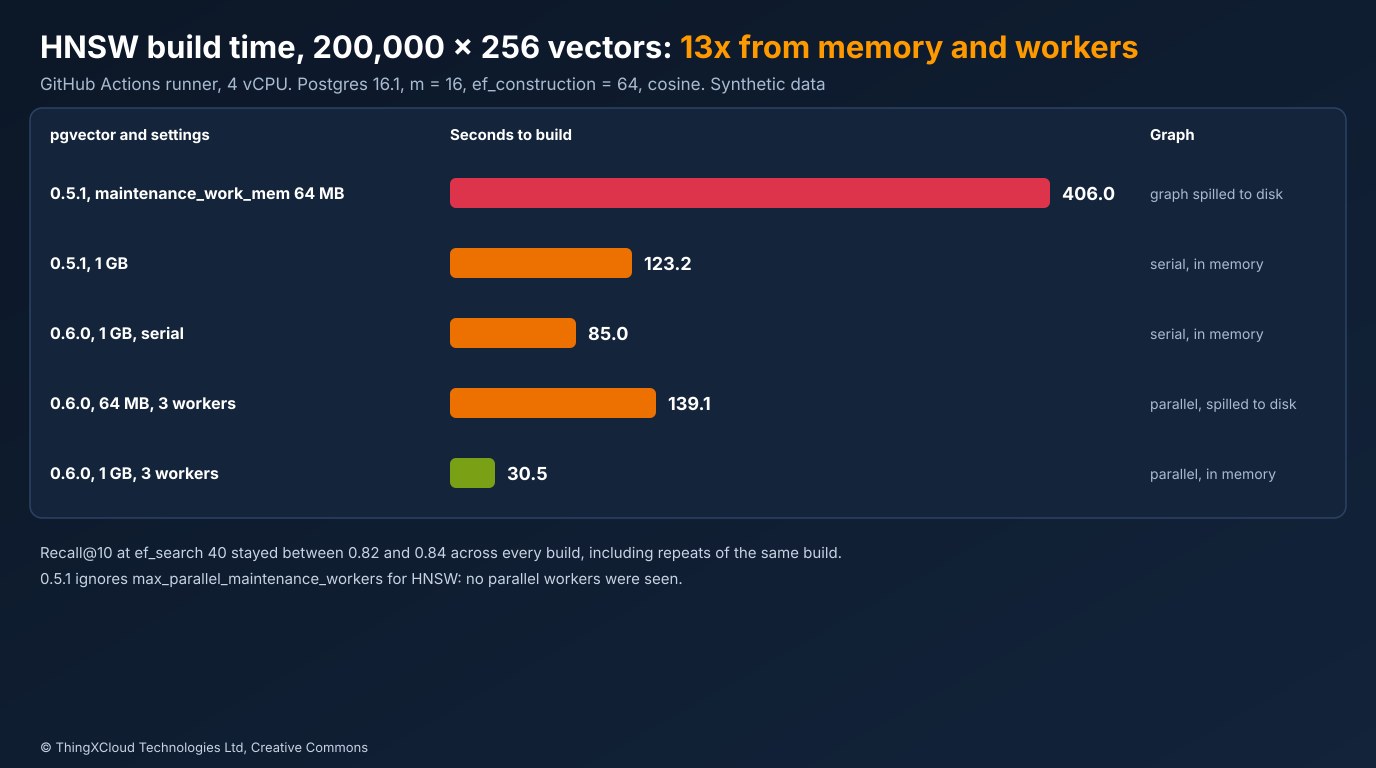
Five things stand out.
Memory matters before workers do. On 0.5.1, raising maintenance_work_mem from 64 MB to 1 GB took the build from 406 to 123 seconds, 3.3 times faster, with no other change. The 64 MB build spilled after 39,898 tuples. If you are on 0.5.1 and cannot upgrade yet, this is the change to make.
0.6.0 is faster on one core too. With workers set to zero, 0.6.0 built the same index in 85 and 85 seconds across two runs, against 123 for 0.5.1: about 1.4 times faster before any parallelism. That is the changelog’s “improved performance of HNSW”.
Three workers and the leader gave about 2.8 times on four vCPUs. The parallel builds took 30.5 and 31.1 seconds. Compared with 0.5.1 at the same memory that is 4.0 times faster, and against 0.5.1 at the default 64 MB it is 13.2 times. The parallel build also helps after the graph spills: 0.6.0 with 64 MB and three workers took 139 seconds against 0.5.1’s 406. 0.5.1 launched no workers for HNSW whatever max_parallel_maintenance_workers said.
Less WAL, and unlogged made no difference here. An in-memory build wrote 304 MB of WAL on 0.5.1 and 254 MB on 0.6.0, and the spilled 0.5.1 build wrote 649 MB. Switching the table to UNLOGGED cut WAL to zero but the build took 30.2 seconds against 30.5, so on this runner WAL was not the bottleneck. Supabase’s 30-times figure for unlogged tables was measured on a much larger machine; whether WAL matters depends on the hardware, so measure before relying on it.
Recall did not change in any way that matters. Recall@10 ranged from 0.818 to 0.844 at ef_search 40 and from 0.920 to 0.944 at 100, and the spread between two runs of the same serial build (0.837 and 0.832) was as large as the spread between serial and parallel. HNSW assigns each element a random level, so no two builds are identical. Index size was 260 MB for every build and query latency was the same, about 1.9 ms at ef_search 40 including the round trip from Python.
Sizing maintenance_work_mem
The spill notices give a way to estimate how much memory a graph needs. The 0.5.1 build held 39,898 vectors in 64 MB before it spilled, about 1,682 bytes per element. A 256-dimension vector takes 1,032 bytes, so with m = 16 the graph’s own bookkeeping, the neighbour lists and per-element headers, adds roughly 650 bytes. The parallel 0.6.0 build spilled earlier, after 36,876 vectors, because its shared segment is maintenance_work_mem minus a few megabytes for other shared state.
That gives a rough rule: rows times (4 x dimensions + about 650 bytes) for m = 16, and more for a larger m. For this article’s table it is about 0.31 GB, which is why 1 GB was enough. For a million 1536-dimension embeddings it is about 6.3 GB, and a parallel build in a container needs a /dev/shm that large as well. Treat the figure as an estimate from one dataset and watch for the notice: if it appears, the build is in the slow phase, and raising memory will help more than adding workers.
To watch a long build from another session, pg_stat_progress_create_index works for HNSW. The README lists two HNSW phases, initializing and loading tuples; the view reported the second as building index: loading tuples, and the harness never caught the first, which is too short to see at five polls a second. The parallel workers appear in pg_stat_activity with backend_type = 'parallel worker', which is the quickest way to confirm a build really is parallel.
The Docker /dev/shm trap
The third container used Docker’s default /dev/shm. Inside it, df reported shm 64M 1.1M 63M 2% /dev/shm. A parallel build with maintenance_work_mem at 1 GB failed at once. This is the error from the server log, without its timestamp:
ERROR: could not resize shared memory segment "/PostgreSQL.2470067724" to 1070648768 bytes: No space left on deviceThe build does not fall back to serial. pgvector backs out to a serial build only when Postgres cannot create a segment at all; a segment that is created but cannot be sized raises an error and the CREATE INDEX fails. The same happened with max_parallel_maintenance_workers left at its default of 2, so this is not something only people who ask for workers will see: raise maintenance_work_mem much beyond its 64 MB default inside a default Docker container and the next HNSW build on 0.6.0 fails, where on 0.5.1 it simply ran on one core. A serial build in the same container, with workers set to zero, succeeded in 83 seconds.
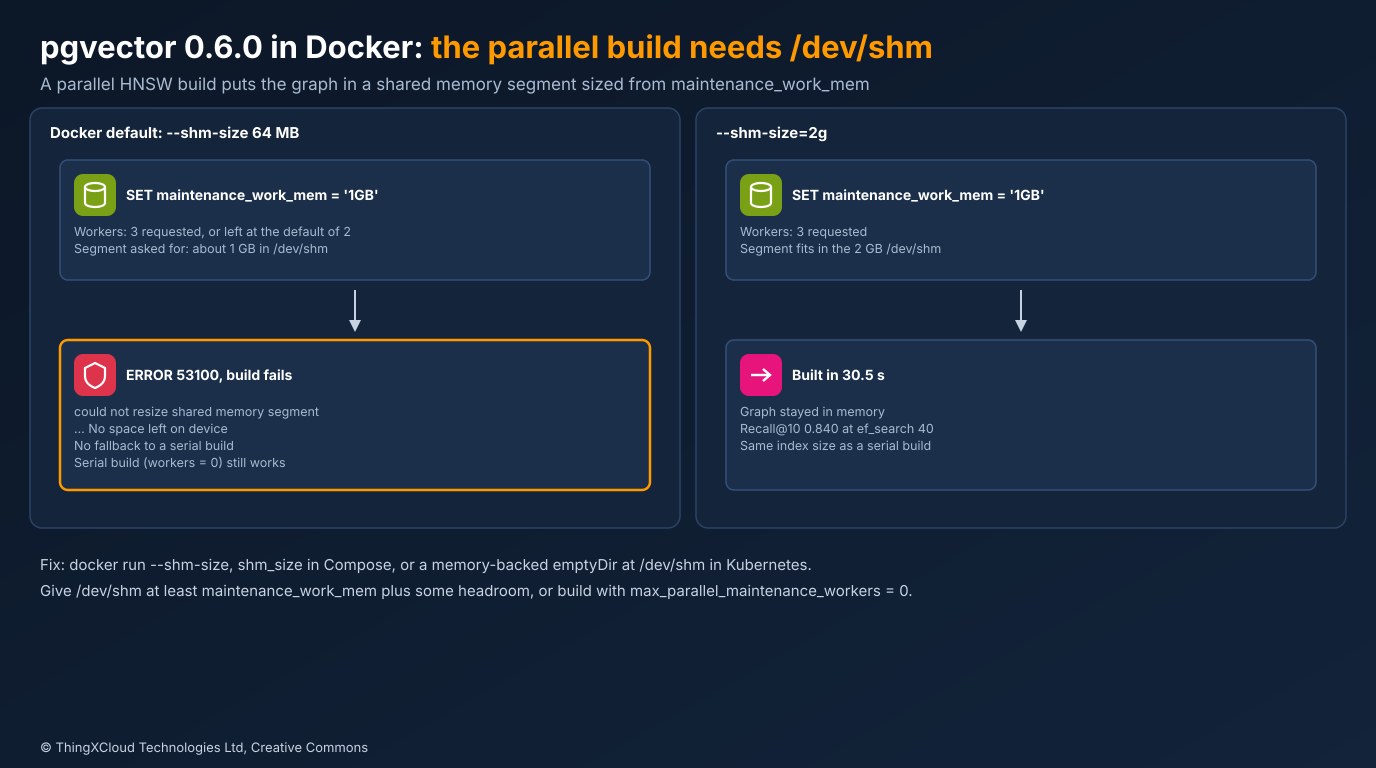
There are three ways out, in order of preference:
- Give the container more shared memory.
docker run --shm-size=2g,shm_size: 2gbin Compose, or in Kubernetes a memory-backedemptyDirvolume mounted at/dev/shmwith asizeLimit. Size it atmaintenance_work_memplus headroom for the rest of Postgres’s parallel queries. Shared memory counts against the container’s memory limit, so raise that too. - Build serially.
SET max_parallel_maintenance_workers = 0in the session that runsCREATE INDEX. You keep 0.6.0’s faster serial build and lose only the parallel speed-up. - Keep
maintenance_work_memsmall. It avoids the error but brings back the slow on-disk phase, which was the largest cost in every test.
If your migration scripts raise maintenance_work_mem before creating HNSW indexes and Postgres runs in a container, upgrading the image to 0.6.0 can turn a slow index build into a failed one. Check the container’s /dev/shm size with df -h /dev/shm before the upgrade, not after the first failed migration.
Upgrading an existing database
- Install the 0.6.0 binaries and run
ALTER EXTENSION vector UPDATE;in each database. The 0.6.0 upgrade notes list nothing else apart from the Postgres 12 and Docker items below. - On Postgres 12, remove the
ALTER TYPE vector SET (STORAGE = external)line fromsql/vector--0.5.1--0.6.0.sqlbeforemake install, as the README’s upgrade notes say. - Docker users: change the image to
pgvector/pgvector:0.6.0-pg16(or your Postgres major) and set the shared memory size at the same time. - Managed Postgres services ship new pgvector versions on their own schedule; check the version with
SELECT extversion FROM pg_extension WHERE extname = 'vector';before planning on parallel builds.
Decision framework
| Situation | What to do |
|---|---|
| Still on 0.5.1 | Raise maintenance_work_mem until the build shows no “no longer fits” notice; that alone was 3 times faster here |
| On 0.6.0, bare metal or a VM | Raise maintenance_work_mem and max_parallel_maintenance_workers towards the core count, minus one for the leader |
| On 0.6.0 in Docker or Kubernetes | Size /dev/shm to at least maintenance_work_mem first, then raise both |
| Cannot change /dev/shm | Build with max_parallel_maintenance_workers = 0; 0.6.0’s serial build is still faster than 0.5.1’s |
| Bulk load with no need for crash safety | An unlogged table removes WAL, but measure; it did not speed up this build |
| Worried about recall | Measure it on your own data; parallel builds were within run-to-run variation here |
Everything above comes from one GitHub Actions run (run) on a 4 vCPU runner: pgvector 0.5.1 and 0.6.0 built from their git tags on postgres:16.1-bookworm, Python 3.12 with packages available on 2 February 2024. The table, the error line and the df output are copied from that run’s files. The data is synthetic, so recall is only compared between builds. The source excerpt is from src/hnswbuild.c at the v0.6.0 tag. Release dates come from the pgvector repository’s tags and changelog.
Key takeaways
- On a 4 vCPU runner, pgvector 0.6.0 with three workers and enough memory built a 200,000-row HNSW index 4.0 times faster than 0.5.1 with the same memory.
- Memory comes first: a build that spills out of maintenance_work_mem is slow in every version, parallel or not.
- 0.6.0’s serial build is faster than 0.5.1’s too, so upgrading helps even where parallel builds are not possible.
- In Docker, a parallel build needs /dev/shm at least as large as maintenance_work_mem; with the 64 MB default it fails with error 53100 instead of falling back.
- Recall, index size and query latency were the same for serial and parallel builds, within the variation between two runs of the same build.
If you have run parallel builds on bigger machines and seen something different, let me know in the comments below.
The complete sample for this article is on GitHub: nithinmohantk/blog-samples-working-repo/pgvector-060-parallel-hnsw. Clone it with git clone https://github.com/nithinmohantk/blog-samples-working-repo.git and open the pgvector-060-parallel-hnsw folder. Its README says how to run it and what has been verified.
Glossary
- HNSW
- Hierarchical Navigable Small World, a graph-based approximate nearest neighbour index.
- pgvector
- Postgres extension that adds a vector type, distance operators and IVFFlat and HNSW indexes.
- maintenance_work_mem
- Postgres setting for memory used by maintenance operations such as CREATE INDEX; 64 MB by default.
- max_parallel_maintenance_workers
- Postgres setting for how many parallel workers a utility command such as CREATE INDEX may use; 2 by default.
- Leader
- The backend running the command; in a parallel build it inserts rows alongside the workers.
- Dynamic shared memory (DSM)
- Shared memory segments Postgres creates on demand, on Linux as files in /dev/shm by default.
- /dev/shm
- Memory-backed filesystem for shared memory; 64 MB by default in a Docker container.
- m
- HNSW parameter: the number of connections per element per layer; 16 by default in pgvector.
- ef_construction
- HNSW parameter: candidate list size while building; 64 by default in pgvector.
- ef_search
- HNSW query setting: candidate list size while searching; 40 by default in pgvector.
- Recall@10
- Share of the true ten nearest neighbours that the index returns among its top ten.
- WAL
- Postgres write-ahead log; an unlogged table writes none, and is emptied after a crash.
References & Further Reading
- → pgvector CHANGELOG at v0.6.0— Release date 29 January 2024 and the list of changes
- → pgvector README at v0.6.0— Index build time, parallel workers and the 0.6.0 upgrade notes
- → src/hnswbuild.c at v0.6.0— How the parallel build sizes its shared memory segment
- → pgvector 0.6.0: 30x faster with parallel index builds— Supabase's release-day benchmarks
- → pgvector 0.6.0 Released— PostgreSQL news announcement, 30 January 2024
- → PostgreSQL 16: Resource Consumption— maintenance_work_mem, max_parallel_maintenance_workers and dynamic_shared_memory_type
- → Docker run reference— The –shm-size option
- → Sample code for this article— Dockerfile, benchmark harness, results and tests
Discover more from C4: Container, Code, Cloud & Context
Subscribe to get the latest posts sent to your email.
