Introduction: Streaming responses dramatically improve perceived latency in LLM applications. Instead of waiting seconds for a complete response, users see tokens appear in real-time, creating a more engaging experience. Implementing streaming correctly requires understanding Server-Sent Events (SSE), handling partial tokens, managing connection lifecycle, and gracefully handling errors mid-stream. This guide covers practical streaming patterns: basic streaming with OpenAI, buffering strategies, SSE implementation with FastAPI, WebSocket alternatives, and client-side consumption.
Streaming dramatically improves perceived latency in LLM applications. This series covers everything from basic stream consumption to production-ready real-time systems.
- Part 1 (this article): SSE, WebSockets, and token delivery fundamentals
- Part 2: Building real-time AI applications with structured streaming
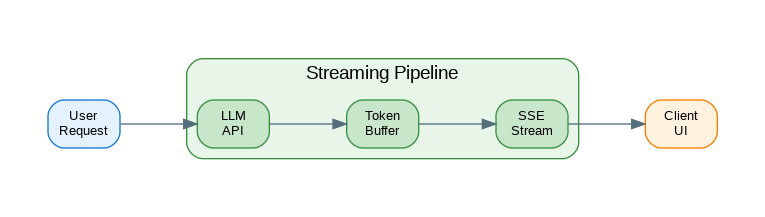
Streaming Architecture Overview
Real-time streaming involves multiple layers working together to deliver tokens as they’re generated. This C4-style diagram shows how streaming flows from the LLM provider to the end user.
flowchart LR
    subgraph Provider["LLM Provider"]
        LLM[LLM API]
        SSE1[SSE Stream]
    end

    subgraph Backend["Backend Service"]
        HC[HTTP Client]
        BUF[Token Buffer]
        FMT[Formatter]
    end

    subgraph Delivery["Delivery Layer"]
        SSE2[SSE Endpoint]
        WS[WebSocket]
    end

    subgraph Client["Client App"]
        EVT[Event Handler]
        UI[UI Renderer]
    end

    LLM --> SSE1
    SSE1 --> HC
    HC --> BUF
    BUF --> FMT
    FMT --> SSE2
    FMT --> WS
    SSE2 --> EVT
    WS --> EVT
    EVT --> UI

    style LLM fill:#E3F2FD,stroke:#90CAF9,stroke-width:2px,color:#1565C0
    style SSE1 fill:#E3F2FD,stroke:#90CAF9,stroke-width:2px,color:#1565C0
    style HC fill:#E8F5E9,stroke:#A5D6A7,stroke-width:2px,color:#2E7D32
    style BUF fill:#E8F5E9,stroke:#A5D6A7,stroke-width:2px,color:#2E7D32
    style FMT fill:#E8F5E9,stroke:#A5D6A7,stroke-width:2px,color:#2E7D32
    style SSE2 fill:#F3E5F5,stroke:#CE93D8,stroke-width:2px,color:#6A1B9A
    style WS fill:#F3E5F5,stroke:#CE93D8,stroke-width:2px,color:#6A1B9A
    style EVT fill:#FFF3E0,stroke:#FFCC80,stroke-width:2px,color:#E65100
    style UI fill:#FFF3E0,stroke:#FFCC80,stroke-width:2px,color:#E65100
Figure 1: C4 Container Diagram – Streaming Architecture
Basic Streaming with OpenAI
The OpenAI API returns responses as a stream of Server-Sent Events. Each event contains a delta with one or more tokens. The following implementation shows how to consume this stream and accumulate tokens into a complete response.
from openai import OpenAI
from typing import Generator, AsyncGenerator

client = OpenAI()

def stream_completion(
    prompt: str,
    model: str = "gpt-4o-mini"
) -> Generator[str, None, None]:
    """Stream completion tokens synchronously."""

    response = client.chat.completions.create(
        model=model,
        messages=[{"role": "user", "content": prompt}],
        stream=True
    )

    for chunk in response:
        if chunk.choices[0].delta.content:
            yield chunk.choices[0].delta.content

# Usage
for token in stream_completion("Explain quantum computing"):
    print(token, end="", flush=True)

# Async streaming
async def async_stream_completion(
    prompt: str,
    model: str = "gpt-4o-mini"
) -> AsyncGenerator[str, None]:
    """Stream completion tokens asynchronously."""

    from openai import AsyncOpenAI
    async_client = AsyncOpenAI()

    response = await async_client.chat.completions.create(
        model=model,
        messages=[{"role": "user", "content": prompt}],
        stream=True
    )

    async for chunk in response:
        if chunk.choices[0].delta.content:
            yield chunk.choices[0].delta.content

# Streaming with metadata
from dataclasses import dataclass
from typing import Optional

@dataclass
class StreamChunk:
    """A chunk from the stream with metadata."""

    content: str
    finish_reason: Optional[str] = None
    model: Optional[str] = None
    index: int = 0

def stream_with_metadata(
    prompt: str,
    model: str = "gpt-4o-mini"
) -> Generator[StreamChunk, None, None]:
    """Stream with full chunk metadata."""

    response = client.chat.completions.create(
        model=model,
        messages=[{"role": "user", "content": prompt}],
        stream=True
    )

    index = 0

    for chunk in response:
        choice = chunk.choices[0]

        yield StreamChunk(
            content=choice.delta.content or "",
            finish_reason=choice.finish_reason,
            model=chunk.model,
            index=index
        )

        index += 1

# Collect full response while streaming
def stream_and_collect(
    prompt: str,
    model: str = "gpt-4o-mini"
) -> tuple[Generator[str, None, None], list[str]]:
    """Stream tokens and collect full response."""

    collected = []

    def generator():
        for token in stream_completion(prompt, model):
            collected.append(token)
            yield token

    return generator(), collected
Token Buffering Strategies
Raw token streaming can produce choppy output—partial words and awkward breaks. Token buffering accumulates tokens until you have a complete word or sentence, producing smoother output that’s easier to read.
Token Buffering Strategy
Raw token streaming produces choppy output. Buffering accumulates tokens until you have complete words or sentences, creating smoother user experience.
flowchart TD
    subgraph Input["Incoming Tokens"]
        T1["'The'"]
        T2["' quick'"]
        T3["' br'"]
        T4["'own'"]
        T5["' fox'"]
    end

    subgraph Buffer["Token Buffer"]
        B1[Accumulator]
        B2{Complete Word?}
        B3[Flush Timer]
    end

    subgraph Output["Output Stream"]
        O1["'The quick'"]
        O2["'brown fox'"]
    end

    T1 --> B1
    T2 --> B1
    T3 --> B1
    T4 --> B1
    T5 --> B1
    B1 --> B2
    B2 -->|Yes| O1
    B2 -->|No| B3
    B3 -->|Timeout| O2

    style T1 fill:#E3F2FD,stroke:#90CAF9,stroke-width:2px,color:#1565C0
    style T2 fill:#E3F2FD,stroke:#90CAF9,stroke-width:2px,color:#1565C0
    style T3 fill:#E3F2FD,stroke:#90CAF9,stroke-width:2px,color:#1565C0
    style T4 fill:#E3F2FD,stroke:#90CAF9,stroke-width:2px,color:#1565C0
    style T5 fill:#E3F2FD,stroke:#90CAF9,stroke-width:2px,color:#1565C0
    style B1 fill:#F3E5F5,stroke:#CE93D8,stroke-width:2px,color:#6A1B9A
    style B2 fill:#F3E5F5,stroke:#CE93D8,stroke-width:2px,color:#6A1B9A
    style B3 fill:#F3E5F5,stroke:#CE93D8,stroke-width:2px,color:#6A1B9A
    style O1 fill:#E8F5E9,stroke:#A5D6A7,stroke-width:2px,color:#2E7D32
    style O2 fill:#E8F5E9,stroke:#A5D6A7,stroke-width:2px,color:#2E7D32
Figure 2: Token Buffering for Smooth Output
from collections import deque
from typing import Callable

class TokenBuffer:
    """Buffer tokens for processing."""

    def __init__(self, flush_on: list[str] = None):
        self.buffer = ""
        self.flush_triggers = flush_on or [". ", "! ", "? ", "\n"]

    def add(self, token: str) -> list[str]:
        """Add token and return complete segments."""

        self.buffer += token
        segments = []

        # Check for flush triggers
        for trigger in self.flush_triggers:
            while trigger in self.buffer:
                idx = self.buffer.index(trigger) + len(trigger)
                segments.append(self.buffer[:idx])
                self.buffer = self.buffer[idx:]

        return segments

    def flush(self) -> str:
        """Flush remaining buffer."""

        remaining = self.buffer
        self.buffer = ""
        return remaining

class SentenceBuffer:
    """Buffer that yields complete sentences."""

    def __init__(self):
        self.buffer = ""
        self.sentence_endings = ".!?"

    def add(self, token: str) -> list[str]:
        """Add token and return complete sentences."""

        self.buffer += token
        sentences = []

        i = 0
        while i < len(self.buffer):
            if self.buffer[i] in self.sentence_endings:
                # Check for sentence end (followed by space or end)
                if i + 1 >= len(self.buffer) or self.buffer[i + 1] in " \n":
                    sentence = self.buffer[:i + 1].strip()
                    if sentence:
                        sentences.append(sentence)
                    self.buffer = self.buffer[i + 1:].lstrip()
                    i = 0
                    continue
            i += 1

        return sentences

    def flush(self) -> str:
        remaining = self.buffer.strip()
        self.buffer = ""
        return remaining

class WordBuffer:
    """Buffer that yields complete words."""

    def __init__(self, min_words: int = 1):
        self.buffer = ""
        self.min_words = min_words

    def add(self, token: str) -> list[str]:
        """Add token and return complete words."""

        self.buffer += token
        words = []

        # Split on whitespace
        parts = self.buffer.split()

        if len(parts) > self.min_words:
            # Keep last part as potentially incomplete
            complete = parts[:-1]
            self.buffer = parts[-1] if parts else ""
            words = complete

        return words

    def flush(self) -> str:
        remaining = self.buffer.strip()
        self.buffer = ""
        return remaining

# Streaming with buffering
def stream_sentences(
    prompt: str,
    model: str = "gpt-4o-mini"
) -> Generator[str, None, None]:
    """Stream complete sentences."""

    buffer = SentenceBuffer()

    for token in stream_completion(prompt, model):
        sentences = buffer.add(token)
        for sentence in sentences:
            yield sentence

    # Flush remaining
    remaining = buffer.flush()
    if remaining:
        yield remaining

# Usage
for sentence in stream_sentences("Tell me a short story"):
    print(f"[Sentence]: {sentence}")
Server-Sent Events (SSE) with FastAPI
Server-Sent Events (SSE) is the standard protocol for server-to-client streaming over HTTP. It’s simpler than WebSockets for one-way streams and works through proxies and load balancers without special configuration.
from fastapi import FastAPI, Request
from fastapi.responses import StreamingResponse
from sse_starlette.sse import EventSourceResponse
import json
import asyncio

app = FastAPI()

async def generate_sse_stream(prompt: str):
    """Generate SSE events from LLM stream."""

    async for token in async_stream_completion(prompt):
        # SSE format: data: {json}\n\n
        data = json.dumps({"token": token})
        yield f"data: {data}\n\n"

    # Send done event
    yield f"data: {json.dumps({'done': True})}\n\n"

@app.get("/stream")
async def stream_endpoint(prompt: str):
    """SSE streaming endpoint."""

    return StreamingResponse(
        generate_sse_stream(prompt),
        media_type="text/event-stream",
        headers={
            "Cache-Control": "no-cache",
            "Connection": "keep-alive",
            "X-Accel-Buffering": "no"  # Disable nginx buffering
        }
    )

# With EventSourceResponse for better SSE support
@app.get("/stream/v2")
async def stream_v2(prompt: str):
    """SSE streaming with EventSourceResponse."""

    async def event_generator():
        async for token in async_stream_completion(prompt):
            yield {
                "event": "token",
                "data": json.dumps({"content": token})
            }

        yield {
            "event": "done",
            "data": json.dumps({"finished": True})
        }

    return EventSourceResponse(event_generator())

# Streaming with progress events
@app.get("/stream/progress")
async def stream_with_progress(prompt: str):
    """Stream with progress updates."""

    async def event_generator():
        tokens = []

        yield {
            "event": "start",
            "data": json.dumps({"status": "generating"})
        }

        async for token in async_stream_completion(prompt):
            tokens.append(token)

            yield {
                "event": "token",
                "data": json.dumps({
                    "content": token,
                    "total_tokens": len(tokens)
                })
            }

        yield {
            "event": "complete",
            "data": json.dumps({
                "status": "done",
                "total_tokens": len(tokens),
                "full_response": "".join(tokens)
            })
        }

    return EventSourceResponse(event_generator())

# Handle client disconnection
@app.get("/stream/safe")
async def safe_stream(request: Request, prompt: str):
    """Stream with disconnection handling."""

    async def event_generator():
        try:
            async for token in async_stream_completion(prompt):
                # Check if client disconnected
                if await request.is_disconnected():
                    print("Client disconnected")
                    break

                yield {
                    "event": "token",
                    "data": json.dumps({"content": token})
                }

        except asyncio.CancelledError:
            print("Stream cancelled")

        finally:
            yield {
                "event": "done",
                "data": json.dumps({"finished": True})
            }

    return EventSourceResponse(event_generator())
WebSocket Streaming
WebSockets provide bidirectional communication, enabling features like mid-stream cancellation and real-time user feedback. The added complexity is worthwhile for interactive chat applications.
from fastapi import WebSocket, WebSocketDisconnect
import json

@app.websocket("/ws/stream")
async def websocket_stream(websocket: WebSocket):
    """WebSocket streaming endpoint."""

    await websocket.accept()

    try:
        while True:
            # Receive prompt from client
            data = await websocket.receive_json()
            prompt = data.get("prompt", "")

            if not prompt:
                await websocket.send_json({"error": "No prompt provided"})
                continue

            # Stream response
            await websocket.send_json({"type": "start"})

            full_response = []

            async for token in async_stream_completion(prompt):
                full_response.append(token)
                await websocket.send_json({
                    "type": "token",
                    "content": token
                })

            await websocket.send_json({
                "type": "done",
                "full_response": "".join(full_response)
            })

    except WebSocketDisconnect:
        print("WebSocket disconnected")

# WebSocket with conversation history
class ConversationWebSocket:
    """WebSocket handler with conversation state."""

    def __init__(self):
        self.conversations: dict[str, list[dict]] = {}

    async def handle(self, websocket: WebSocket, conversation_id: str):
        """Handle WebSocket connection."""

        await websocket.accept()

        if conversation_id not in self.conversations:
            self.conversations[conversation_id] = []

        messages = self.conversations[conversation_id]

        try:
            while True:
                data = await websocket.receive_json()
                user_message = data.get("message", "")

                messages.append({"role": "user", "content": user_message})

                # Stream response
                assistant_response = []

                async for token in self._stream_with_history(messages):
                    assistant_response.append(token)
                    await websocket.send_json({
                        "type": "token",
                        "content": token
                    })

                full_response = "".join(assistant_response)
                messages.append({"role": "assistant", "content": full_response})

                await websocket.send_json({
                    "type": "done",
                    "message_count": len(messages)
                })

        except WebSocketDisconnect:
            pass

    async def _stream_with_history(
        self,
        messages: list[dict]
    ) -> AsyncGenerator[str, None]:
        """Stream with conversation history."""

        from openai import AsyncOpenAI
        client = AsyncOpenAI()

        response = await client.chat.completions.create(
            model="gpt-4o-mini",
            messages=messages,
            stream=True
        )

        async for chunk in response:
            if chunk.choices[0].delta.content:
                yield chunk.choices[0].delta.content

conversation_handler = ConversationWebSocket()

@app.websocket("/ws/chat/{conversation_id}")
async def chat_websocket(websocket: WebSocket, conversation_id: str):
    await conversation_handler.handle(websocket, conversation_id)
SSE vs WebSocket Comparison
Both SSE and WebSocket enable real-time streaming, but they serve different use cases. Choose based on your application’s requirements.
flowchart LR
    subgraph SSE["Server-Sent Events"]
        S1[HTTP/1.1 or HTTP/2]
        S2[Server → Client only]
        S3[Auto-reconnect]
        S4[Text-based]
        S5[Simple setup]
    end

    subgraph WS["WebSocket"]
        W1[Dedicated protocol]
        W2[Bidirectional]
        W3[Manual reconnect]
        W4[Binary support]
        W5[More complex]
    end

    subgraph UseCase["Best For"]
        U1[LLM streaming ✓]
        U2[Notifications ✓]
        U3[Chat with cancel ✓]
        U4[Real-time collab ✓]
    end

    S1 --> U1
    S2 --> U2
    W2 --> U3
    W2 --> U4

    style S1 fill:#E8F5E9,stroke:#A5D6A7,stroke-width:2px,color:#2E7D32
    style S2 fill:#E8F5E9,stroke:#A5D6A7,stroke-width:2px,color:#2E7D32
    style S3 fill:#E8F5E9,stroke:#A5D6A7,stroke-width:2px,color:#2E7D32
    style S4 fill:#E8F5E9,stroke:#A5D6A7,stroke-width:2px,color:#2E7D32
    style S5 fill:#E8F5E9,stroke:#A5D6A7,stroke-width:2px,color:#2E7D32
    style W1 fill:#F3E5F5,stroke:#CE93D8,stroke-width:2px,color:#6A1B9A
    style W2 fill:#F3E5F5,stroke:#CE93D8,stroke-width:2px,color:#6A1B9A
    style W3 fill:#F3E5F5,stroke:#CE93D8,stroke-width:2px,color:#6A1B9A
    style W4 fill:#F3E5F5,stroke:#CE93D8,stroke-width:2px,color:#6A1B9A
    style W5 fill:#F3E5F5,stroke:#CE93D8,stroke-width:2px,color:#6A1B9A
    style U1 fill:#FFF3E0,stroke:#FFCC80,stroke-width:2px,color:#E65100
    style U2 fill:#FFF3E0,stroke:#FFCC80,stroke-width:2px,color:#E65100
    style U3 fill:#FFF3E0,stroke:#FFCC80,stroke-width:2px,color:#E65100
    style U4 fill:#FFF3E0,stroke:#FFCC80,stroke-width:2px,color:#E65100
Figure 3: SSE vs WebSocket – When to Use Each
Client-Side Consumption
Frontend applications need to consume streams efficiently, handle errors gracefully, and provide visual feedback like typing indicators. The following patterns work with React, Vue, and vanilla JavaScript.
# Python client for SSE
import httpx

async def consume_sse_stream(url: str, prompt: str):
    """Consume SSE stream from server."""

    async with httpx.AsyncClient() as client:
        async with client.stream(
            "GET",
            url,
            params={"prompt": prompt},
            timeout=None
        ) as response:
            async for line in response.aiter_lines():
                if line.startswith("data: "):
                    data = json.loads(line[6:])

                    if data.get("done"):
                        break

                    token = data.get("token", "")
                    print(token, end="", flush=True)

# JavaScript client example (for reference)
"""
// EventSource (SSE)
const eventSource = new EventSource(`/stream?prompt=${encodeURIComponent(prompt)}`);

eventSource.addEventListener('token', (event) => {
    const data = JSON.parse(event.data);
    document.getElementById('output').textContent += data.content;
});

eventSource.addEventListener('done', (event) => {
    eventSource.close();
});

eventSource.onerror = (error) => {
    console.error('SSE error:', error);
    eventSource.close();
};

// WebSocket
const ws = new WebSocket('ws://localhost:8000/ws/stream');

ws.onopen = () => {
    ws.send(JSON.stringify({ prompt: 'Hello' }));
};

ws.onmessage = (event) => {
    const data = JSON.parse(event.data);
    if (data.type === 'token') {
        document.getElementById('output').textContent += data.content;
    } else if (data.type === 'done') {
        console.log('Stream complete');
    }
};

// Fetch with ReadableStream
async function streamFetch(prompt) {
    const response = await fetch(`/stream?prompt=${encodeURIComponent(prompt)}`);
    const reader = response.body.getReader();
    const decoder = new TextDecoder();

    while (true) {
        const { done, value } = await reader.read();
        if (done) break;

        const text = decoder.decode(value);
        // Parse SSE format
        const lines = text.split('\\n');
        for (const line of lines) {
            if (line.startsWith('data: ')) {
                const data = JSON.parse(line.slice(6));
                console.log(data.token);
            }
        }
    }
}
"""

# Streaming with retry logic
class StreamingClient:
    """Client with retry and reconnection."""

    def __init__(self, base_url: str, max_retries: int = 3):
        self.base_url = base_url
        self.max_retries = max_retries

    async def stream(
        self,
        prompt: str,
        on_token: Callable[[str], None] = None
    ) -> str:
        """Stream with automatic retry."""

        collected = []
        retries = 0

        while retries < self.max_retries:
            try:
                async with httpx.AsyncClient() as client:
                    async with client.stream(
                        "GET",
                        f"{self.base_url}/stream",
                        params={"prompt": prompt},
                        timeout=httpx.Timeout(60.0, connect=10.0)
                    ) as response:
                        async for line in response.aiter_lines():
                            if line.startswith("data: "):
                                data = json.loads(line[6:])

                                if data.get("done"):
                                    return "".join(collected)

                                token = data.get("token", "")
                                collected.append(token)

                                if on_token:
                                    on_token(token)

            except (httpx.ReadTimeout, httpx.ConnectError) as e:
                retries += 1
                if retries >= self.max_retries:
                    raise

                await asyncio.sleep(2 ** retries)

        return "".join(collected)
Production Streaming Service
The following implementation demonstrates a production-ready approach to production streaming service. This code includes proper error handling, logging, and configuration management.
from fastapi import FastAPI, HTTPException, Request, Depends
from fastapi.middleware.cors import CORSMiddleware
from pydantic import BaseModel
import time
import uuid

app = FastAPI()

app.add_middleware(
    CORSMiddleware,
    allow_origins=["*"],
    allow_methods=["*"],
    allow_headers=["*"],
)

class StreamRequest(BaseModel):
    prompt: str
    model: str = "gpt-4o-mini"
    max_tokens: int = 1000

# Metrics tracking
stream_metrics = {
    "active_streams": 0,
    "total_streams": 0,
    "total_tokens": 0
}

@app.post("/v1/stream")
async def stream_completion_endpoint(
    request: Request,
    body: StreamRequest
):
    """Production streaming endpoint."""

    stream_id = str(uuid.uuid4())
    start_time = time.time()

    stream_metrics["active_streams"] += 1
    stream_metrics["total_streams"] += 1

    async def event_generator():
        tokens_generated = 0

        try:
            # Send stream start
            yield {
                "event": "stream_start",
                "data": json.dumps({
                    "stream_id": stream_id,
                    "model": body.model
                })
            }

            async for token in async_stream_completion(body.prompt, body.model):
                # Check client connection
                if await request.is_disconnected():
                    break

                tokens_generated += 1

                yield {
                    "event": "token",
                    "data": json.dumps({
                        "content": token,
                        "index": tokens_generated
                    })
                }

                # Respect max_tokens
                if tokens_generated >= body.max_tokens:
                    break

            # Send completion
            duration = time.time() - start_time

            yield {
                "event": "stream_end",
                "data": json.dumps({
                    "stream_id": stream_id,
                    "tokens_generated": tokens_generated,
                    "duration_ms": duration * 1000,
                    "tokens_per_second": tokens_generated / duration if duration > 0 else 0
                })
            }

        except Exception as e:
            yield {
                "event": "error",
                "data": json.dumps({
                    "error": str(e),
                    "stream_id": stream_id
                })
            }

        finally:
            stream_metrics["active_streams"] -= 1
            stream_metrics["total_tokens"] += tokens_generated

    return EventSourceResponse(
        event_generator(),
        headers={
            "X-Stream-ID": stream_id,
            "Cache-Control": "no-cache"
        }
    )

@app.get("/v1/stream/metrics")
async def get_stream_metrics():
    """Get streaming metrics."""
    return stream_metrics

@app.get("/health")
async def health():
    return {
        "status": "healthy",
        "active_streams": stream_metrics["active_streams"]
    }
References
- OpenAI Streaming: https://platform.openai.com/docs/api-reference/streaming
- Server-Sent Events: https://developer.mozilla.org/en-US/docs/Web/API/Server-sent_events
- FastAPI StreamingResponse: https://fastapi.tiangolo.com/advanced/custom-response/#streamingresponse
- sse-starlette: https://github.com/sysid/sse-starlette
Conclusion
Streaming dramatically improves user experience in LLM applications by showing responses as they generate. Use Server-Sent Events (SSE) for simple one-way streaming—it’s well-supported and easy to implement. WebSockets are better for bidirectional communication like chat applications. Implement token buffering when you need to process complete sentences or words rather than raw tokens. Handle client disconnections gracefully to avoid wasted API calls. For production, track streaming metrics, implement timeouts, and consider rate limiting per-stream. The key is balancing responsiveness with reliability—users should see tokens immediately while the system handles errors and disconnections gracefully.
Key Takeaways
- ✅ Stream by default – Users perceive responses in 100ms vs 2-3 seconds
- ✅ Use SSE for simplicity – WebSockets only when you need bidirectional communication
- ✅ Buffer tokens smartly – Accumulate complete words for smoother output
- ✅ Handle cancellation – Let users abort long responses to save costs
- ✅ Test error paths – Network interruptions happen; handle them gracefully
Conclusion
Streaming transforms LLM applications from feeling slow and unresponsive to immediate and interactive. The techniques covered—from basic token streaming to structured output parsing—enable production-ready real-time AI experiences that users love.
References
- OpenAI Streaming API Documentation
- Anthropic Streaming Documentation
- MDN: Server-Sent Events
- FastAPI StreamingResponse
Discover more from C4: Container, Code, Cloud & Context
Subscribe to get the latest posts sent to your email.