Infrastructure as Code (IaC) enables you to manage AWS resources through code, providing version control, repeatability, and collaboration. This guide compares AWS CDK, CloudFormation, and Terraform with production-ready examples.
AWS DevOps & IaC Overview
AWS provides multiple options for Infrastructure as Code and CI/CD. Your choice depends on team skills, multi-cloud requirements, and preference for declarative vs imperative approaches.
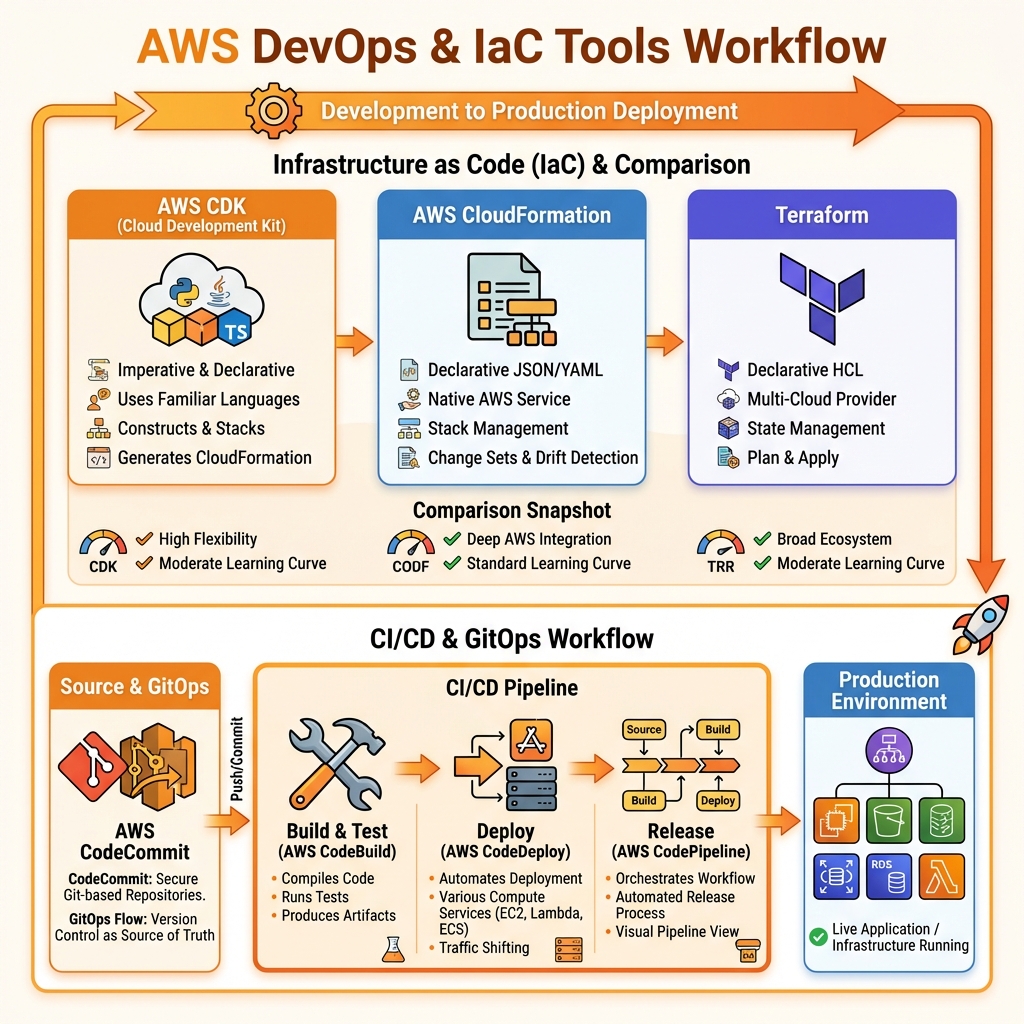
IaC Tool Comparison
| Feature | AWS CDK | CloudFormation | Terraform |
|---|---|---|---|
| Language | TypeScript, Python, Java, C#, Go | JSON/YAML | HCL |
| Approach | Imperative → Declarative | Declarative | Declarative |
| Cloud Support | AWS only | AWS only | Multi-cloud |
| State Management | CloudFormation (AWS-managed) | AWS-managed | Local/Remote (S3, TFC) |
| Drift Detection | ✅ Native | ✅ Native | ✅ terraform plan |
| Best For | Developers, complex logic | AWS-native, simple stacks | Multi-cloud, platform teams |
AWS CDK Deep Dive
AWS CDK lets you define infrastructure using familiar programming languages. It synthesizes to CloudFormation, giving you the best of both worlds: programming flexibility and AWS-native deployment.
CDK Project Structure
# Initialize a new CDK project
mkdir my-cdk-app && cd my-cdk-app
npx cdk init app --language typescript

# Project structure
my-cdk-app/
├── bin/
│   └── my-cdk-app.ts       # App entry point
├── lib/
│   └── my-cdk-app-stack.ts # Stack definition
├── test/
│   └── my-cdk-app.test.ts  # Tests
├── cdk.json                 # CDK config
├── package.json
└── tsconfig.json

# Common CDK commands
cdk synth      # Generate CloudFormation template
cdk diff       # Preview changes
cdk deploy     # Deploy stack
cdk destroy    # Delete stack
cdk bootstrap  # Initialize CDK in account/region
Complete CDK Application Example
// lib/full-stack.ts - Complete serverless application
import * as cdk from 'aws-cdk-lib';
import * as apigateway from 'aws-cdk-lib/aws-apigateway';
import * as lambda from 'aws-cdk-lib/aws-lambda';
import * as dynamodb from 'aws-cdk-lib/aws-dynamodb';
import * as s3 from 'aws-cdk-lib/aws-s3';
import * as cloudfront from 'aws-cdk-lib/aws-cloudfront';
import * as origins from 'aws-cdk-lib/aws-cloudfront-origins';
import { Construct } from 'constructs';

export interface FullStackProps extends cdk.StackProps {
  environment: 'dev' | 'staging' | 'prod';
}

export class FullStackApplication extends cdk.Stack {
  constructor(scope: Construct, id: string, props: FullStackProps) {
    super(scope, id, props);

    const isProd = props.environment === 'prod';

    // DynamoDB table
    const table = new dynamodb.Table(this, 'DataTable', {
      partitionKey: { name: 'pk', type: dynamodb.AttributeType.STRING },
      sortKey: { name: 'sk', type: dynamodb.AttributeType.STRING },
      billingMode: isProd
        ? dynamodb.BillingMode.PROVISIONED
        : dynamodb.BillingMode.PAY_PER_REQUEST,
      pointInTimeRecovery: isProd,
      removalPolicy: isProd
        ? cdk.RemovalPolicy.RETAIN
        : cdk.RemovalPolicy.DESTROY,
    });

    if (isProd) {
      table.autoScaleReadCapacity({
        minCapacity: 5,
        maxCapacity: 100,
      }).scaleOnUtilization({ targetUtilizationPercent: 70 });
    }

    // Lambda function
    const handler = new lambda.Function(this, 'ApiHandler', {
      runtime: lambda.Runtime.NODEJS_18_X,
      code: lambda.Code.fromAsset('lambda'),
      handler: 'api.handler',
      memorySize: isProd ? 512 : 256,
      timeout: cdk.Duration.seconds(30),
      environment: {
        TABLE_NAME: table.tableName,
        ENVIRONMENT: props.environment,
      },
      tracing: isProd ? lambda.Tracing.ACTIVE : lambda.Tracing.DISABLED,
    });

    table.grantReadWriteData(handler);

    // API Gateway
    const api = new apigateway.RestApi(this, 'Api', {
      restApiName: `api-${props.environment}`,
      deployOptions: {
        stageName: props.environment,
        throttlingRateLimit: isProd ? 10000 : 1000,
        throttlingBurstLimit: isProd ? 5000 : 500,
      },
    });

    api.root.addResource('items').addMethod('GET',
      new apigateway.LambdaIntegration(handler)
    );

    // Static website bucket
    const websiteBucket = new s3.Bucket(this, 'WebsiteBucket', {
      blockPublicAccess: s3.BlockPublicAccess.BLOCK_ALL,
      encryption: s3.BucketEncryption.S3_MANAGED,
      removalPolicy: cdk.RemovalPolicy.DESTROY,
      autoDeleteObjects: !isProd,
    });

    // CloudFront distribution
    const distribution = new cloudfront.Distribution(this, 'Distribution', {
      defaultBehavior: {
        origin: origins.S3BucketOrigin.withOriginAccessControl(websiteBucket),
        viewerProtocolPolicy: cloudfront.ViewerProtocolPolicy.REDIRECT_TO_HTTPS,
      },
      additionalBehaviors: {
        '/api/*': {
          origin: new origins.HttpOrigin(`${api.restApiId}.execute-api.${this.region}.amazonaws.com`),
          viewerProtocolPolicy: cloudfront.ViewerProtocolPolicy.HTTPS_ONLY,
          cachePolicy: cloudfront.CachePolicy.CACHING_DISABLED,
          originRequestPolicy: cloudfront.OriginRequestPolicy.ALL_VIEWER_EXCEPT_HOST_HEADER,
        },
      },
    });

    // Outputs
    new cdk.CfnOutput(this, 'ApiUrl', { value: api.url });
    new cdk.CfnOutput(this, 'DistributionUrl', {
      value: `https://${distribution.distributionDomainName}`
    });
  }
}
AWS CI/CD Pipeline
AWS CodePipeline orchestrates your CI/CD workflow, integrating source control, build, test, and deployment stages.
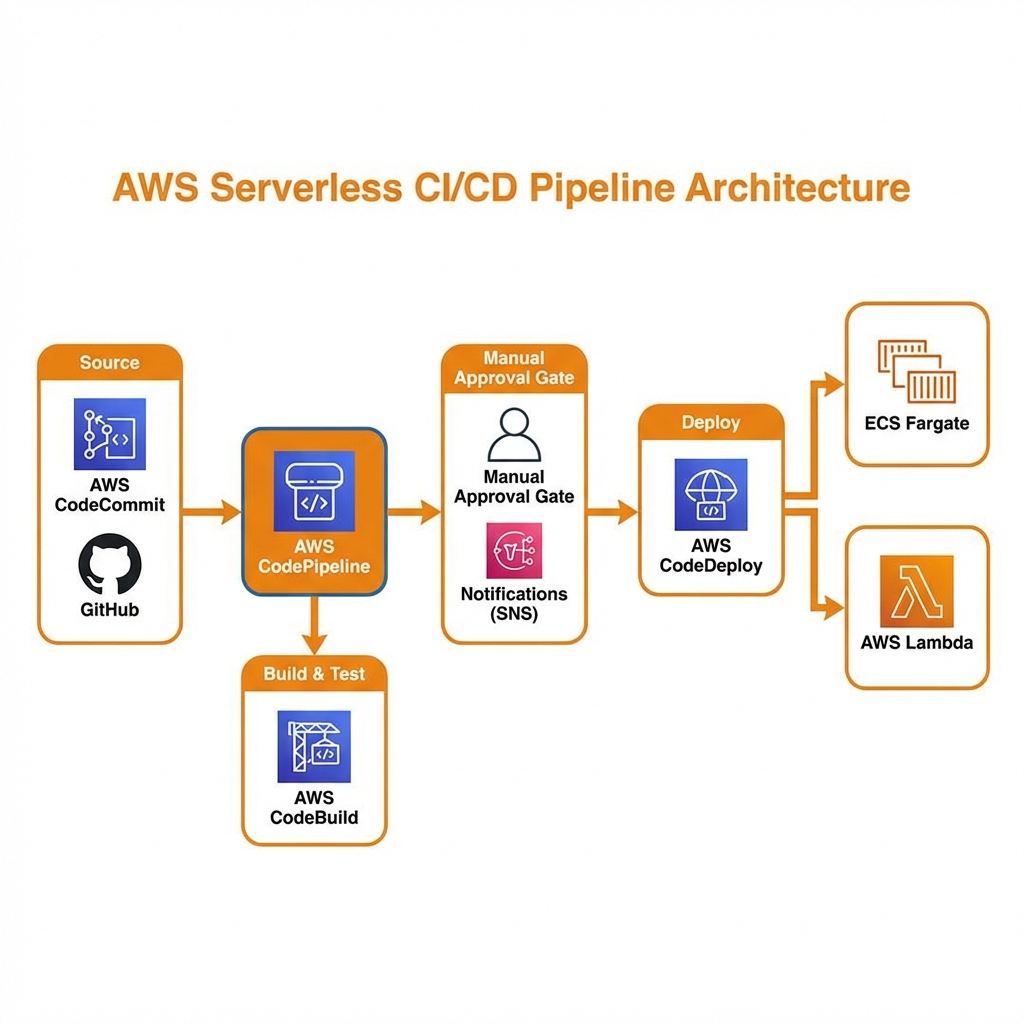
CDK Pipeline with Self-Mutating Updates
// lib/pipeline-stack.ts - Self-mutating CDK Pipeline
import * as cdk from 'aws-cdk-lib';
import * as pipelines from 'aws-cdk-lib/pipelines';
import { Construct } from 'constructs';

export class PipelineStack extends cdk.Stack {
  constructor(scope: Construct, id: string, props?: cdk.StackProps) {
    super(scope, id, props);

    const pipeline = new pipelines.CodePipeline(this, 'Pipeline', {
      pipelineName: 'MyAppPipeline',
      synth: new pipelines.ShellStep('Synth', {
        input: pipelines.CodePipelineSource.gitHub('owner/repo', 'main', {
          authentication: cdk.SecretValue.secretsManager('github-token'),
        }),
        commands: [
          'npm ci',
          'npm run build',
          'npm run test',
          'npx cdk synth',
        ],
      }),
      dockerEnabledForSynth: true,
      crossAccountKeys: true,
    });

    // Development stage
    const devStage = pipeline.addStage(new MyApplicationStage(this, 'Dev', {
      env: { account: '111111111111', region: 'us-east-1' },
    }));

    devStage.addPost(
      new pipelines.ShellStep('IntegrationTests', {
        commands: ['npm run test:integration'],
      })
    );

    // Production stage with manual approval
    const prodStage = pipeline.addStage(new MyApplicationStage(this, 'Prod', {
      env: { account: '222222222222', region: 'us-east-1' },
    }));

    prodStage.addPre(
      new pipelines.ManualApprovalStep('PromoteToProd', {
        comment: 'Ready to deploy to production?',
      })
    );
  }
}
Terraform on AWS
Terraform is ideal for multi-cloud environments or teams with existing Terraform experience. Use remote state in S3 with DynamoDB locking for team collaboration.
Terraform Best Practices Structure
# Backend configuration for team collaboration
# backend.tf
terraform {
  required_version = ">= 1.5"

  required_providers {
    aws = {
      source  = "hashicorp/aws"
      version = "~> 5.0"
    }
  }

  backend "s3" {
    bucket         = "my-terraform-state-bucket"
    key            = "prod/terraform.tfstate"
    region         = "us-east-1"
    dynamodb_table = "terraform-locks"
    encrypt        = true
  }
}

# variables.tf
variable "environment" {
  type        = string
  description = "Environment name"
  validation {
    condition     = contains(["dev", "staging", "prod"], var.environment)
    error_message = "Environment must be dev, staging, or prod."
  }
}

variable "vpc_cidr" {
  type        = string
  default     = "10.0.0.0/16"
  description = "VPC CIDR block"
}

# locals.tf
locals {
  common_tags = {
    Environment = var.environment
    Project     = "my-app"
    ManagedBy   = "terraform"
  }

  is_prod = var.environment == "prod"
}

# main.tf
module "vpc" {
  source  = "terraform-aws-modules/vpc/aws"
  version = "~> 5.0"

  name = "${var.environment}-vpc"
  cidr = var.vpc_cidr

  azs             = ["us-east-1a", "us-east-1b", "us-east-1c"]
  private_subnets = ["10.0.1.0/24", "10.0.2.0/24", "10.0.3.0/24"]
  public_subnets  = ["10.0.101.0/24", "10.0.102.0/24", "10.0.103.0/24"]

  enable_nat_gateway     = true
  single_nat_gateway     = !local.is_prod
  one_nat_gateway_per_az = local.is_prod

  tags = local.common_tags
}

# outputs.tf
output "vpc_id" {
  value       = module.vpc.vpc_id
  description = "VPC ID"
}

output "private_subnet_ids" {
  value       = module.vpc.private_subnets
  description = "Private subnet IDs"
}- Use remote state (S3 + DynamoDB for Terraform)
- Implement state locking to prevent concurrent changes
- Use workspaces or separate state files per environment
- Pin provider/module versions for reproducibility
- Run
planin CI,applyonly after approval - Use OIDC for CI/CD authentication (no long-lived keys)
GitHub Actions for AWS
# .github/workflows/deploy.yml
name: Deploy to AWS

on:
  push:
    branches: [main]
  pull_request:
    branches: [main]

permissions:
  id-token: write  # For OIDC
  contents: read

jobs:
  deploy:
    runs-on: ubuntu-latest
    steps:
      - uses: actions/checkout@v4

      - name: Configure AWS credentials (OIDC)
        uses: aws-actions/configure-aws-credentials@v4
        with:
          role-to-assume: arn:aws:iam::${{ secrets.AWS_ACCOUNT_ID }}:role/GitHubActionsRole
          aws-region: us-east-1

      - name: Setup Node.js
        uses: actions/setup-node@v4
        with:
          node-version: '18'
          cache: 'npm'

      - name: Install dependencies
        run: npm ci

      - name: Run tests
        run: npm test

      - name: CDK Diff
        if: github.event_name == 'pull_request'
        run: npx cdk diff

      - name: CDK Deploy
        if: github.ref == 'refs/heads/main'
        run: npx cdk deploy --all --require-approval never
Key Takeaways
- ✅ CDK for developers – Programming languages, IDE support, type safety
- ✅ CloudFormation for AWS-native – No additional tooling, deep integration
- ✅ Terraform for multi-cloud – Consistent workflow across providers
- ✅ Use OIDC for CI/CD – No long-lived credentials in pipelines
- ✅ Remote state is mandatory – Enables team collaboration
- ✅ Test infrastructure code – CDK has built-in testing support
Conclusion
Congratulations on completing the AWS Fundamentals Series! You now have comprehensive knowledge of AWS core services: account structure, compute, storage, databases, networking, security, and infrastructure as code. Apply these concepts iteratively—start with simple architectures and evolve as your needs grow. Remember: the best architecture is one that solves your specific problems while remaining maintainable and cost-effective.
Series Recap
- Part 1: AWS Organizations, IAM, global infrastructure
- Part 2: EC2, Lambda, ECS, EKS compute options
- Part 3: S3, RDS, DynamoDB, Aurora storage & databases
- Part 4: VPC, Route 53, CloudFront, load balancers
- Part 5: KMS, WAF, Shield, GuardDuty security
- Part 6: CDK, CloudFormation, Terraform, CI/CD (this article)
References
- AWS CDK Developer Guide
- AWS CloudFormation User Guide
- Terraform Documentation
- AWS CodePipeline User Guide
- CDK Pipelines Documentation
Discover more from C4: Container, Code, Cloud & Context
Subscribe to get the latest posts sent to your email.